Zoho Google Drive Integration

View, Access, Upload, and Transfer files from Google Drive to Zoho CRM's Custom Modules and Standard Modules.

Zoho Google Drive Integration

Zoho Google Drive Integration

View, Access, Upload, and Transfer files from Google Drive to Zoho CRM's Custom Modules and Standard Modules.

Zoho Google Drive Integration

Google Drive Extension for Zoho CRM (Custom Modules & Standard Modules)

Important files should always be close at hand.Don't waste time on locating the files by using the Google Drive Extension for Zoho CRM, which allows the users to view,access,share and manage all the files for your business within the Zoho CRM Custom modules and Standard Modules,thus making it easier for you to access all your documents & files you need from a single location-Zoho CRM and eliminating the need to open Google Drive and search for the files in the piles of folders in Google Drive.

By using this extension,you no longer have to search the long email threads to look for the attachments you need and no more switching tabs to import files into your Google Drive account and reattach them to the relevant records in the Zoho CRM Modules.All the attachments from the respective records in the Zoho CRM custom modules/standard modules will be synced and saved in to your specifically created Google Drive folder,which reduces the amount of time spend on transferring files and finding important information.


Key Features:

  • Able to Add files to Zoho CRM Standard Modules (leads, deals, accounts, and contacts) module and sync them to the integrated Google Drive account.
  • Allow users to view, access and manage all their files within a Zoho CRM Custom Module and sync them to the connected Google Drive account.
  • Synchronize files and folders between Zoho CRM Custom/Standard Modules and Google Drive.
  • Adding, editing, and deleting files in Zoho CRM's Custom Modules and Standard Modules get automatically synchronized with Google Drive, ensuring that your data is up-to-date and accurate on both platforms.
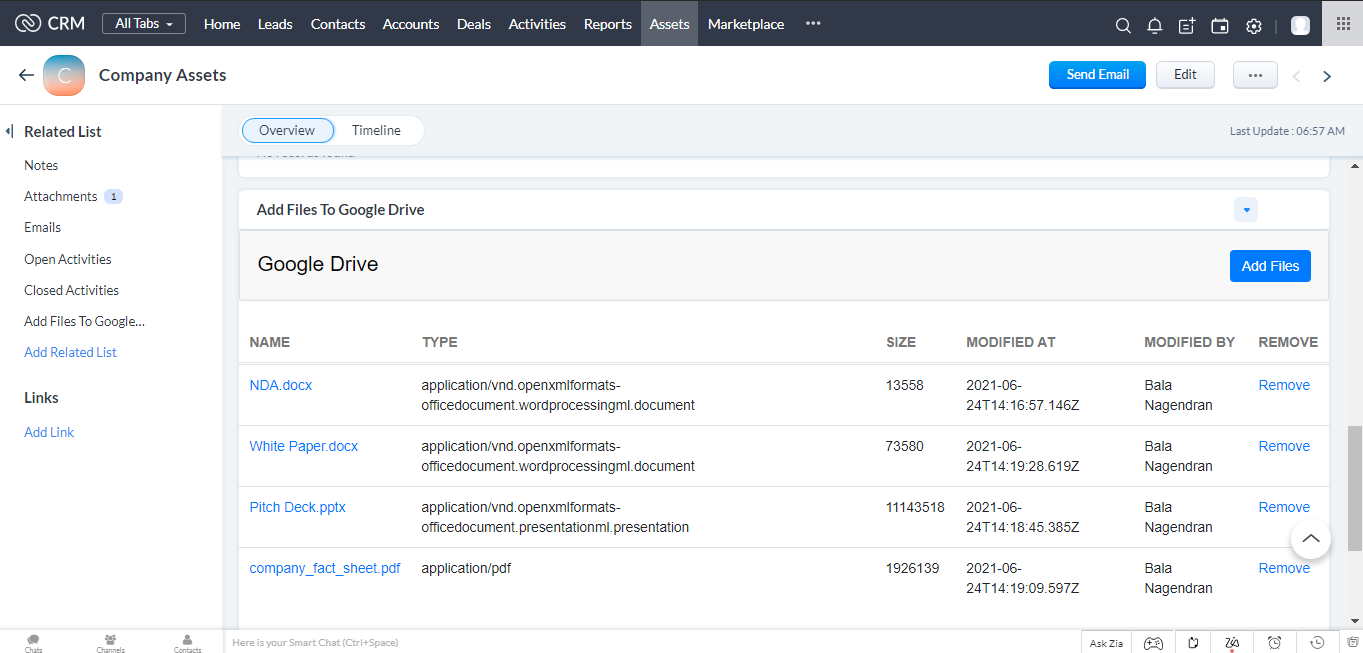
  • Users can preview the name, type, size, modified by, modified at, and thumbnail of any file uploaded to Google Drive from Zoho CRM records.

See how Zoho CRM Google Drive Integration Works

Avoid tab switching and time spent on finding important files by integrating Zoho CRM with Google Drive.

Integrating Google Drive with Zoho CRM makes it easier for the users to view,access,edit and maintain all the files needed for your business from one central location- Zoho CRM and store the files automatically into the respective folder you have linked with your Google Drive account.All the uploaded files from your respective Zoho CRM records will be synced and stored in to your associated Google Drive folder you have created.

This Zoho Google Drive integration will save your time, especially if you are dealing with many files.You don't have to hop in and out of the Zoho CRM and Google Drive to search for your clients' files and documents.You can simply get the files you need for the customer from your Zoho CRM's Custom Module.

Take a sneak peek of how it looks like:

Share files from Zoho CRM to Google Drive (Standard Modules)

share files from zoho crm to google drive standard modules

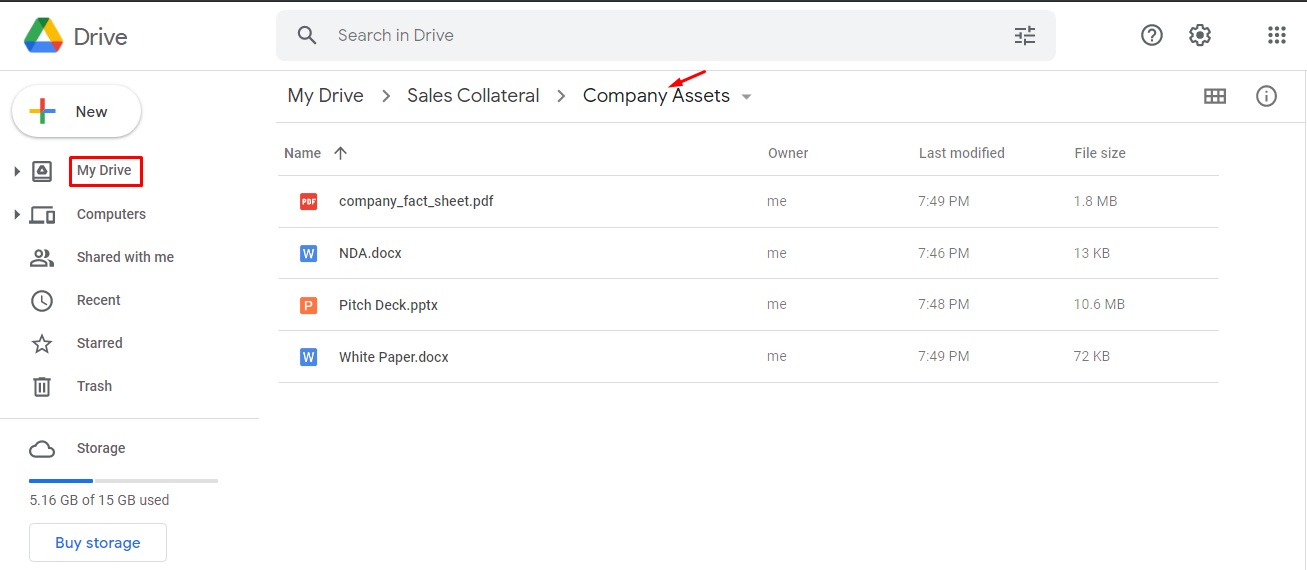
Whenever files are uploaded in lead, deals, contacts and accounts module, a folder will be automatically created inside your Google Drive account and the files you have been uploaded in Zoho CRM standard modules will be automatically uploaded to the respective folders in your integrated Google Drive account.

share files from zoho crm to google drive standard modules

Share files from Zoho CRM to Google Drive (Standard Modules)

Whenever files are uploaded in lead, deals, contacts and accounts module, a folder will be automatically created inside your Google Drive account and the files you have been uploaded in Zoho CRM standard modules will be automatically uploaded to the respective folders in your integrated Google Drive account.

Share files from Zoho CRM to Google Drive (Custom Modules)

share files from zoho crm to google drive custom modules

Able to view, share and upload the files directly to your Google Drive account, right from the Zoho CRM Custom module.

share files from zoho crm to google drive custom modules

Share files from Zoho CRM to Google Drive (Custom Modules)

Able to view, share and upload the files directly to your Google Drive account, right from the Zoho CRM Custom module.

View files associated to a Zoho CRM record

Upon installation, a folder have to be created in the root path of your Google Drive account. Whenever a file is added/uploaded within a record in the Zoho CRM Custom module, it creates a file with the name of the record, and automatically uploads the file into the associated folder in the Google Drive.

View files associated to a Zoho CRM record

Upon installation, a folder have to be created in the root path of your Google Drive account. Whenever a file is added/uploaded within a record in the Zoho CRM Custom module, it creates a file with the name of the record, and automatically uploads the file into the associated folder in the Google Drive.

Bi-directional Synchronization

Any changes (like add or delete) made in one application will automatically reflected in the other application.

Bi-directional Synchronization

Any changes (like add or delete) made in one application will automatically reflected in the other application.

Install the Google Drive Extension→

Google Drive - Zoho CRM Integration HelpDoc

Need any help in setting up and configuring the Google Drive extension in your Zoho CRM ? Refer to the help doc for detailed instructions.

Popular Zoho CRM Extensions Available on Zoho Marketplace

Our ready-to-use Zoho extensions help you quickly connect Zoho CRM with the tools your business relies on, automate repetitive tasks, and build a more connected sales ecosystem without the cost and complexity of custom development.

Accounting

QuickBooks Online for Zoho CRM

View customer invoices, payment history, outstanding balances, and accounting information directly inside Zoho CRM, giving your sales team complete financial visibility without switching applications.

Accounting

Xero Integration for Zoho CRM

Synchronize customer records and accounting data between Xero and Zoho CRM to keep your finance and sales teams working with accurate, up-to-date information.

Marketplace

Amazon Seller Central for Zoho CRM

Import Amazon customers, orders, and sales information into Zoho CRM automatically to improve customer service, order tracking, and sales reporting.

Ecommerce

Shopify to Zoho CRM

Automatically sync Shopify customers, products, orders, and sales information into Zoho CRM to improve customer management and sales tracking.

Ecommerce

BigCommerce to Zoho CRM

Connect BigCommerce with Zoho CRM to synchronize customers, products, and orders in real time, providing a complete view of your ecommerce business.

Ecommerce

WooCommerce for Zoho CRM

Synchronize WooCommerce customers, products, and orders with Zoho CRM to streamline sales processes and maintain a complete customer history.

Automation

Magento 2 for Zoho CRM

Automatically sync Magento 2 customer accounts, products, and order information with Zoho CRM for better sales and customer management.

Automation

Mailchimp Integration for Zoho CRM

Sync Mailchimp subscribers, campaigns, and marketing insights with Zoho CRM to help your sales and marketing teams work together more effectively.

Automation

MailParser for Zoho CRM

Automatically convert incoming emails and attachments into Zoho CRM leads, contacts, deals, or custom module records, eliminating manual data entry.

Documents

Dropbox Integration for Zoho CRM

Store, access, and manage Dropbox documents directly inside Zoho CRM to improve collaboration and document management.

Visualization

Organization Chart for Zoho CRM

Visualize customer organizations with interactive organization charts to understand reporting structures quickly, identify key decision-makers, and business relationships.

Visualization

Dynamic Org Chart for Zoho CRM

Generate dynamic organizational charts from your CRM data to understand reporting relationships, stakeholder hierarchies, and customer structures more effectively.

Documents

Avalara Integration with Zoho CRM

Automatically calculate accurate sales tax within Zoho CRM using Avalara, helping streamline tax compliance and improve quote-to-order accuracy.

Need a Custom Integration or Zoho Extension?

Whether you're looking for a ready-to-install extension or a completely custom integration, our Zoho Extension Developers will build custom Zoho extensions, integrations, and widgets for you, tailored to your business requirements.

Explore Marketplace Extensions

Get a personalized demo of Google Drive for Zoho CRM Extension?

A respective person from our Zoho Extension Development Team will reach out to you for a 1:1 demo to clarify your doubts and answer any questions you have.


zoho app development icon+ zoho app development icon Install