MailChimp Logo
Zoho CRM logo

Mailchimp Integration with Zoho CRM

Create, View, and Synchronize Data Between Mailchimp and Zoho CRM (Bi-Directional), eliminating data duplication and ensuring data consistency.

Mailchimp for Zoho CRM Extension

Are you tired of juggling between Mailchimp and Zoho CRM, struggling with data inconsistencies and duplication?

Say goodbye to those headaches with the Mailchimp for Zoho CRM Extension.

Sales and Marketing teams often operate in silos, hindering campaign effectiveness and lead nurturing. The MailChimp for Zoho CRM Extension bridges this gap, empowering you to to bridge the gap between your sales and marketing efforts by automatically sync your Mailchimp data (Campaigns, Audience, and Contacts) with Zoho CRM (Campaigns, Mailchimp Audience, Contacts/Leads) and vice versa. This means you can choose the direction of data flow based on your needs-whether you want to push from Zoho CRM to Mailchimp or from Mailchimp to Zoho CRM or both, our extension empowers you with complete control.

By having all your campaign data in Zoho CRM, you can easily track and analyze Mailchimp campaign performance data directly within Zoho CRM to gain valuable audience engagement insights and make data-driven decisions to optimize your email marketing efforts.

Ready to try the Mailchimp extension in your Zoho CRM account?

Key Features

  • Flexible Sync Options: Choose the data points you want to sync(from Mailchimp to Zoho CRM, Zoho CRM to Mailchimp or both) and the direction of the flow (one-way or two-way).
  • Automate data transfer between platforms, freeing up valuable time for you to focus on building relationships and closing deals.
  • Sync your entire Audience Lists in Mailchimp or campaign-specific MailChimp Audience Lists into Zoho CRM with a few clicks to avoid entering unnecessary contacts.
  • Sales teams can leverage Mailchimp campaign engagement data (opens, clicks) within Zoho CRM, allowing them to prioritize leads based on engagement and close deals faster.
  • Bulk Actions: Save hours with the ability to bulk Subscribe or Unsubscribe Contacts in Mailchimp directly from Zoho CRM.
  • One-click Record Creation : You can quickly add a Lead, Contact, Campaign, or Audience to Mailchimp from Zoho CRM with a single click from our extension Record Creator page.
  • Campaign Insights: View MailChimp campaign performance data directly within Zoho CRM, gaining valuable insights into audience engagement and make data-driven decisions to optimize your email marketing efforts.
  • Users can track the sync details and success/failure sync on a audit logs page in the extension.
Benefits of Integrating Mailchimp with Zoho CRM

Integrating Mailchimp with Zoho CRM can revolutionize the way you manage your marketing campaigns and customer relationships.

Here’s why this Mailchimp Zoho CRM Integration is a game-changer:

  • Two-Way Sync: Choose the direction of your data flow - from MailChimp to Zoho CRM or Mailchimp to Zoho CRM or both ways for a truly connected ecosystem.

  • Data Accuracy & Efficiency: Eliminate manual data entry errors and save time by automating data sync between Zoho CRM and MailChimp.

  • Improved Productivity: Empower sales teams with real-time email engagement data to prioritize leads and close deals faster.

  • Target High-Engagement Leads: Leverage Mailchimp campaign data (opens, clicks) directly within Zoho CRM, enabling your sales teams to prioritize leads who are actively engaged and close deals faster.

  • Effortless Audience Management: Sync your entire Mailchimp audience list or specific campaign lists into Zoho CRM with just a few clicks. No more unnecessary contact entries.

  • Enhanced Collaboration: The extension fosters better collaboration between your marketing and sales teams. With a shared view of customer data and campaign performance, both teams can work together more effectively to achieve better results from email campaigns.

  • Campaign Performance Tracking: Track the performance of your email campaigns in Mailchimp directly within Zoho CRM. See which leads or contacts opened emails, clicked on links, or unsubscribed, allowing you to refine your marketing strategies for better results and optimize your email marketing for maximum impact.

If you're using both Mailchimp and Zoho CRM, integrating them can be a powerful way to improve your marketing and sales effectiveness.

You don’t have to Hire a Zoho developer to integrate Mailchimp and Zoho CRM. All you have to do is just install our Mailchimp for Zoho CRM Extension from the Zoho Marketplace.

What are you waiting for?

See How Mailchimp and Zoho CRM Integration Works


With the Mailchimp for Zoho CRM Extension, your Sales teams can track lead interactions with email marketing campaigns within Zoho CRM, and Marketing teams can use campaign performance data to refine their strategy and target high-potential leads.

The main purpose of integrating Mailchimp, your email marketing tool, with Zoho CRM, your CRM software, is to break down information silos and create a single, unified view of your customers.

Let’s see how this Mailchimp Zoho Integration Works.

Flexible Data Synchronization

You have complete control over the data flow.Choose a one-way sync (CRM to Mailchimp or vice versa) or a two-way sync for a truly integrated experience.

Our extension allows you to synchronize the following data if the following options are enabled:

Sync Mailchimp to Zoho CRM or from Zoho CRM to Mailchimp or both ways, allows you to track email campaign performance directly within Zoho CRM, which helps your sales and marketing teams analyze your audience engagement metrics to optimize your email marketing strategy for future campaigns.

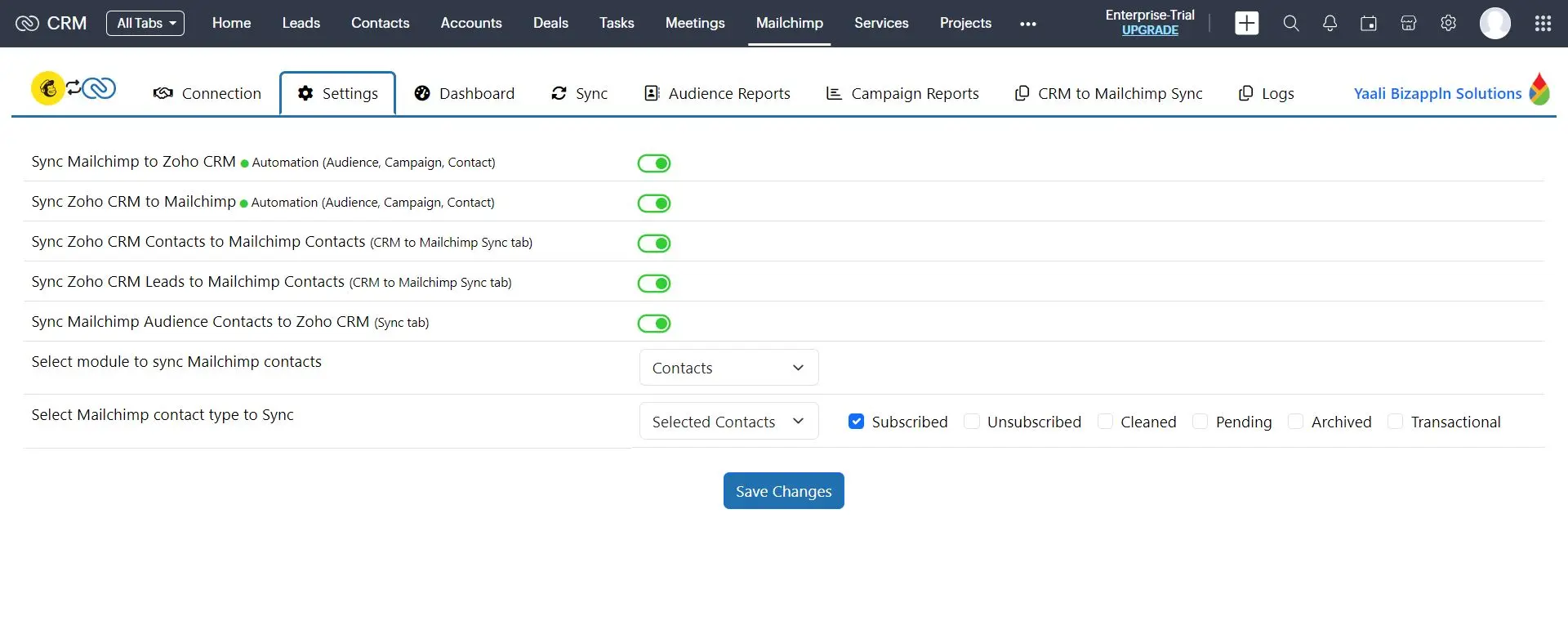
You can even sync the Mailchimp Contact type status (Subscribed, Unsubscribed, Cleaned, Pending, Archived, Transactional) with Zoho CRM based on your preference- either for specific Contact or All contacts.


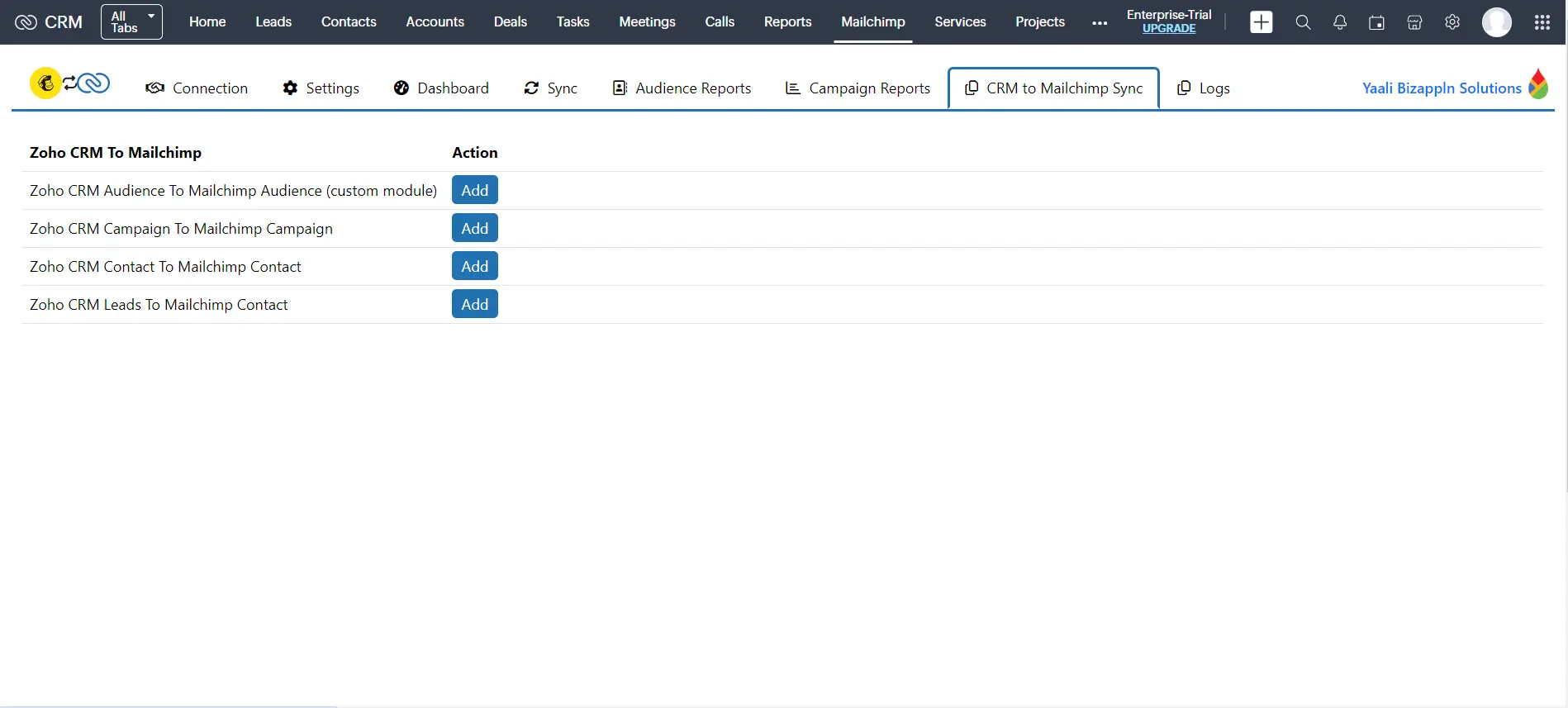
Sync Zoho CRM Leads/Contacts with Mailchimp Contacts Bi-directionally

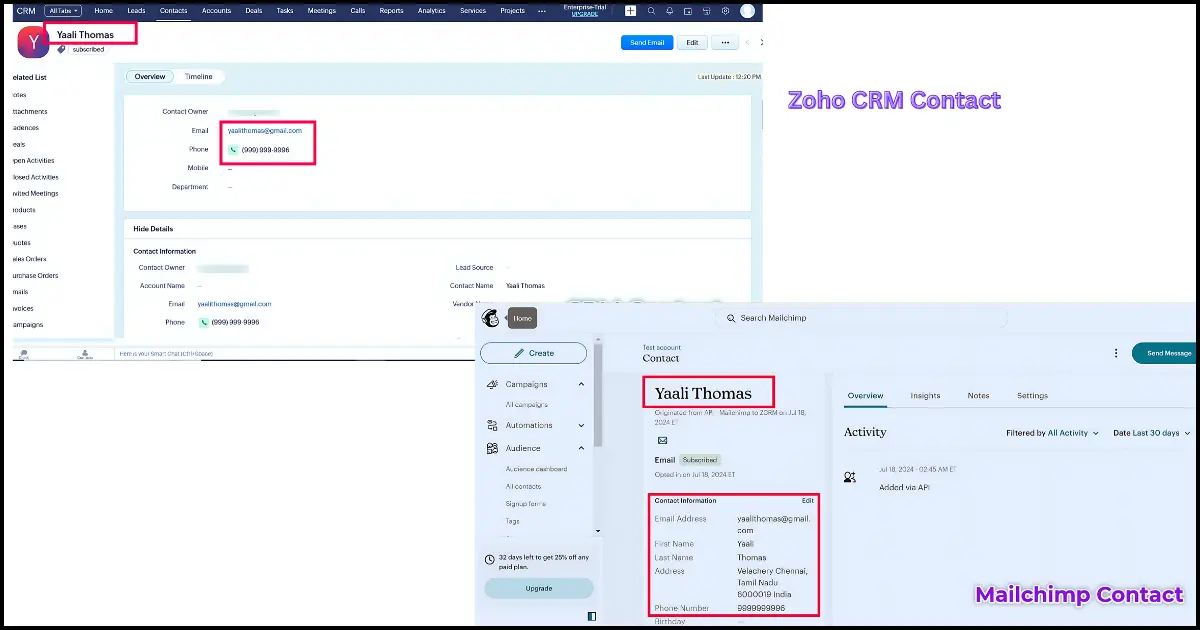
Our Mailchimp extension gives you the ability to sync Contacts in Mailchimp with selected Modules in Zoho CRM- either Leads or Contacts. This means all of your Contacts from Mailchimp will be synchronized to the Contacts/ Leads module of Zoho CRM based on your configured settings.

By using this extension, your sales & marketing teams can keep track of all your Mailchimp Contacts in one place. You can also easily create new leads and contacts in Zoho CRM and sync them with your Mailchimp account. Additionally, you can track your campaign performance in real time.


Sync Mailchimp Campaign with Zoho CRM Campaign Bi-directionally

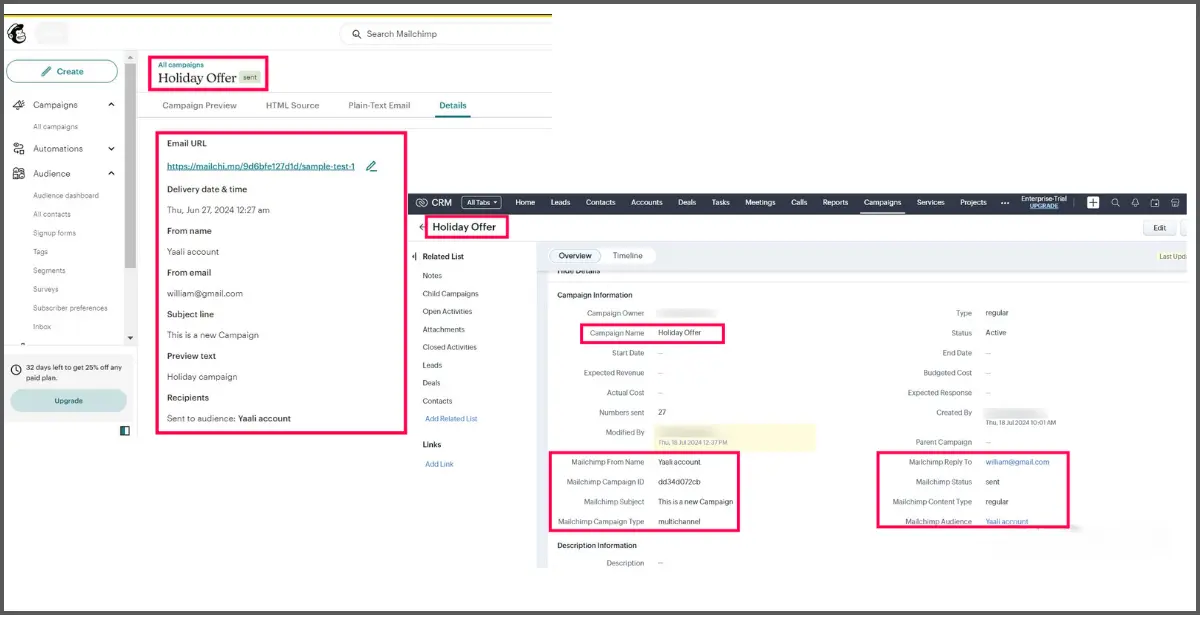
Ditch the manual data entry! By integrating Mailchimp with Zoho CRM, your email campaigns in Mailchimp are automatically imported into Zoho CRM's Campaign module. Not only that, but the corresponding contacts from each campaign are seamlessly added to the Leads/Contacts module within Zoho CRM. This ensures that all your customer and campaign data is stored in one place, making it easier to manage and analyze. This centralized approach not only improves data accuracy but also simplifies reporting and analytics.


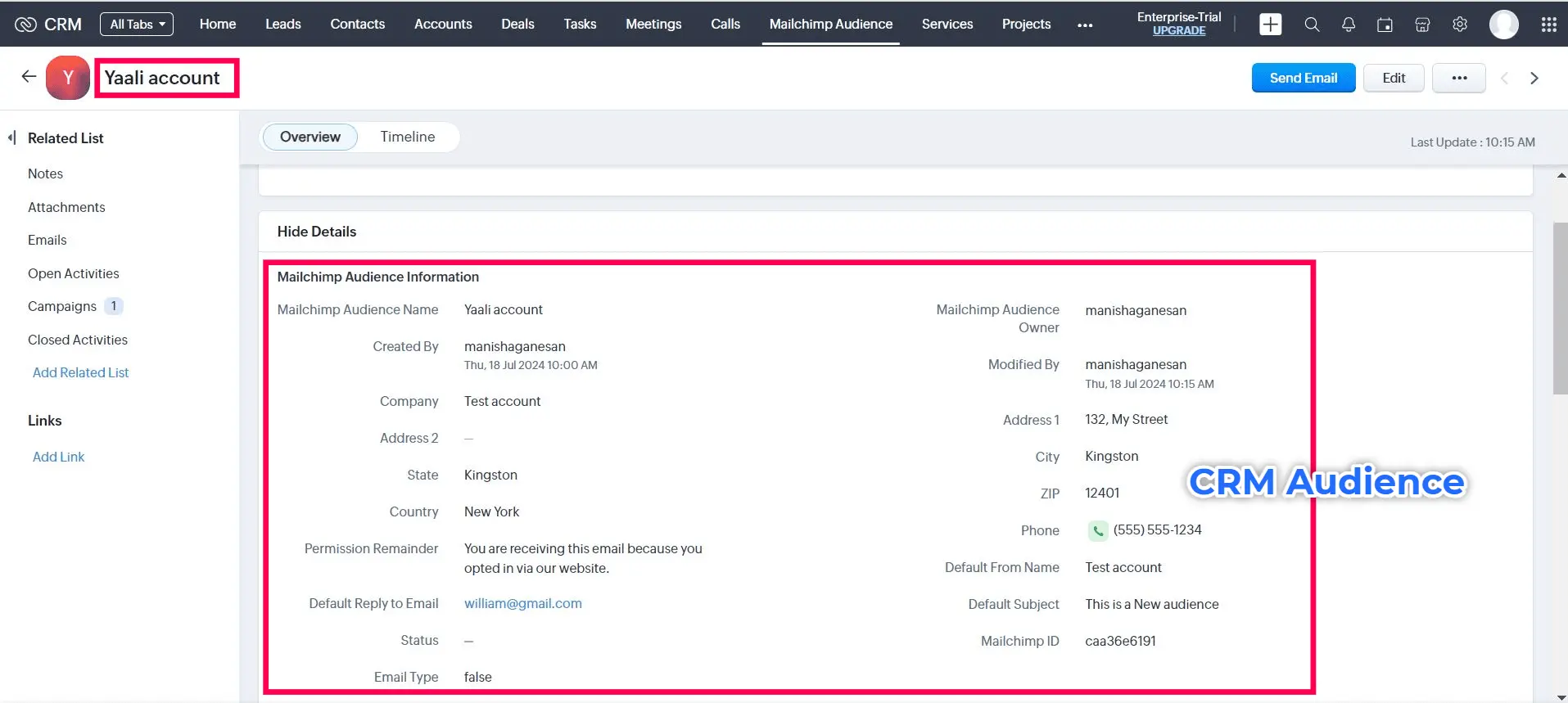
Sync Mailchimp Audience Contacts with Zoho CRM Mailchimp Audience (Custom Module)

By syncing your Mailchimp audience list or specific campaign members directly into Zoho CRM, your campaigns & audience data will be synced into Zoho CRM’s Campaigns module & Mailchimp Audience custom module automatically.This ensures that your audience information is always up-to-date and eliminates the need for manual imports of audience lists, saving you time and effort.

Moreover, syncing specific campaign members from Mailchimp into Zoho CRM allows for more targeted and personalized marketing efforts. By syncing only those who have engaged with a particular campaign, businesses can focus their efforts on nurturing those leads and converting them into customers. This not only saves time and resources but also increases the chances of successfully closing deals.


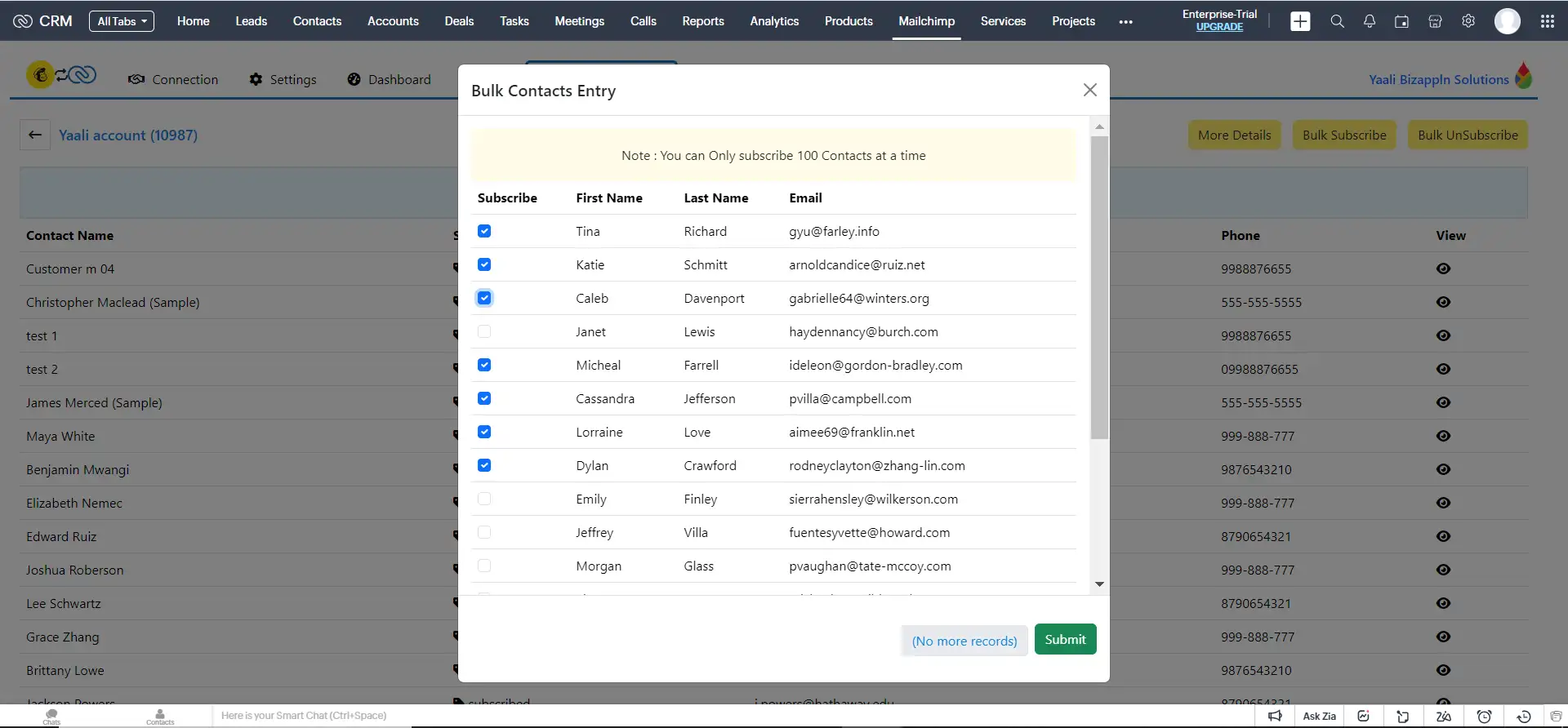
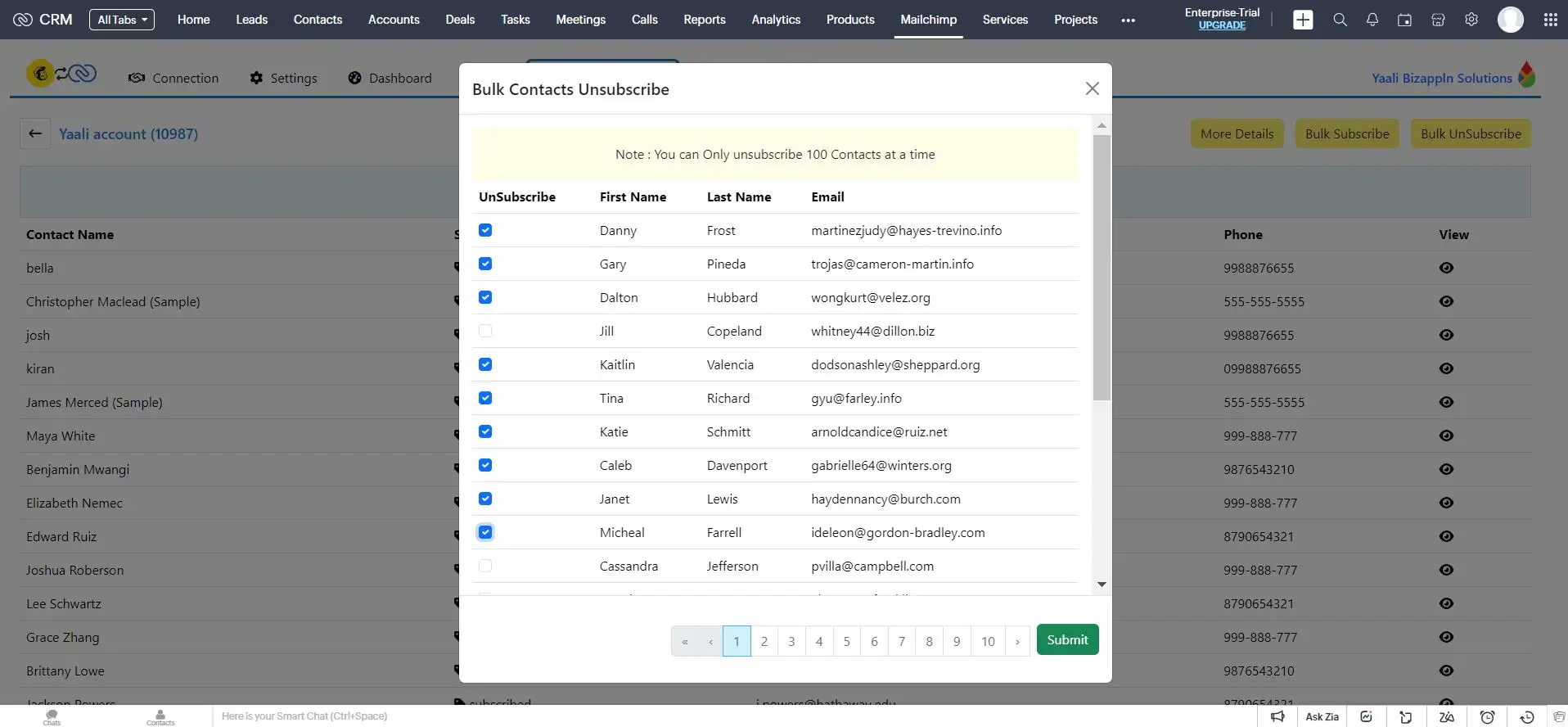
Bulk Subscribe/UnSubscribe Contacts in Mailchimp from Zoho CRM

Need to subscribe or unsubscribe a large group of contacts in Mailchimp? No problem!

Use bulk actions to add or remove contacts in Mailchimp directly from Zoho CRM without manually exporting and importing them. It allows you to subscribe quickly and efficiently or unsubscribe from a large group of contacts at once. This will save you time and effort, and ensure that your data is up-to-date and accurate


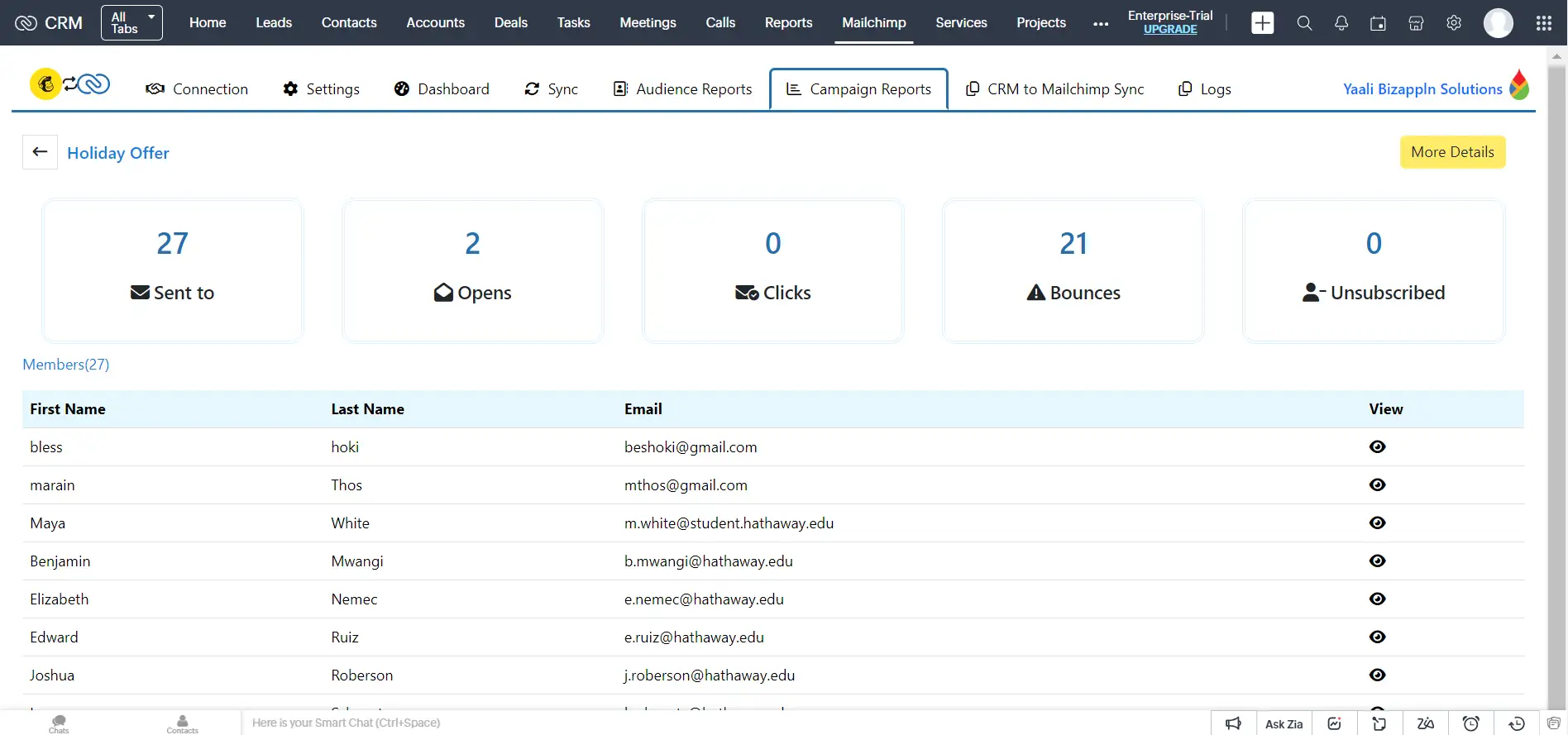
Actionable Campaign Insights

No more switching between Mailchimp and Zoho CRM. You can view and effortlessly track your email campaign performance data from Mailchimp directly within Zoho CRM to gain valuable insights into audience engagement and make data-driven decisions to optimize your email marketing efforts for maximum impact.


Record Creator Page: Manual Record Creation Made Easy

Our Mailchimp extension's primary function is to synchronize data between the two platforms, ensuring consistency and eliminating manual updates. Within our extension's Record Creator page, you can manually create/add Contacts, Campaigns, and Audiences in Mailchimp. Once created, the data automatically syncs between the two platforms, eliminating the need for manual updates.


Detailed Audit Logs

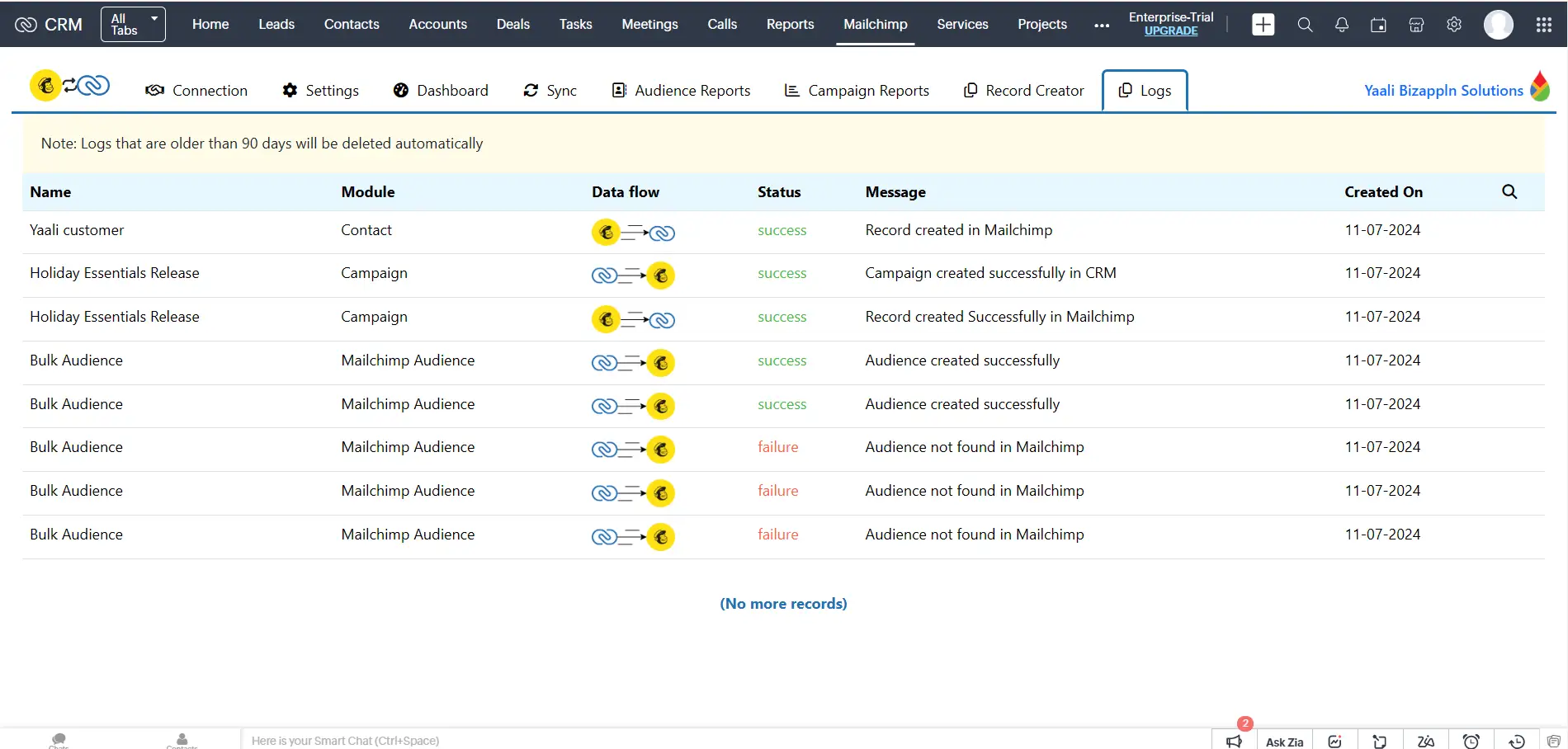
Our audit logs page acts as your personal watchdog. You can track the sync details and success/failure logs within the extension's audit log page. You can also filter the record sync between any particular time interval with the Filter option


See howMailchimp and Zoho CRM Integration Works

With the Mailchimp for Zoho CRM Extension, your Sales teams can track lead interactions with email marketing campaigns within Zoho CRM, and Marketing teams can use campaign performance data to refine their strategy and target high-potential leads.

The main purpose of integrating Mailchimp, your email marketing tool, with Zoho CRM, your CRM software, is to break down information silos and create a single, unified view of your customers.

Let’s see how this Mailchimp Zoho Integration Works.

Flexible Data Synchronization

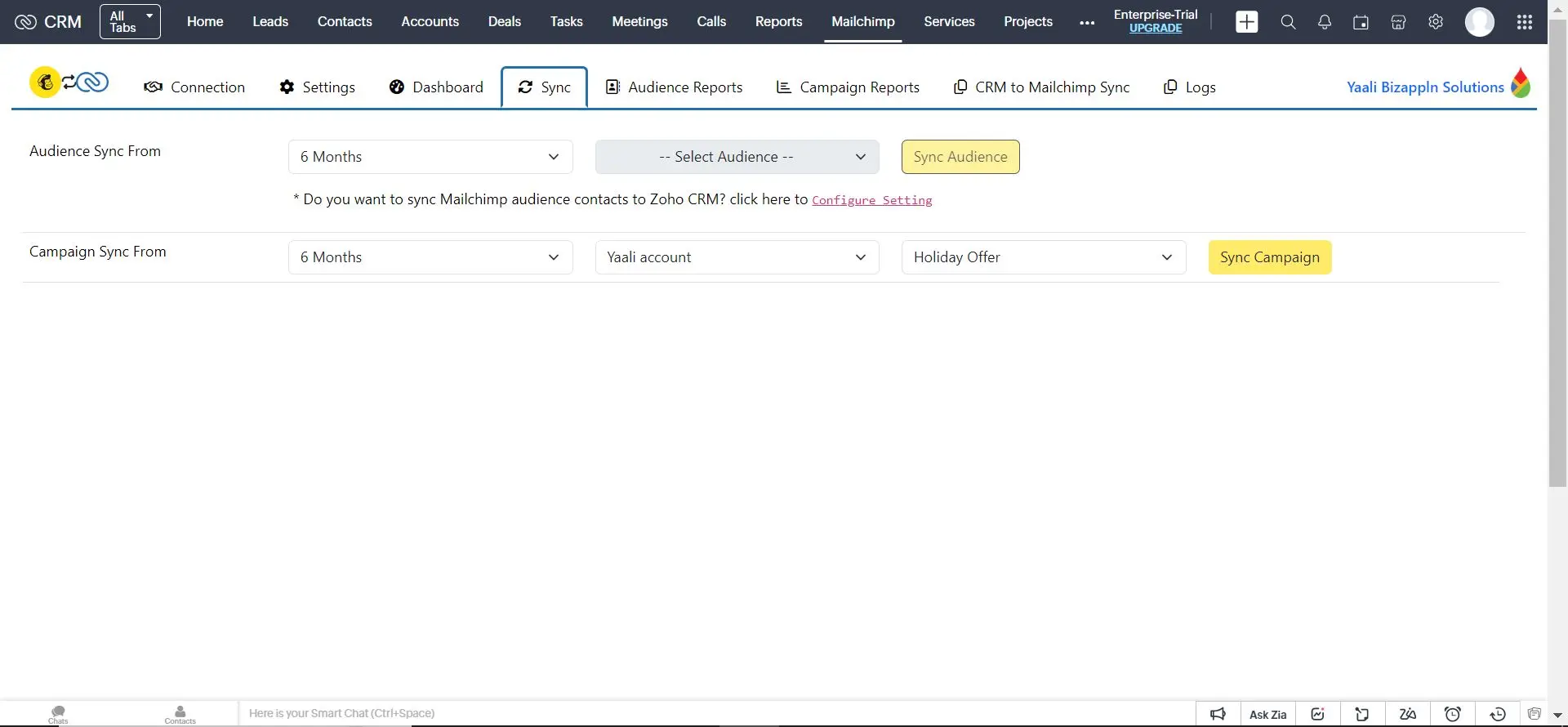
Mailchimp and Zoho CRM Data sync settings

You have complete control over the data flow.Choose a one-way sync (CRM to Mailchimp or vice versa) or a two-way sync for a truly integrated experience.

Our extension allows you to synchronize the following data if the following options are enabled:

Sync Mailchimp to Zoho CRM or from Zoho CRM to Mailchimp or both ways, allows you to track email campaign performance directly within Zoho CRM, which helps your sales and marketing teams analyze your audience engagement metrics to optimize your email marketing strategy for future campaigns.

You can even sync the Mailchimp Contact type status (Subscribed, Unsubscribed, Cleaned, Pending, Archived, Transactional) with Zoho CRM based on your preference- either for specific Contact or Any contacts.


Sync Zoho CRM Leads/Contacts with Mailchimp Contacts Bi-directionally

Sync Mailchimp Contact with Zoho CRM Contact

Our Mailchimp extension gives you the ability to sync Contacts in Mailchimp with selected Modules in Zoho CRM- either Leads or Contacts. This means all of your Contacts from Mailchimp will be synchronized to the Contacts/ Leads module of Zoho CRM based on your configured settings.

By using this extension, your sales & marketing teams can keep track of all your Mailchimp Contacts in one place. You can also easily create new leads and contacts in Zoho CRM and sync them with your Mailchimp account. Additionally, you can track your campaign performance in real time.


Sync Mailchimp Campaign with Zoho CRM Campaign Bi-directionally

Sync Mailchimp Campaign with Zoho CRM Campaign

Ditch the manual data entry! By integrating Mailchimp with Zoho CRM, your email campaigns in Mailchimp are automatically imported into Zoho CRM's Campaign module. Not only that, but the corresponding contacts from each campaign are seamlessly added to the Leads/Contacts module within Zoho CRM. This ensures that all your customer and campaign data is stored in one place, making it easier to manage and analyze. This centralized approach not only improves data accuracy but also simplifies reporting and analytics.


Sync Mailchimp Audience Contacts with Zoho CRM Mailchimp Audience (Custom Module)

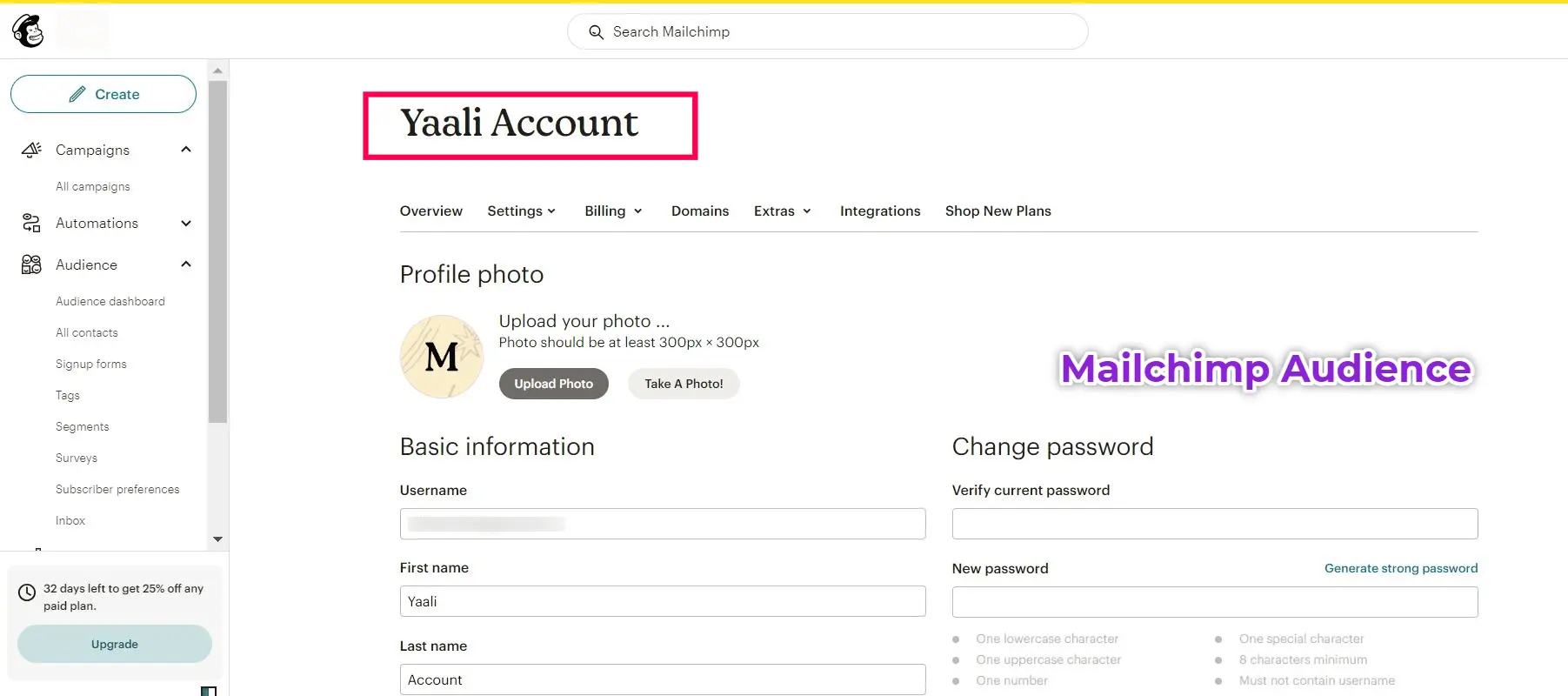
Sync Mailchimp Audience Contacts with Zoho CRM Mailchimp Audience
Click Icon
Mailchimp Audience Details
Click Icon
Mailchimp Audience data synced with Zoho CRM Audience Module
Click Icon

By syncing your Mailchimp audience list or specific campaign members directly into Zoho CRM, your campaigns & audience data will be synced into Zoho CRM’s Campaigns module & Mailchimp Audience custom module automatically.This ensures that your audience information is always up-to-date and eliminates the need for manual imports of audience lists, saving you time and effort.

Moreover, syncing specific campaign members from Mailchimp into Zoho CRM allows for more targeted and personalized marketing efforts. By syncing only those who have engaged with a particular campaign, businesses can focus their efforts on nurturing those leads and converting them into customers. This not only saves time and resources but also increases the chances of successfully closing deals.


Bulk Subscribe/UnSubscribe Contacts in Mailchimp from Zoho CRM

Bulk Subscribe Contacts from Zoho CRM to Mailchimp
Click Icon
Bulk Unsubscribe Contacts in Mailchimp from Zoho CRM
Click Icon

Need to subscribe or unsubscribe a large group of contacts in Mailchimp? No problem!

Use bulk actions to add or remove contacts in Mailchimp directly from Zoho CRM without manually exporting and importing them. It allows you to subscribe quickly and efficiently or unsubscribe from a large group of contacts at once. This will save you time and effort, and ensure that your data is up-to-date and accurate


Actionable Campaign Insights

Mailchimp Email Campaign Reports viewed in Zoho CRM

No more switching between Mailchimp and Zoho CRM. You can view and effortlessly track your email campaign performance data from Mailchimp directly within Zoho CRM to gain valuable insights into audience engagement and make data-driven decisions to optimize your email marketing efforts for maximum impact.


Record Creator Page: Manual Record Creation Made Easy

Manual Record Creation from Zoho CRM to Mailchimp

Our Mailchimp extension's primary function is to synchronize data between the two platforms, ensuring consistency and eliminating manual updates. Within our extension's Record Creator page, you can manually create/add Contacts, Campaigns, and Audiences in Mailchimp. Once created, the data automatically syncs between the two platforms, eliminating the need for manual updates.


Detailed Audit Logs

Audit logs in Mailchimp extension for Zoho CRM

Our audit logs page acts as your personal watchdog. You can track the sync details and success/failure logs within the extension's audit log page. You can also filter the record sync between any particular time interval with the Filter option


Mailchimp for Zoho CRM Integration HelpDoc

Need any help with setting up and configuring the Mailchimp extension in your Zoho CRM account? Refer to the help doc for detailed instructions.

|

Get a personalized demo of Mailchimp For Zoho CRM Extension

A respective person from our Zoho Extension Development Team will reach out to you for a 1:1 demo to clarify your doubts and answer any questions you have.

Integrating Mailchimp and Zoho CRM has never been easy!

Our Zoho Creator developers will help you to set up this Mailchimph extension in your Zoho CRM account efficiently. We've got your back.

MailChimp logo
+ zoho app development icon Install
BigCommerce logo
+ zoho app development icon Install