If your business manages and runs multiple Shopify stores, use our Shopify to Zoho CRM extension
to centralize customer and sales data. With our extension, you can connect multiple Shopify
stores to a single Zoho CRM account, providing you with a unified view of customer and
order
data, ensures a seamless flow of customer information, order details, and product
information
from your Shopify to Zoho CRM account.
Experience the efficiency of automated data synchronization and focus on growing your business
without the burden of manual data entry tasks.
Ready to try the Shopify extension in your Zoho CRM account?
Unidirectional Sync from Shopify to Zoho CRM
Key Features of Shopify Extension
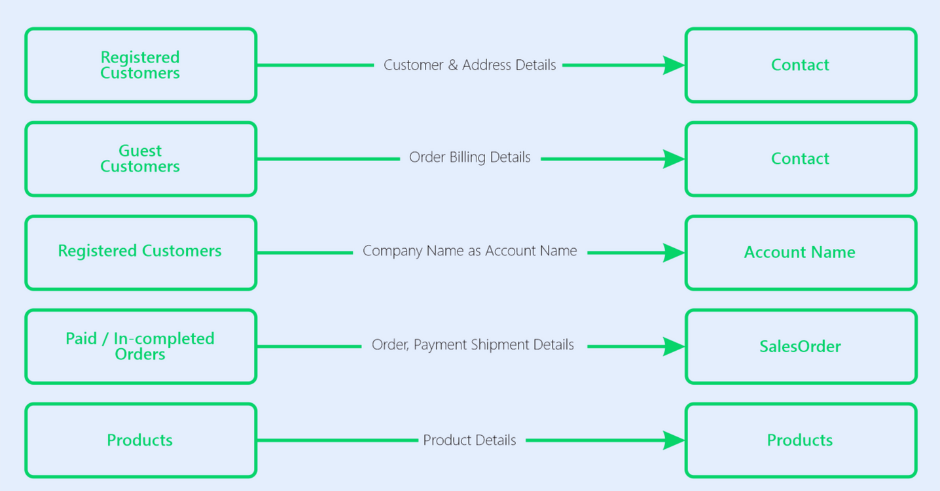
For each Shopify order, our extension automatically creates customers, orders, and products in Zoho CRM.
Sync customer information, orders, and product details automatically from multiple Shopify stores to
Zoho CRM.
View order status, shipping information, and payment information from multiple Shopify stores within
Zoho CRM.
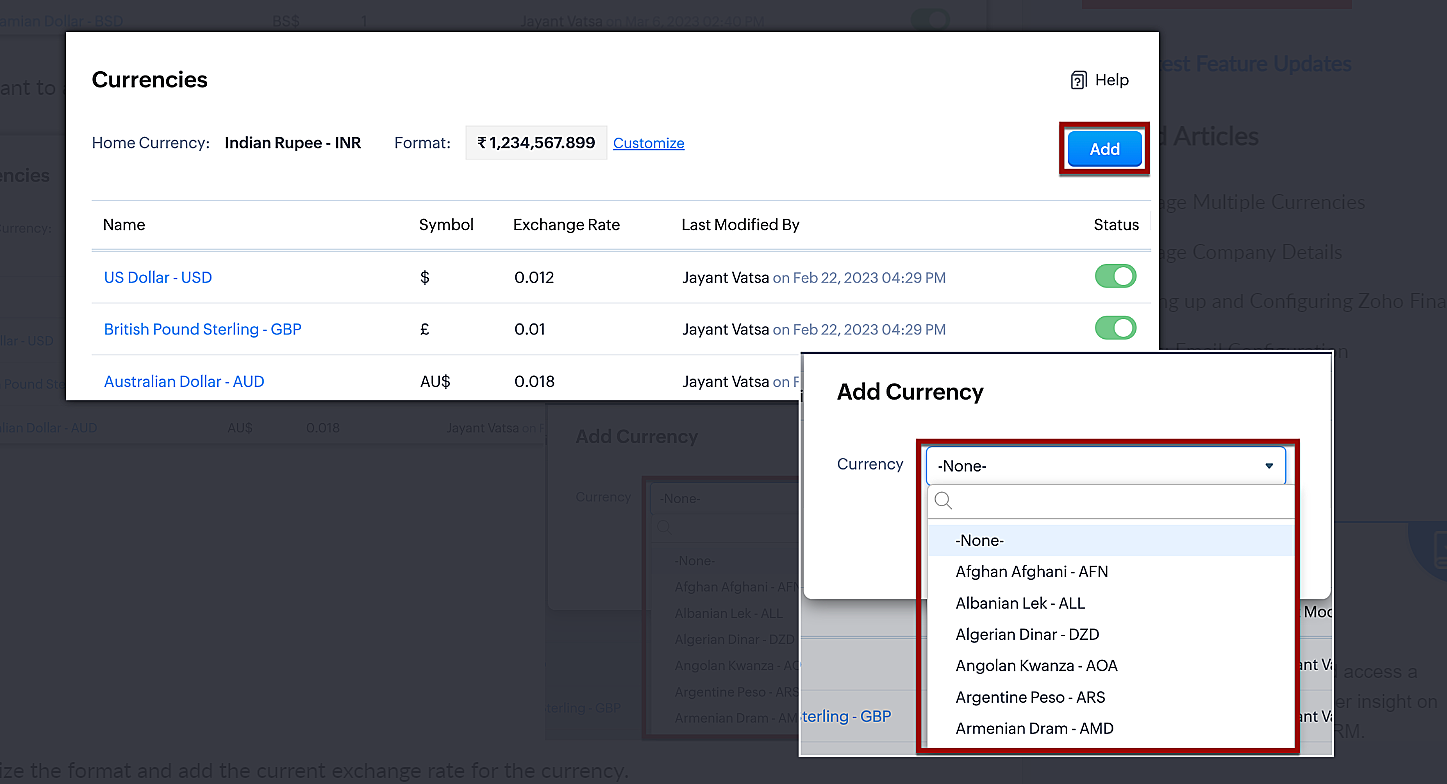
Multicurrency transactions can be handled effortlessly, enabling you to manage transactions in different
currencies.
For paid Shopify orders, Zoho CRM automatically creates tasks based on the relevant information from extension settings.
Automatically capture log errors for Sales Orders, Products and Customers in the Logs if they
occur during order synchronization.
Support teams can provide customers with personalized service by accessing Shopify order details
directly in Zoho CRM.
Benefits of using
Shopify to Zoho CRM Extension
Seamless Data Synchronization :Our extension enables seamless synchronization between your
Shopify store and Zoho CRM. By automating the synchronization process, customer information, orders, and
product details are securely synchronized between the platforms, eliminating manual data entry and
minimizing errors.
Centralized Data Management : Our extension allows you to centralize customer and order data from
your Shopify store directly into Zoho CRM. Having all the relevant information in one place makes
managing and analyzing data easier.
Real-Time Order Synchronization : One of the standout features of our Shopify extension is the
real-time synchronization of orders. The moment a customer completes a purchase on your Shopify store,
the information is instantly reflected in your Zoho CRM. This synchronization not only saves time but
also improves data accuracy, and eliminates the need for manual data entry.
Automated Task Creation in Zoho CRM for Orders : The ability to automate workflows based on order
status is available if you want. For example, you can assign tasks to sales representatives
automatically, improving efficiency and reducing manual workload.
Improved Customer Service : Access to comprehensive customer data within Zoho CRM enables your
customer service team to respond more effectively to inquiries, issues, and requests. This can lead to
improved customer satisfaction and loyalty.
See how Shopify Zoho Integration
Works
The integration between Shopify and Zoho CRM must be authenticated and authorized. To do this,
configure the necessary settings and authorizations must be performed to enable data transfer
from Shopify to Zoho CRM. This step ensures that both platforms can communicate with each other
securely.
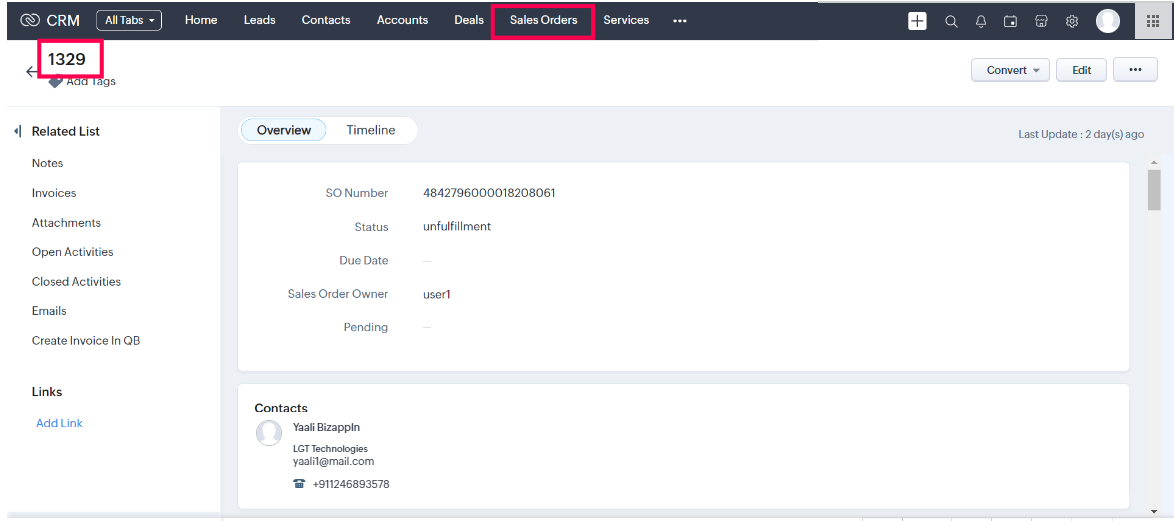
Shopify Order to Zoho CRM SalesOrder
When a new order is placed,
the extension creates a corresponding sales order in Zoho CRM. The sales order in Zoho CRM is
populated with information from the Shopify order, such as the customer's name, shipping
address, and order details.
In addition, if an order is
shipped on Shopify, our extension will update the corresponding sales order in Zoho CRM to
reflect the updated order status.
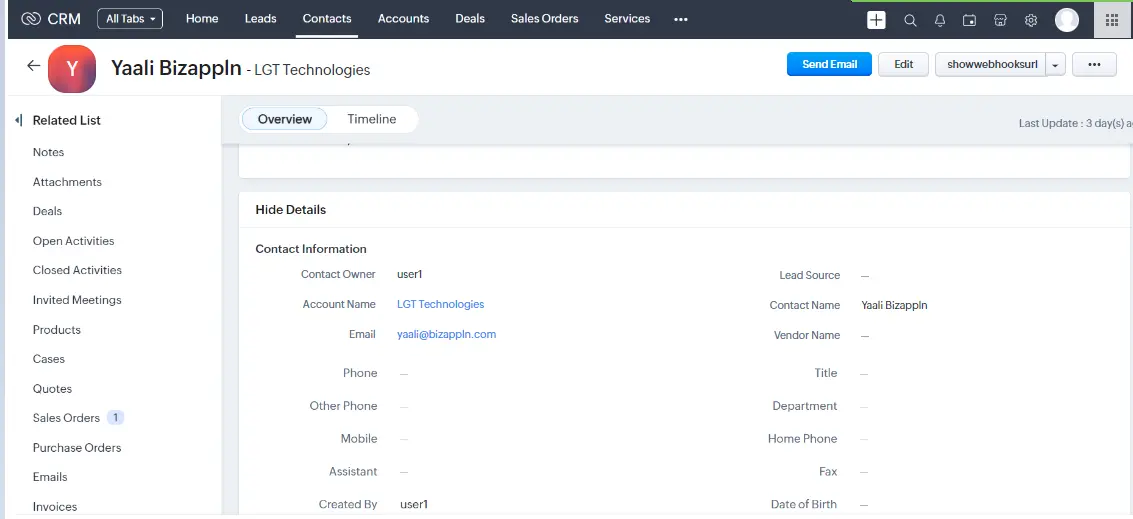
Shopify Customer to Zoho CRM Contact
The Shopify to Zoho CRM
extension automatically creates new customers(registered or guest) in Zoho CRM contacts module
for Shopify customers while order creation.The contact in Zoho CRM is populated with information from the Shopify
customer, such as the customer's name, email address, and shipping address.
Our extension syncs orders, along with their associated contacts and products from Shopify to Zoho CRM. It also automatically updates order status changes in Zoho CRM as they occur in Shopify.
Shopify Products to Zoho CRM Products
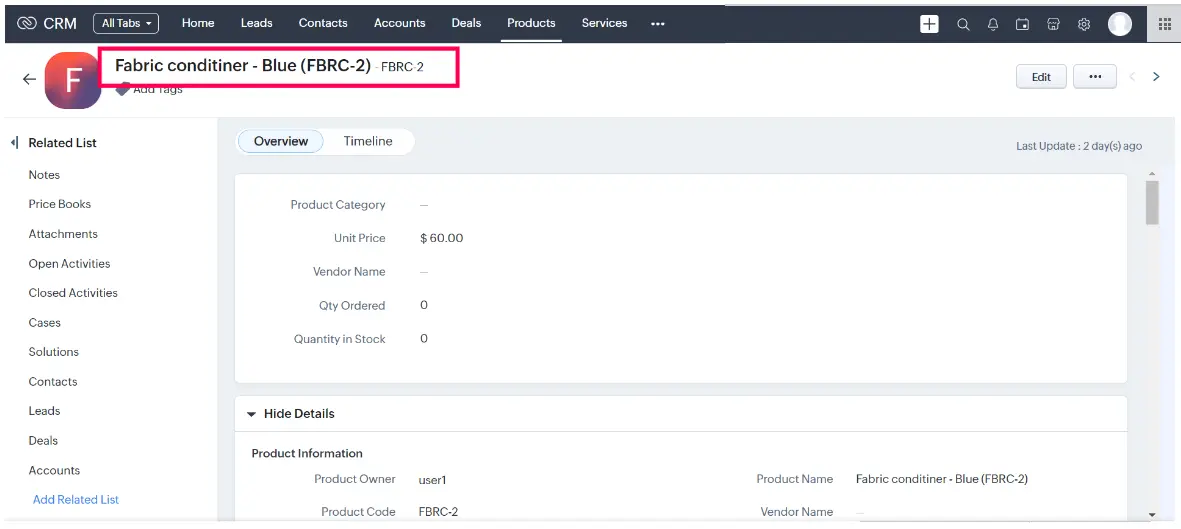
For every Shopify order,
corresponding products are added to the Zoho CRM Products module. The product in Zoho CRM is
populated with information from the Shopify product, such as product names, descriptions,
prices, SKUs, and any other relevant details.
If there are new products in
Shopify that are not yet available in Zoho CRM, the sync process will automatically create new
records in the "Products" module during order sync.
If the product data already exists in Zoho CRM for a Shopify product, the sync process will update the existing record from Shopify. This ensures data consistency between Shopify and Zoho CRM.
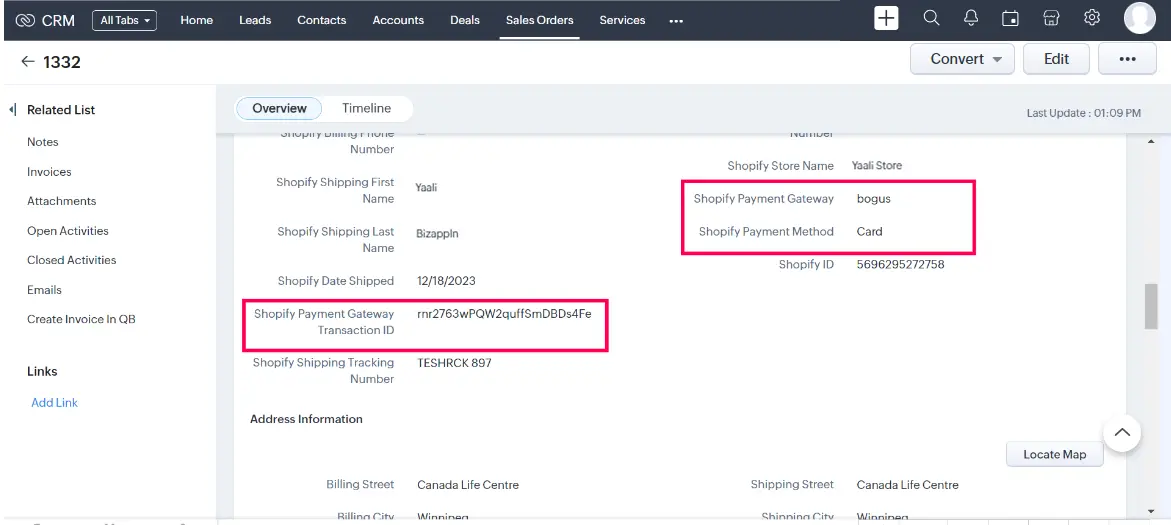
View Payment and Shipping information for Shopify orders in Zoho CRM
You can get a quick overview of the status of paid orders status (Unfulfilled, Partially
Fulfilled, Fulfilled
etc), shipment details ( Tracking number, Shipment Date), and payment method
(Credit card, PayPal, or other Online Payment Gateway, etc) from Zoho CRM's Sales Order.
As a result, both systems have consistent and up-to-date information, reducing manual data entry
efforts.
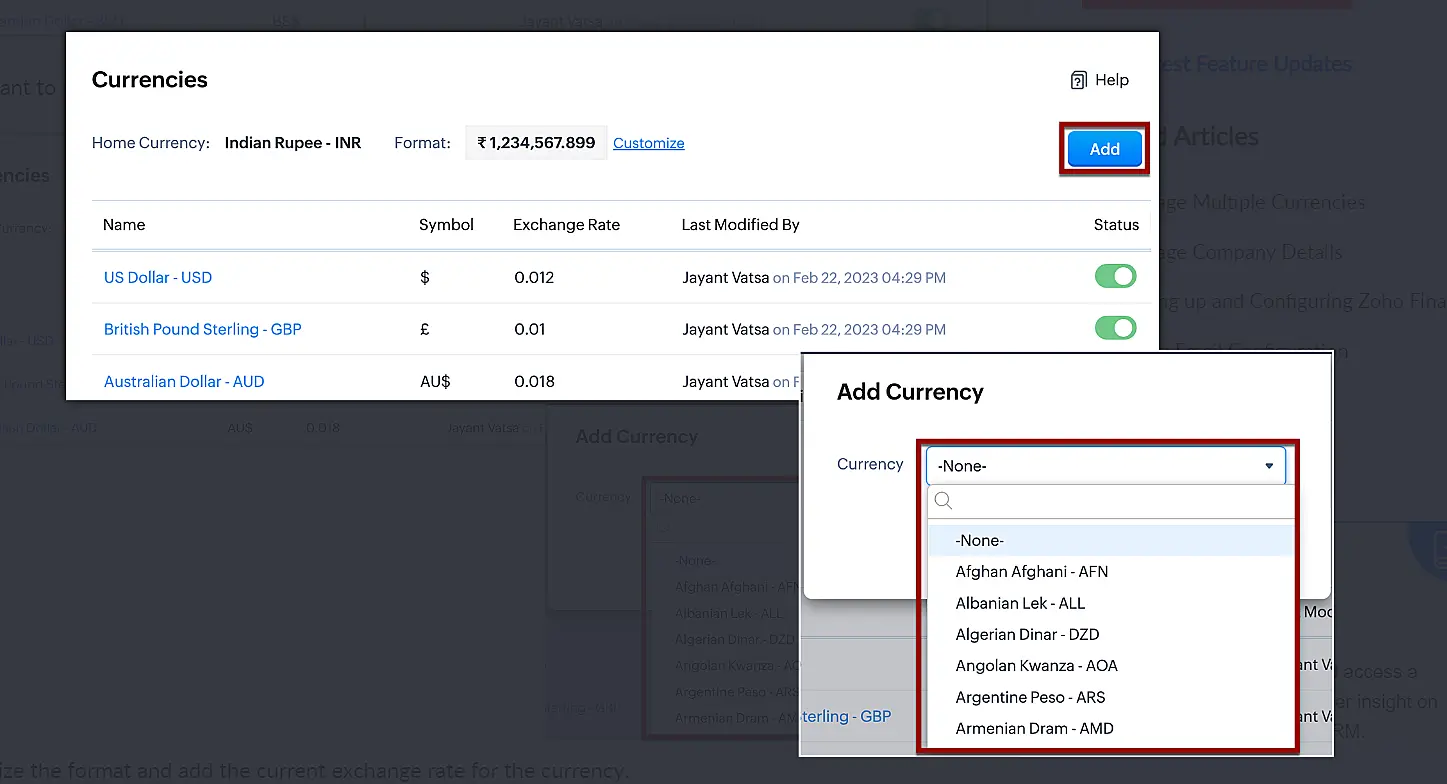
MultiCurrency Support
Our extension supports multi-currency operations, which enables you to manage
multi-currency transactions seamlessly. This makes it easier for organizations to manage and
track multi-currency transactions within the Zoho CRM platform when it is connected to Shopify
and ensures smooth processing of multi-currency transactions between Shopify and Zoho CRM.
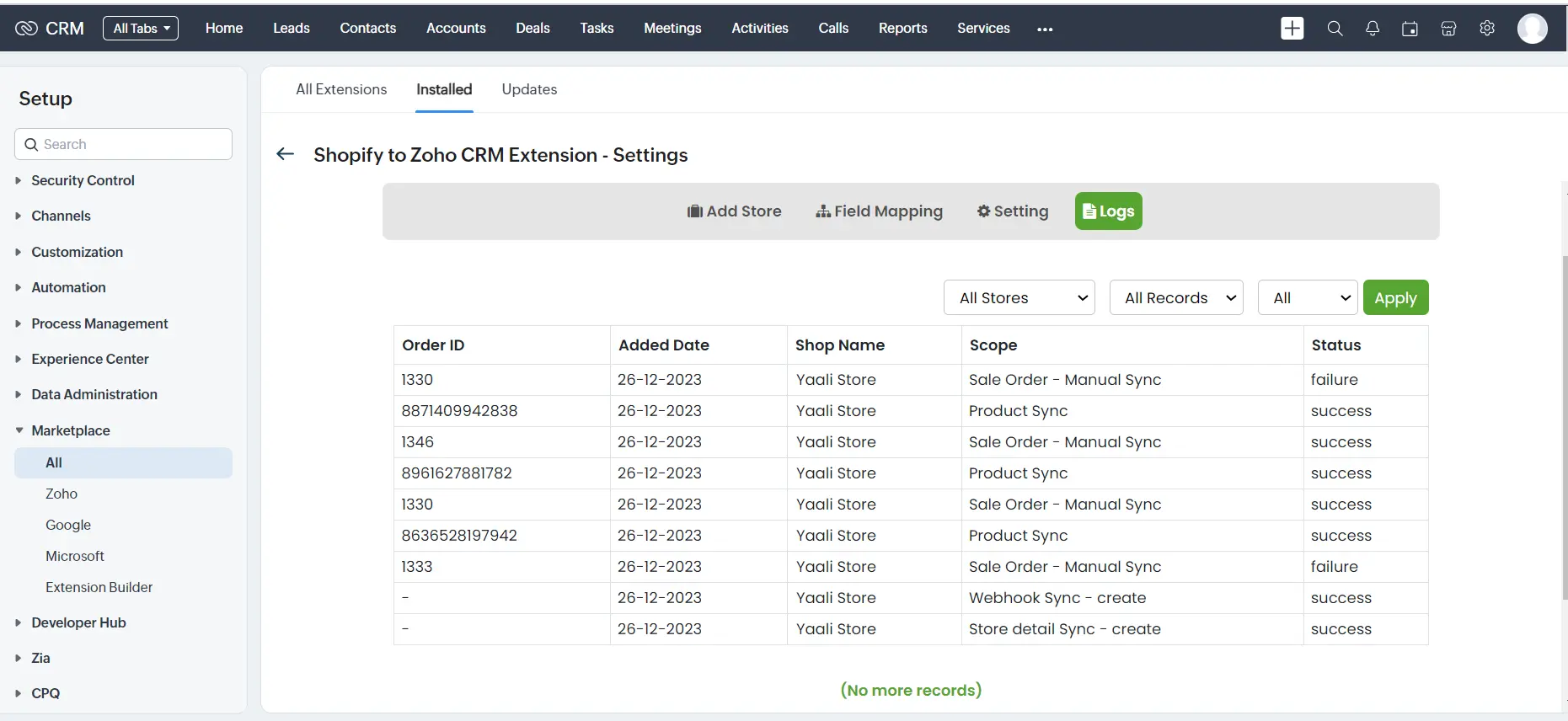
Logs
The Logs capture the data and sync errors logs occurring in the extension, which can be
used to identify the cause and take steps to resolve them. The user can filter the logs
based on the Store, Module and success/failure type of events. This can be helpful in
narrowing down the search for a specific error.
The log module captures the
following details:
Order ID
Added Date
Shop Name
Scope
Status
Want a quick, personalized tour of how the Shopify extension works with Zoho CRM?
Shopify Zoho Integration HelpDoc
Curious about setting up and configuring the Shopify extension in your Zoho CRM account? Refer to the help doc for detailed instructions.
Popular Zoho CRM Extensions Available on Zoho Marketplace
Our ready-to-use Zoho extensions help you quickly connect Zoho CRM with the tools your business relies on, automate repetitive tasks, and build a more connected sales ecosystem without the cost and complexity of custom development.
View customer invoices, payment history, outstanding balances, and accounting information directly inside Zoho CRM, giving your sales team complete financial visibility without switching applications.
Synchronize customer records and accounting data between Xero and Zoho CRM to keep your finance and sales teams working with accurate, up-to-date information.
Visualize customer organizations with interactive organization charts to understand reporting structures quickly, identify key decision-makers, and business relationships.
Generate dynamic organizational charts from your CRM data to understand reporting relationships, stakeholder hierarchies, and customer structures more effectively.
Automatically calculate accurate sales tax within Zoho CRM using Avalara, helping streamline tax compliance and improve quote-to-order accuracy.
Need a Custom Integration or Zoho Extension?
Whether you're looking for a ready-to-install extension or a completely custom integration, our Zoho Extension Developers will build custom Zoho extensions, integrations, and widgets for you, tailored to your business requirements.
Get a personalized demo of Shopify to Zoho CRM Extension
A respective person from our Zoho Extension Development Team will reach out to you for a 1:1 demo to clarify your doubts and answer any questions you have.
Would you like us to customize this Shopify
extension
according to your business needs?
Our Zoho developer utilizes Zoho Sigma
(Extension Development Platform) to build extensions that your business requires.



 +
+