How Zoho ERP Is Replacing Traditional ERP for SMB
SMBs no longer need complex, expensive ERP systems built for enterprises.Zoho ERP replaces traditional ERP with a cloud-native, modular ecosystem that reduces cost, speeds up implementation, and adapts as businesses scale.This post explains why SMBs are switching from legacy ERP systems to Zoho ERP.

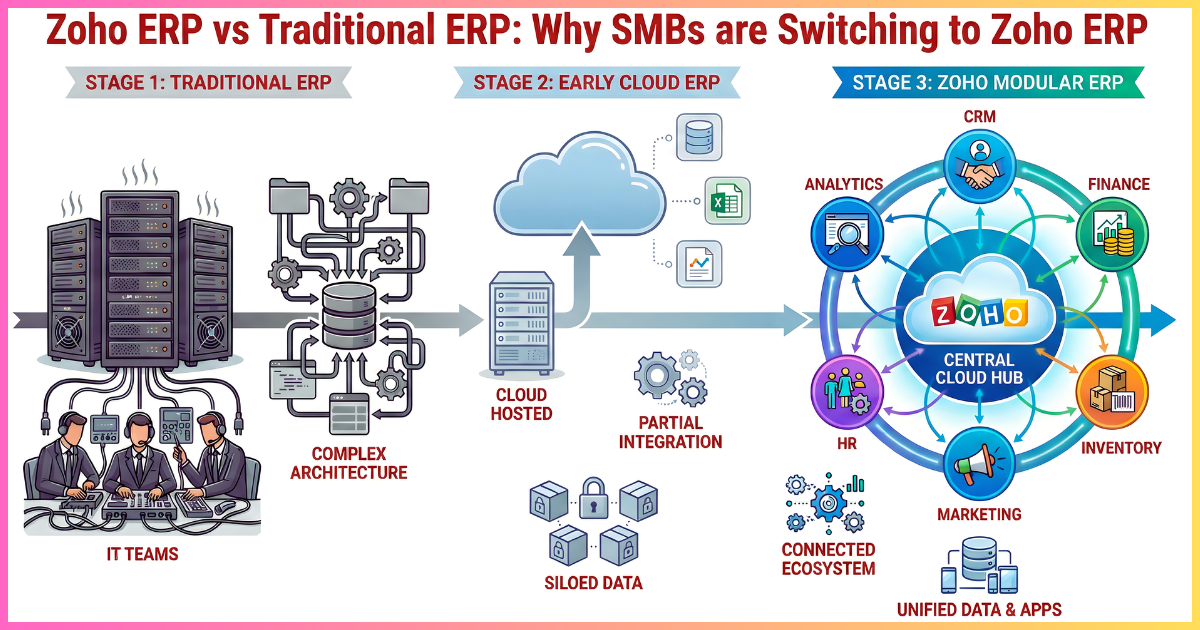
Enterprise Resource Planning (ERP) systems were once used mainly by large enterprises with big budgets, long rollout timelines, and dedicated IT teams.
For small and mid-sized businesses, ERP often felt like too much. It was expensive, complex, and rigid for organizations that needed speed and flexibility more than heavy systems.
Today, a new wave of cloud-native ERP platforms has changed that reality. Among these platforms, Zoho ERP has become one of the most disruptive forces in the SMB market. Many small and mid-sized businesses now choose Zoho ERP instead of traditional systems from vendors such as SAP, Oracle, and Microsoft Dynamics.
The market has shifted. Cloud-native ERP ecosystems, especially Zoho’s unified business suite, are starting to replace traditional ERP systems for SMBs. This change is not only about saving money. It reflects deeper changes in how modern businesses run, grow, and compete.
As a result, SMBs began asking their ERP vendors:
“Why pay for large and complicated ERP systems when the same work can be done faster and at a lower cost in the cloud? “
This question has driven the rise of cloud-based ERP solutions like Zoho ERP.
This blog post breaks down exactly how Zoho ERP is replacing traditional ERP for SMBs. You will learn why legacy ERP models are failing smaller businesses, how Zoho approaches ERP differently, and what sets Zoho ERP apart, and why this shift is crucial for companies looking to grow efficiently while maintaining flexibility.
If you want clarity on whether Zoho ERP is right for your business, this is the blog post you need to read. At the end, you can decide whether Zoho ERP aligns with your operational needs and long-term business goals effectively.
No fluff, no sugarcoating. Just exposing the reality currently faced by SMBs when it comes to ERP.
Recommended Content To Read: If you are already part of the Zoho ecosystem or considering a broader rollout, it helps to understand how Zoho ERP fits into the broader operational stack of Zoho One by reviewing what makes Zoho One as an all-in-one solution for your business and review the hidden costs of Zoho One implementation to plan realistically.
Why SMBs Struggled With Traditional ERP
Before examining Zoho ERP, it is useful to outline the limitations that traditional ERP systems have posed for small and medium-sized businesses.
Traditional ERP platforms were originally designed for large enterprises with substantial budgets, dedicated IT teams, and long planning cycles. As a result, ERP often meant heavy upfront costs, lengthy deployment timelines, and complex customization.
Traditional ERP systems typically created barriers that smaller organizations could not easily overcome.
Common challenges included:
- Licensing fees that required tens or hundreds of thousands of dollars upfront.
- Implementation timelines measured in months or even years.
- High consultant fees for configuration and customization.
- Rigid system architecture that made changes expensive and slow.
- Dependence on internal IT teams for maintenance and support.
- Fragmented data because only a limited set of modules was affordable.
- Training programs that did not match how SMB teams actually worked.
Collectively, these factors indicate that conventional ERP systems were never designed to meet the needs of small and medium-sized businesses. They were designed for organizations with large teams and large budgets.
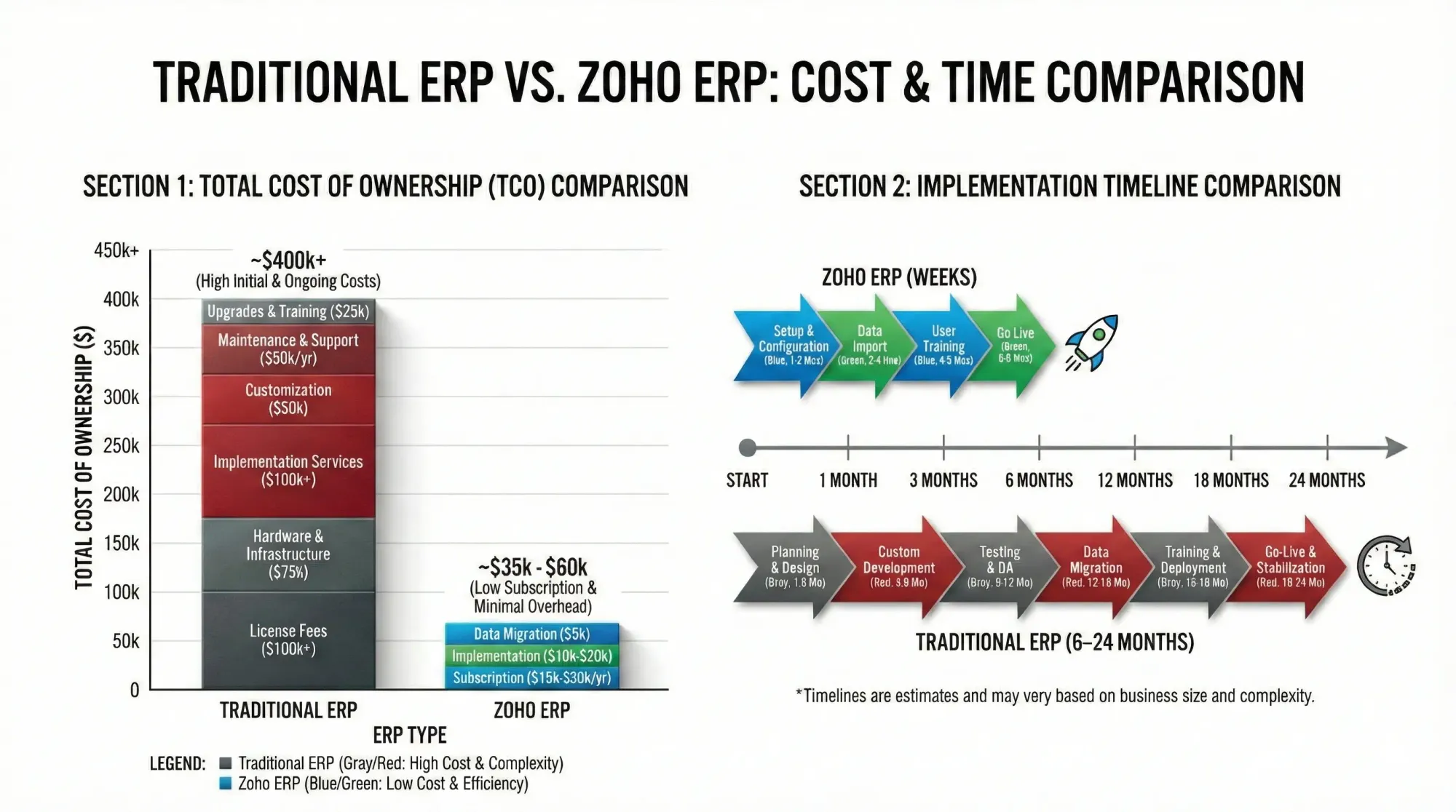
For SMBs, these characteristics often created significant barriers. Implementation timelines frequently ranged from 6 to 24 months. Businesses operating in competitive markets with tight margins found these constraints difficult to justify.
Today, small and mid-sized businesses require agility, cost control, and integrated systems across departments without the burden of legacy infrastructure. Traditional ERP platforms such as SAP Business One, Oracle NetSuite, and Microsoft Dynamics have historically dominated the market.
Traditional ERP systems were never designed with SMB realities in mind. High licensing fees, long implementation cycles, and heavy reliance on consultants made ERP adoption risky for smaller organizations.
SMBs require ERP systems that deliver value quickly without locking them into rigid, expensive frameworks.
The cloud-based ERP platforms like Zoho ERP have gained traction because of their flexibility, affordability, ease of use, and faster deployment.
This shift marks a turning point in how SMBs evaluate ERP investments. Decision makers now expect faster time to value and predictable costs.
The Rise of Cloud-based ERP for SMBs
Cloud-based ERP systems reduce initial costs, speed up deployment, and remove the need for large on-site infrastructure. These benefits have made cloud ERP especially appealing to small and mid-sized businesses.
ERP covers nearly every part of an organization, including finance, inventory, procurement, human resources, and more. Moving such a broad system to the cloud required a new way of thinking. Instead of copying traditional ERP models, some providers chose a more flexible approach.
Zoho approached the challenge differently. Rather than building one large system that tries to handle everything in a single interface, it created a connected ecosystem of applications that work together as an ERP. Each application focuses on a specific function, but all the zoho apps share data and integrate smoothly.
For SMBs, this structure feels familiar. It reflects how many teams already work. Sales teams use a CRM. Finance teams use accounting software. Operations teams track inventory. Support teams manage tickets. When these apps connect and share information, they form a unified system without forcing every user into one platform.
Cloud-based ERP systems changed the equation by reducing infrastructure costs and enabling faster deployment. Zoho took this further by offering a modular ERP ecosystem instead of a monolithic system.
This same modular thinking powers Zoho Creator, which SMBs often use alongside ERP to fill functional gaps. For context, read how zoho creator empowers small businesses to build their apps faster and cost-efficiently.
This modular, cloud-first model is one reason Zoho ERP is gaining ground among SMBs that are moving away from traditional ERP systems.
Companies want ERP systems that are easier to deploy, easier to manage, and easier to scale as they grow.
This shift offers several practical advantages:
- Lower upfront costs through subscription pricing
- Faster implementation
- Automatic updates
- Remote access from any location
- Scalability as business needs change
Zoho entered the ERP space with a clear goal: build an integrated suite of business applications designed for growing companies rather than large enterprises with complex legacy systems. This approach appealed to SMBs that wanted strong capabilities without heavy technical overhead.
Business operations have changed. Speed is important. Flexibility is significant. Cost control is essential. Simplicity is also significant. Many SMBs now prefer ERP systems that help them move quickly and adapt without large IT investments.
The move toward platforms like Zoho ERP reflects a broader change in how smaller businesses operate. Companies are looking for ERP systems that are agile, cost-effective, and easy to manage. Zoho ERP aims to meet those expectations by offering a connected, scalable ecosystem built for modern business needs.
What Is Zoho ERP
Zoho ERP is not a single product but a tightly integrated suite of business applications. It covers finance, sales, inventory, CRM, HR, project management, analytics, and more. All applications run in the cloud and connect smoothly.
Instead of installing software on local servers, businesses access Zoho through a web browser. Updates happen automatically, integrations are built in, and data moves across departments with little friction.
In simple terms, Zoho ERP brings operations, teams, and data together into one unified system. For small and mid-sized businesses, this unified ERP stack feels lighter, faster, and easier to adapt than traditional ERP systems.
Key ERP modules included in Zoho ERP:
Finance and Accounting: Zoho Books for the general ledger, Zoho Inventory, Zoho Expense, Zoho Billing, and Zoho Checkout.
Operations and Sales: Zoho CRM, Zoho Desk for support, Zoho Projects, and Zoho Analytics.
HR and Productivity: Zoho People and Zoho Recruit.
Administrative: Zoho Directory and Zoho Flow.
Together, these applications form a complete ERP stack without the heavy setup often linked to traditional systems. For small and mid-sized businesses, this approach feels natural. Instead of investing heavily at the start, they can begin with a few tools and scale up as needed.
Consider a retail business with 20 employees. Rather than rolling out a large ERP system all at once, the company starts with Zoho Books for accounting and Zoho Inventory. As the business grows, it adds Zoho CRM, Zoho People, and Zoho Analytics. Each new tool fits in smoothly and works with the others.
This modular approach reduces risk and keeps the ERP aligned with business growth. It gives companies the freedom to shape the ERP system around their processes instead of changing their processes to fit the system.
Traditional ERP systems rarely offer this level of flexibility.
You now have a clear view of traditional ERP systems and their limits for small and mid-sized businesses.
The next section explores how Zoho ERP replaced conventional ERP systems, the growing shift toward cloud-based solutions, and the reasons many businesses find this approach appealing.
How is Zoho ERP taking over from traditional ERPs among SMBs?
Traditional ERP systems were built for large enterprises that manage complex operations, many departments, and global teams. ERP systems such as SAP ERP, Oracle ERP, and Microsoft Dynamics were designed to bring all business data into one place across finance, inventory, manufacturing, HR, and supply chain functions.
While these ERP systems are powerful, they often come with high infrastructure costs, long setup times, and the need for experts to run and maintain them.
As a result, many small and mid-sized businesses found it hard to adopt them. These demands became major roadblocks for SMBs that wanted to grow but could not take on heavy systems.
Over time, SMBs began to look for other options that could deliver ERP-level features without enterprise-level complexity and cost. They wanted ERP that was easier to set up, simpler to manage, affordable, flexible and scalable, and ready to use out of the box.
Zoho ERP stepped in to fill this gap.
Zoho ERP addresses many of the limitations that kept SMBs from adopting traditional systems. Its cloud-based architecture removes the need for expensive servers, dedicated IT teams, and complex infrastructure. Businesses can access the ERP through a browser, deploy modules as needed, and scale usage as operations grow. This lowers both upfront investment and long-term maintenance costs.
As SMBs prioritize agility, affordability, and ease of use, the demand for lighter, cloud-first ERP systems continues to grow. Zoho ERP meets these expectations by offering enterprise-grade capabilities without enterprise-level complexity.
For many small and mid-sized businesses, it represents a practical path toward digital transformation, enabling them to manage operations efficiently while maintaining the flexibility needed to scale.
Zoho ERP has emerged as a strong alternative in the ERP segment by aligning with the practical realities of small and medium-sized businesses. Zoho ERP offers a unified ecosystem of applications that can be adopted gradually, integrated easily, and managed without extensive technical overhead. This approach reduces complexity while still delivering the core capabilities companies expect from an ERP system.
As a result, many organizations are transitioning away from traditional ERP platforms and toward more agile, cloud-based solutions that better match their operational pace and budget constraints.
Why SMBs Are Switching to Zoho ERP?
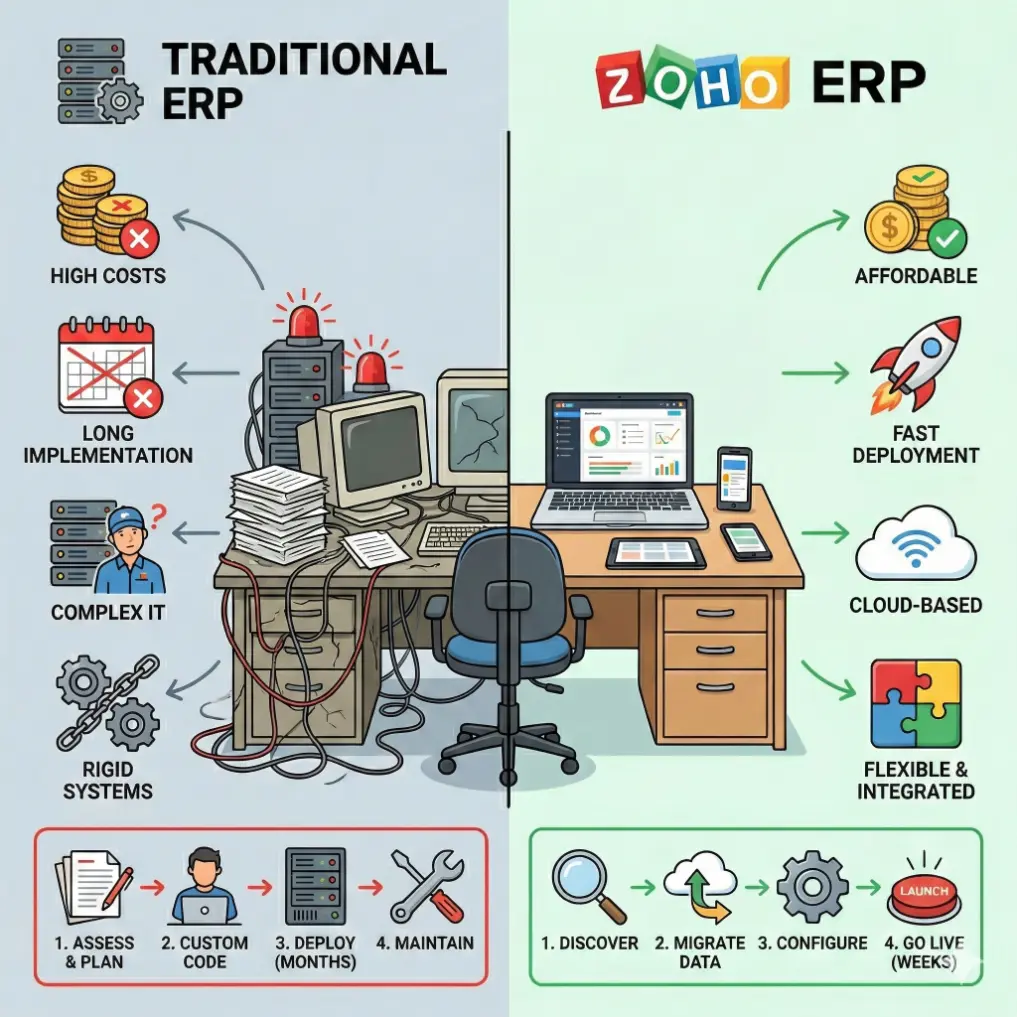
Modern cloud-based platforms are reshaping expectations around what an ERP system should deliver. Businesses today prioritize flexibility, faster deployment, seamless integration, and predictable costs.
Zoho ERP aligns closely with these needs by offering a unified, scalable solution that supports business growth without the overhead commonly associated with legacy systems.
🙌 The following factors outline the primary reasons Zoho ERP is steadily replacing conventional ERP solutions in the SMB segment:
1. Cloud-First Architecture That Matches SMB Reality
One of the main reasons Zoho is replacing traditional ERP systems for SMBs is its cloud-native design. A cloud system removes the need for costly hardware and in-house IT maintenance. Teams can log in from anywhere, updates install automatically, and security and compliance are managed in one place.
In practical terms, this means:
- Faster setup times
- Lower total cost of ownership
- Easier remote teamwork
- Real-time access to data
Consider a mid-sized manufacturing company moving away from spreadsheets and disconnected software. With a traditional ERP system, the company might spend months setting up servers, configuring networks, and planning data migration. With Zoho, the team can start using core modules within weeks and expand as needed.
The cloud-first model also supports teams working in different locations. Many SMBs now operate across cities or regions. A centralized cloud ERP helps everyone use the same data without relying on VPNs or local servers. As a result, teams stay aligned, and decisions are based on current information.
2. Pricing That Fits SMB Budgets
Cost is one of the strongest reasons SMBs choose Zoho over traditional ERP systems. The difference is often significant rather than small.
Traditional ERP systems usually include:
- License fees per user or module
- Hardware and infrastructure expenses
- Implementation consulting fees
- Ongoing maintenance and upgrades
- Dedicated IT staff
Zoho uses a subscription model that is hosted in the cloud. SMBs pay monthly or yearly per user, and there is no need to pay to maintain large infrastructure to run the ERP. Many companies report setup costs that are far lower than legacy ERP systems.
Many research findings indicate that small and medium-sized businesses can cut their ERP costs by 30 to 50 percent by transitioning from local systems to cloud-based ERP solutions like Zoho ERP. Zoho’s pricing and bundled apps make it appealing to budget-conscious companies.
Zoho’s subscription-based pricing allows SMBs to start small and scale gradually. However, businesses should still understand the total cost of ownership beyond the base subscription.
Hidden expenses often appear during customization, training, and integrations, which are covered in detail in Hidden Costs of Zoho Implementation.
3. Faster Deployment
Traditional ERP systems were known for slow and complex deployments. A typical implementation could take six months to two years. During that period, critical upgrades stalled, teams paused improvements, and strategic decisions were pushed back.
In contrast, Zoho ERP delivers value in a fraction of that time. Many businesses can deploy core modules in weeks rather than years, depending on scope and readiness.
Real-time examples:
We have implemented a custom ERP built using Zoho for:
- A retail business implementing inventory and sales automation in as little as three weeks.
- A service company launching CRM and project management in about four weeks.
- An eCommerce brand enabling order management, fulfillment, and finance in approximately six weeks.
This speed matters. SMBs operate in fast-moving markets where customer expectations shift quickly and delays can eat into profits. The ability to hit the ground running can make a measurable difference.
Zoho’s implementation approach focuses on rapid rollout, straightforward configuration, and phased adoption. Instead of biting off more than you can chew, you start with essential modules and expand as your business grows.
4. Implementation Speed and Simplicity
Traditional ERP projects often unfold in multiple phases. They typically require external consultants, complex data migration, and heavy customization. For SMBs with limited technical staff, this can feel like climbing a mountain.
Zoho ERP implementations are generally faster and more manageable due to several built-in advantages:
- Cloud deployment removes the need for server setup.
- Pre-built integrations reduce customization work.
- User-friendly interfaces shorten training time.
- Modular rollout supports phased adoption.
As a result, many SMBs can go live within weeks rather than months. This quicker turnaround allows businesses to see returns sooner and adapt to market changes without being tied up in long implementation cycles.
For example, a small manufacturing company might begin with Zoho Inventory and Zoho Books. Over time, it can add CRM and analytics as operations expand. This methodical approach contrasts with the traditional ERP model, which typically demands a one-size-fits-all upfront commitment.
5. Customization Without Heavy Development
Every SMB has unique workflows. Traditional ERP systems can accommodate these differences; however, customization often requires specialized development and long implementation timelines.
Zoho addresses this challenge through a low-code development platform like Zoho Creator. Businesses can create custom apps, forms, and processes for their needs without extensive coding.
However, understanding platform limits is important. These boundaries and practical workarounds are covered in Zoho Creator Limitations and Workarounds.
Zoho ERP enables the creation of tailored apps for its ERP functions using Zoho Creator, eliminating the need for extensive development and lengthy wait times.
This level of customization empowers internal teams to adjust the ERP as business needs evolve, rather than depending heavily on external developers to do some customization for their work. As a result, the ERP remains aligned with day-to-day operations and long-term growth.
For SMBs deciding how far to customize Zoho ERP, Zoho Creator vs Custom Development provides useful perspective
Related Content To Read: Before deploying custom Zoho Creator apps as part of ERP workflows, teams should follow the best practices outlined in 10 Critical Steps to Check Before Deploying a Zoho Creator App.
6. Flexibility and Scalability
Traditional ERP systems often require businesses to adjust their processes to match the software. Zoho shifts this dynamic by allowing the software to adapt to the business.
SMBs frequently experience rapid changes in headcount, product offerings, and operational complexity. Traditional ERP systems may struggle to keep pace without costly modifications or extended development cycles.
Zoho’s modular architecture provides flexibility in several ways:
- Add modules as needed: Businesses can start small and expand their ERP capabilities over time.
- Scale users easily: Adding employees requires only additional licenses, not infrastructure upgrades.
- Custom workflows: Low-code tools allow companies to tailor processes without heavy technical work.
- API integrations: Zoho connects with hundreds of third-party applications, enabling SMBs to build systems that fit their specific needs.
As SMBs seek flexibility while maintaining control, Zoho ERP has become more than an alternative to traditional systems. For many organizations, it is now a practical first choice.
Zoho ERP supports a wide range of industries, including:
- Manufacturing
- Wholesale and distribution
- Professional services
- SaaS and subscription businesses
- Retail and ecommerce
Rather than forcing businesses into rigid industry templates, Zoho provides industry-specific solutions that support evolving business models. This flexibility reflects how SMBs actually grow and change over time.
Traditional ERP systems also offer industry-specific solutions; however, customization frequently increases costs and complexity. Zoho’s modular approach enables businesses to configure their operations to suit their industry, without extensive development.
Zoho ERP implementations are typically faster than traditional ERP projects because businesses can roll out modules in phases.
This approach closely mirrors the structured rollout principles discussed in How to Overcome Top Challenges of Implementing Zoho One.
7. User Experience and Adoption
User adoption is critical to ERP success. Traditional ERP systems often struggle in this area because of complex interfaces and steep learning curves. Employees may resist tools that feel confusing or difficult to use.
Zoho’s design approach focuses on usability. The interfaces are modern, simple, and consistent across applications. Employees can move between CRM, accounting, and project management with little training. As a result, teams are more likely to use the ERP day in and day out.
Higher adoption leads to better data accuracy and smoother operations. Small businesses gain more from apps that employees use rather than avoid.
Mobile access also helps promote adoption. Zoho's mobile applications enable teams to access data and finish tasks on their phones and tablets.Sales teams, field staff, and remote workers can stay connected while on the move. This flexibility helps organizations keep work moving forward, even outside the office.
8. Automation and Productivity Gains
Automation is another area where Zoho ERP delivers clear value. Many SMBs rely on manual processes that take time and lead to mistakes.
Automation reduces repetitive tasks, enabling workers to concentrate on jobs that demand critical thinking and creativity. This transition can lead to higher productivity and greater job satisfaction over time.
Zoho's low-code automation tool enables non-technical users to design workflows without needing to write code. This approach puts automation within reach for smaller organizations that do not have dedicated IT teams. Teams can rapidly develop, evaluate, and improve their processes, keeping them efficient and competitive.
Automation and AI-driven insights are becoming key differentiators for modern ERP systems. Zoho integrates artificial intelligence (AI) into all of its applications, including Zoho ERP.
If AI feels underutilized or confusing, the challenges and fixes are outlined in How to Overcome AI Hurdles in Zoho With Expert Strategies.
Related Content: Zoho’s broader AI roadmap and partner ecosystem evolution are covered in AI Trends in Zoho Revolutionizes Zoho Partner Dynamics.
9. Integration with the Broader Business Ecosystem
Modern SMBs depend on many digital tools to run daily operations. Payment gateways, e-commerce platforms, marketing systems, and collaboration tools need to connect and share data smoothly.
Zoho ERP integrates with several third-party platforms.Some of them are mentioned below:
- Shopify
- Amazon
- Stripe
- PayPal
- Google Workspace
- Microsoft 365
These connections allow Zoho ERP to act as a central hub while letting businesses keep the third-party apps they already use. Many traditional ERP systems require costly custom work to achieve the same level of connectivity.
ERP success also depends on how well finance, HR, support, and operations are connected. Zoho ERP supports this through integrated HRMS and accounting modules.
For finance-driven workflows, How to Automate Quote-to-Cash Process Using Zoho Finance shows how ERP-level automation improves cash flow and visibility.
10. Security and Compliance Without Enterprise Bloat
Many SMBs worry about whether cloud ERP systems can provide the same level of security as traditional enterprise software. Zoho addresses this concern by building strong security features into the platform from the start.
Enterprise-Grade Security by Default
Zoho invests in security infrastructure that includes:
- End-to-end encryption
- Role-based access control
- Continuous monitoring and audits
These protections are built into the system rather than sold as optional add-ons. This helps SMBs maintain strong safeguards without needing a large IT team.
Compliance Without Complexity
Zoho supports widely used compliance standards for finance, data protection, and operational controls. This structure helps SMBs meet regulatory needs while reducing the effort required to manage compliance internally. As a result, businesses can focus more on operations and less on technical oversight.
11. Modular Adoption Reduces Risk
Rather than forcing businesses to adopt all modules at once, Zoho ERP allows you to implement only what you need, when you need it.
Consider the contrast.
Traditional ERP systems required major decisions early in the process. Companies had to purchase modules for finance, HR, inventory, purchasing, CRM, production, and more. ERP consultants were often needed to determine which modules to install. Businesses frequently paid for features they never fully used.
Zoho ERP takes a different approach. You can begin with the modules that are critical to your operations, then add additional components as your needs grow. Instead of biting off more than you can chew, you roll out capabilities step by step.
This modular model provides:
- Lower initial costs
- Faster time to value
- Flexibility to scale
- Simpler implementation
For SMBs, that is a significant advantage. You might start with finance and inventory. As your sales team expands, you can add CRM. When your headcount rises, you can bring in additional apps your business needs. There is no pressure to purchase everything upfront, which helps you stay in control and reduce risk.
12. Analytics That Are Usable, Not Just Powerful
ERP systems generate large amounts of data. The real question is whether decision-makers can put that data to work.
Embedded Analytics, Not Separate BI Projects
Zoho ERP includes built-in analytics that allow managers to track KPIs without separate BI tools.
This data-driven approach aligns with how Zoho Analytics simplifies reporting for growing businesses.
In contrast, traditional ERP systems often require separate business intelligence tools, data warehouses, and specialized analysts to achieve similar outcomes.
For SMBs, analytics must be practical and easy to apply, not theoretical or overly complex. Zoho’s approach encourages teams to use analytics to draw useful insights from their ERP data every day rather than leaving insights in the hands of a small group of executives. When data is simple to access and understand and you can get useful insights from it, teams are more likely to act on it and follow through.
Role of AI in Zoho ERP
Zoho continues to incorporate AI-driven insights across its applications. These capabilities improve forecasting, automation, and operational visibility.
However, AI success in ERP depends on knowing when to use AI in Zoho and where manual logic still matters.
Many businesses also face adoption challenges when introducing AI features in Zoho, which are addressed in How to Overcome AI Hurdles in Zoho With Expert Strategies.
Now you know the reasons for why SMBs are moving away from their existing ERP to Zoho ERP.
If you want a clear assessment of whether Zoho ERP fits your business processes and budget, speak with a Zoho ERP consultant. Get a tailored roadmap based on your current systems and growth goals.
Contact us to discuss your requirements Talk to our Zoho ERP Expert
If you are decided to migrate your data from the current ERP software to Zoho ERP, how can you do that efficiently?
That’s what I am going to cover in the next section.
How to Transition From Traditional ERP to Zoho ERP
Migrating from a traditional ERP system can seem difficult, but it can be done in a structured and controlled way. A successful transition requires planning, data cleanup, phased rollout, and training. Many businesses benefit from Zoho expert guidance during this data migration.
The following step-by-step approach helps ensure a smooth transition.
Step 1. Evaluate Your Current Pain Points
Begin by identifying the main challenges in your current system. Ask the following questions:
- Which processes take the most time?
- Where do you lack visibility?
- What data is difficult to access?
- Which reports are challenging to generate?
Record the answers. They will help you decide which areas to address first.
Step 2. Map Your Core Business Processes
Document how your business operates today, including finance, sales, inventory, operations, and HR. This map does not need to be perfect. The goal is to understand how work gets done and how data moves across teams.
This step helps you decide which Zoho modules to implement first.
Step 3. Choose Your Initial Core ERP Modules
Select the modules that solve your biggest problems first. Many SMBs begin with Zoho Books for finance, Zoho Inventory for stock control, and Zoho CRM for sales.
Start with a small scope and expand after early success.
Step 4. Plan Your Data Migration
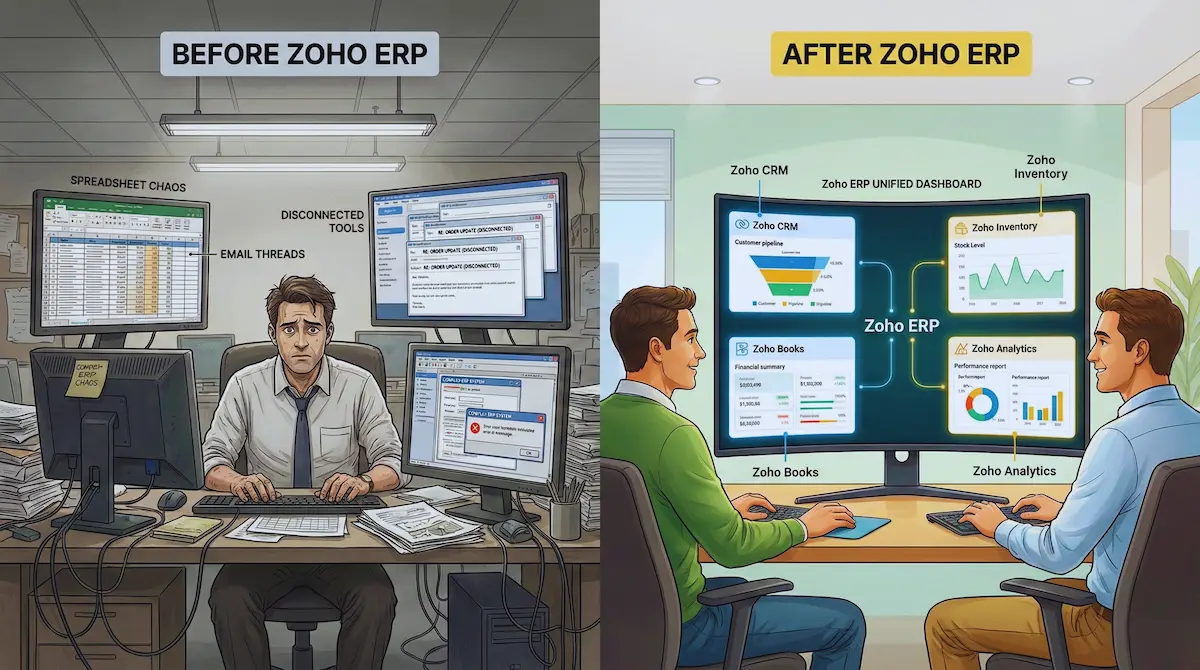
Data migration is often the most stressful part of an ERP transition, but it can be managed with proper planning. Export key data from your current system, including:
- Customers
- Suppliers
- Products
- Inventory balances
- Open orders
- Financial balances
Clean the data before importing. Remove duplicates, fix errors, and standardize formats. Then import the data into Zoho ERP. Zoho provides tools and support to assist with the data migration process.
If you need any help migrating your data from the current ERP to Zoho ERP without a hitch,hire our Zoho data migration expert to ensure a smooth migration.
Step 5. Train Your Team
An ERP system is effective only when people use it correctly. Plan structured training sessions. Start with key users and let them support others.
Early training reduces confusion and improves adoption.
Step 6. Configure Workflows and Automation
Workflows and automation are central to Zoho ERP. Define approval steps and set rules for alerts, notifications, and tasks.
Configure the system to match your business processes so that daily work becomes easier and more consistent.
Step 7. Test Before Going Live
Before switching fully, run test scenarios. Simulate daily operations, create sample transactions, and review reports. Confirm that integrations work correctly.
Testing builds confidence and helps identify issues before launch.
Step 8. Go Live and Monitor
Begin using the system and monitor performance closely. Track usage, errors, and feedback. Adjust workflows as needed during the early stages. This phase provides an opportunity to optimize the system and ensure long-term operational success.
Still stuck with a traditional ERP that slows your business down?
We help SMBs migrate from legacy ERP systems to Zoho ERP with minimal disruption and faster ROI.
Bonus Step: Work With a Certified Zoho Partner During Transition
Many SMBs choose to work with Zoho Partner like YAALI to accelerate ERP adoption and reduce risk.
Understanding what does Zoho Partner do for your business early helps avoid rework and unnecessary costs. Evaluate the total cost of ownership and expected benefits before making decisions.
If you don’t know how to choose the Zoho implementation partner for your ERP needs, then you must read how to choose the best zoho partner for your business without wasting your time and effort.
A successful ERP transition requires planning, technical setup, and workflow alignment. Working with an experienced Zoho implementation partner reduces risk and speeds up deployment.
Thinking about migrating your existing ERP to the Zoho ERP?
Our Zoho-certified consultants help you plan, implement, and scale Zoho ERP without unnecessary complexity.
To sum it up, Traditional ERP systems were designed for large enterprises with significant budgets and resources. Small and mid-sized businesses operate differently and need systems that are flexible, affordable, and easy to use.
Zoho ERP offers a cloud-based and modular approach that allows businesses to start small and expand over time. It combines core business tools into one connected environment. This structure can reduce complexity and improve visibility across operations.
The shift toward platforms like Zoho reflects broader changes in how SMBs adopt technology. Many organizations now prioritize cost control, speed of implementation, and scalability. A well-planned transition can help businesses modernize their operations while maintaining stability.
Want to implement Zoho ERP setup tailored to your exact business needs?
Real-Time Business Scenario of one of our clients
“Migrating from an Outdated ERP to Zoho ERP for Advanced Order Fulfillment.”
Business Context
A mid-sized manufacturing organization was operating on a legacy ERP that had been customized many years earlier. The system handled accounting, procurement, and basic inventory, but it lacked flexibility for modern manufacturing operations. As production complexity increased, the ERP began to create operational bottlenecks instead of solving them.
The organization evaluated multiple options and ultimately chose a modern cloud-based ERP architecture built on the Zoho ecosystem, including:
- Zoho CRM
- Zoho Books
- Zoho Inventory
- Zoho Creator
- Zoho Analytics
This was not simply a software replacement. It was a strategic transition from a rigid ERP to a modular, cloud-native ERP architecture.
Key Limitations of the Legacy ERP
1. Disconnected Production and Order Fulfillment
The legacy system tracked inventory and invoices but did not provide structured production workflows. Production teams relied on spreadsheets to manage:
- Raw material planning
- Production sequencing
- Quality checks
- Dispatch planning
There was no unified order-to-production visibility.
2. Lack of Workflow Automation
Manufacturing operations required approval stages and step-based execution. The ERP could not enforce process sequencing or capture time spent on each production step. This caused:
- Delays in production
- Rework due to missed steps
- Lack of performance metrics
3. Limited Customization Without High Cost
Every modification required external developers. Custom manufacturing workflows were expensive to build and difficult to maintain.
Why Zoho ERP Was Recommended by our Zoho Expert
The organization selected Zoho ERP because it enabled a hybrid approach:
- Standard ERP modules for finance and inventory
- Custom manufacturing workflows using Zoho Creator
- Real-time analytics and reporting
This allowed them to modernize without rebuilding everything from scratch.
Zoho ERP Implementation Plan
Core ERP Layer
- Sales and customer lifecycle in Zoho CRM
- Accounting in Zoho Books
- Inventory and warehouse control in Zoho Inventory
Manufacturing and Fulfillment Layer
A custom manufacturing and order fulfillment application was built using Zoho Creator and integrated into the ERP environment.
This type of solution digitizes the entire manufacturing lifecycle from raw material intake to final shipment and can significantly reduce operational costs through automation and centralized data visibility.
Real-Time Operational Transformation
1. End-to-End Order Fulfillment Visibility
Before migration:
Orders were manually transferred from sales to production planning.
After migration:
A Zoho Creator manufacturing app handled:
- Customer enquiry capture
- Quote generation
- Sales order conversion
- Production planning
- Dispatch tracking
These modules provided real-time order status tracking and ensured that every order progressed through defined stages without delays.
The ERP now had a continuous data flow:
CRM → Order → Production → Dispatch → Accounting
2. Multi-Warehouse and Production Coordination
The legacy ERP could not manage multiple warehouses in real time. With Zoho Creator integrated into Zoho Inventory:
- Stock levels across warehouses became visible instantly
- Orders were routed to the most suitable warehouse
- Automatic replenishment rules reduced stockouts
Real-time inventory visibility across locations improved fulfillment planning and prevented production interruptions.
3. Structured Manufacturing Workflow Control
A major challenge in the legacy system was defining and tracking manufacturing steps. The new Zoho-based solution implemented:
- Category-based production steps
- Hierarchical process flows
- Automated step sequencing
- Time tracking per operation
In a comparable manufacturing scenario, structured workflows built on Zoho Creator improved operational efficiency by enabling clear process flows and better tracking of manufacturing steps.
This allowed production managers to monitor:
- Which step each order was in
- How long each step took
- Where delays occurred
This level of visibility did not exist in the previous ERP.
4. Quality and Dispatch Integration
The new system automatically triggered quality inspections after production completion. Only approved items moved to dispatch.
Quality checks, shipment creation, and dispatch notifications were all managed inside the same workflow system, ensuring that only approved products reached customers and that shipping teams worked with accurate data.
5. Real-Time Reporting and Decision Support
Management dashboards were implemented using Zoho Analytics. They displayed:
- Production throughput
- Order cycle time
- Inventory turnover
- Margin by product line
Real-time dashboards allowed management to identify bottlenecks and adjust production schedules quickly. Data-driven decisions replaced manual reporting.
Strategic Takeaway
The organization did not simply replace an outdated ERP. It transitioned to a modular ERP ecosystem where:
- Standard ERP modules handled finance and inventory
- Custom manufacturing workflows were built on Zoho Creator
- Real-time analytics enabled proactive decision-making
This hybrid approach is now a common strategy among growing manufacturing organizations. It balances standardization with customization while maintaining cost efficiency and scalability.
Want a faster Zoho ERP implementation without surprises?
We specialize in phased rollouts that deliver value in weeks, not months.
Contact us now to estimate your Zoho ERP implementation timeline.
Challenges and Considerations of Zoho ERP
Although Zoho ERP has numerous benefits, it also presents certain difficulties. Businesses transitioning from traditional ERP systems must plan data migration carefully to avoid disruptions. Training employees on new workflows is also essential to ensure successful adoption.
Some organizations with highly specialized processes may require additional customization or integration with external systems. While Zoho’s low-code tools address many customization needs, complex requirements may still require technical expertise.
Despite these challenges, the overall transition to Zoho ERP is generally smoother and less costly than implementing or upgrading traditional ERP systems.
At its core, smaller and mid-sized businesses are rapidly embracing ERP systems, requiring these platforms to evolve in pace with their agility and priorities. Zoho's model shows how ERP solutions can be affordable, flexible, and tailored to the actual needs of SMBs.
Practical Tips for SMBs Considering Zoho ERP
Start with Core Pain Points
Start by pinpointing areas of inefficiency, like sales tracking, invoicing, inventory control, or reporting. Focus first on the tools that address your most pressing issues to get started quickly and effectively.
Map Current Workflows
Next, map out how data moves through your business, starting from lead generation through billing and reporting. This allows you to configure Zoho aligns with your current operations, avoiding the need for your team to overhaul processes all at once.
Train Teams Early
Deliver organized training, offer easy-to-follow resources, and promote open communication to allow teams to share concerns if something isn’t working.
Automate Gradually
Start with simple workflows, such as automatic invoice reminders or lead assignments. Over time, build more advanced automation as your team becomes comfortable and ready to take things to the next level.
Use Analytics Regularly
Review dashboards weekly and dig into the numbers. Use these insights to spot trends, make informed decisions, and stay ahead of potential issues before they snowball.
Leverage the Ecosystem
As your business grows, explore integrations and additional applications within the Zoho ecosystem. This allows you to expand capabilities without starting from scratch.
For many small and midsize businesses, the debate isn't about whether to adopt ERP software anymore; it's about choosing between a traditional system or a cloud-based platform built for today's business needs. The trend is clearly leaning toward Zoho ERP.
Are you still evaluating whether Zoho ERP is right for your business?
Get Zoho expert guidance before you decide. No sales pressure. Just practical guidance.
The Future of ERP for SMBs
ERP is no longer just for large enterprises. Cloud-based ecosystems are redefining what business systems look like.
Zoho represents a shift toward accessible, flexible, and user-friendly ERP solutions. SMBs are no longer forced to choose between power and usability. They can have both by choosing Zoho ERP.
Key trends are positioned to transform the ERP landscape for SMBs:
AI and analytics integration: Zoho continues to incorporate AI-driven insights, predictive analytics, and automation.
Low-code customization: SMBs will demand greater control over workflows without relying on developers.
Industry-specific solutions: Tailored ERP configurations for specific sectors will become more common.
Global expansion: Cloud-based ERP systems will enable global operations through support for multiple currencies and regulatory compliance.
Zoho continues to expand its capabilities with:
- AI-driven insights and Forecasts
- BI analytics
- Cross-module automation
- Deeper integrations
The ERP market itself is becoming more democratized. Advanced features and functionalities once reserved for large enterprises are now accessible to smaller organizations. This trend enables SMBs to compete more effectively in global markets.
Businesses evaluating ERP solutions should consider their operational goals, budget, and scalability requirements.
SMBs are not just adopting new ERP systems. They are replacing traditional ERP entirely with cloud-first ecosystems built around flexibility and usability. For a growing number of companies, Zoho ERP has become that replacement.
This is not a trend driven by hype. It is driven by necessity. SMBs need visibility across operations, finance, sales, inventory, and support. They need automation without a team of consultants on permanent standby. They need systems that evolve as fast as their businesses do.
Your future ERP does not have to be expensive. It just has to be right. Choose an ERP system that reflects how you work, gives you clarity today, and supports you as you grow. Zoho ERP might just be that system.
The question is not whether SMBs will move away from traditional ERP. That shift is already happening.
The real question is “whether your business will lead the change or watch from the sidelines.” The ball is in your court.
Closing Thoughts
The ERP landscape is rapidly evolving. Traditional ERP systems once dominated the market, but they no longer fit the needs of many small and mid-sized businesses. High costs, long implementations, and rigid workflows have pushed SMBs to seek alternatives.
Zoho ERP offers a compelling solution:
- Lower total cost of ownership
- Faster implementation
- Modular scalability
- Easier customization
- Integrated analytics
- Continuous updates
- High usability
These factors collectively address the limitations that have historically prevented SMBs from adopting ERP systems effectively.
The question is no longer whether Zoho ERP will replace traditional systems for SMBs. The transition is already underway. Businesses that embrace this shift gain agility, efficiency, and scalability.
Those that cling to outdated ERP systems risk falling behind.
The future of ERP for SMBs is modular, cloud-based, and user-friendly. Zoho ERP stands at the center of this transformation, helping businesses move faster, operate smarter, and grow with confidence.
If you are still running your business on legacy ERP logic, it may be time to ask a hard question: Is your system helping you move faster, or holding you back?
Zoho ERP proves that SMBs no longer have to choose between power and simplicity. You can have both. You can scale without sacrificing usability. You can gain visibility without drowning in complexity.
When ERP becomes flexible, affordable, and user-friendly, it stops being a burden. It becomes a competitive advantage.
That is why Zoho ERP is not just replacing traditional ERP systems. It is redefining what ERP means for SMBs.
Planning to implement Zoho ERP but not sure if Zoho ERP is the right fit for your business?
Consult our Zoho ERP expert and get a clear, practical recommendation based on your current processes, budget, and growth plans.
👉 Contact us today to evaluate Zoho ERP for your business
👉 Schedule a free Zoho ERP consultation call
Share this Post if you found this Content Useful😊. Sharing is Caring!
📧 Join over 1000+ Business Owners, Zoho Customers, Consultants, and Zoho Partners who read our content to get the most out of Zoho for their business.
▣ Zoho + Your Business+ Our Expertise = Get Maximum Value out of your Zoho Investment.

Enter Your Email Address Below to receive the Exclusive Content that we only share with those who Subscribe to our Newsletter.


