What You Can Do with AI Agents in Zoho Creator
Discover everything you need to know about AI Agents in Zoho Creator, from core concepts to real-time business use cases, implementation strategies, security considerations, integrations, pricing, best practices, and future trends that are transforming the way businesses operate with Zoho Creator.

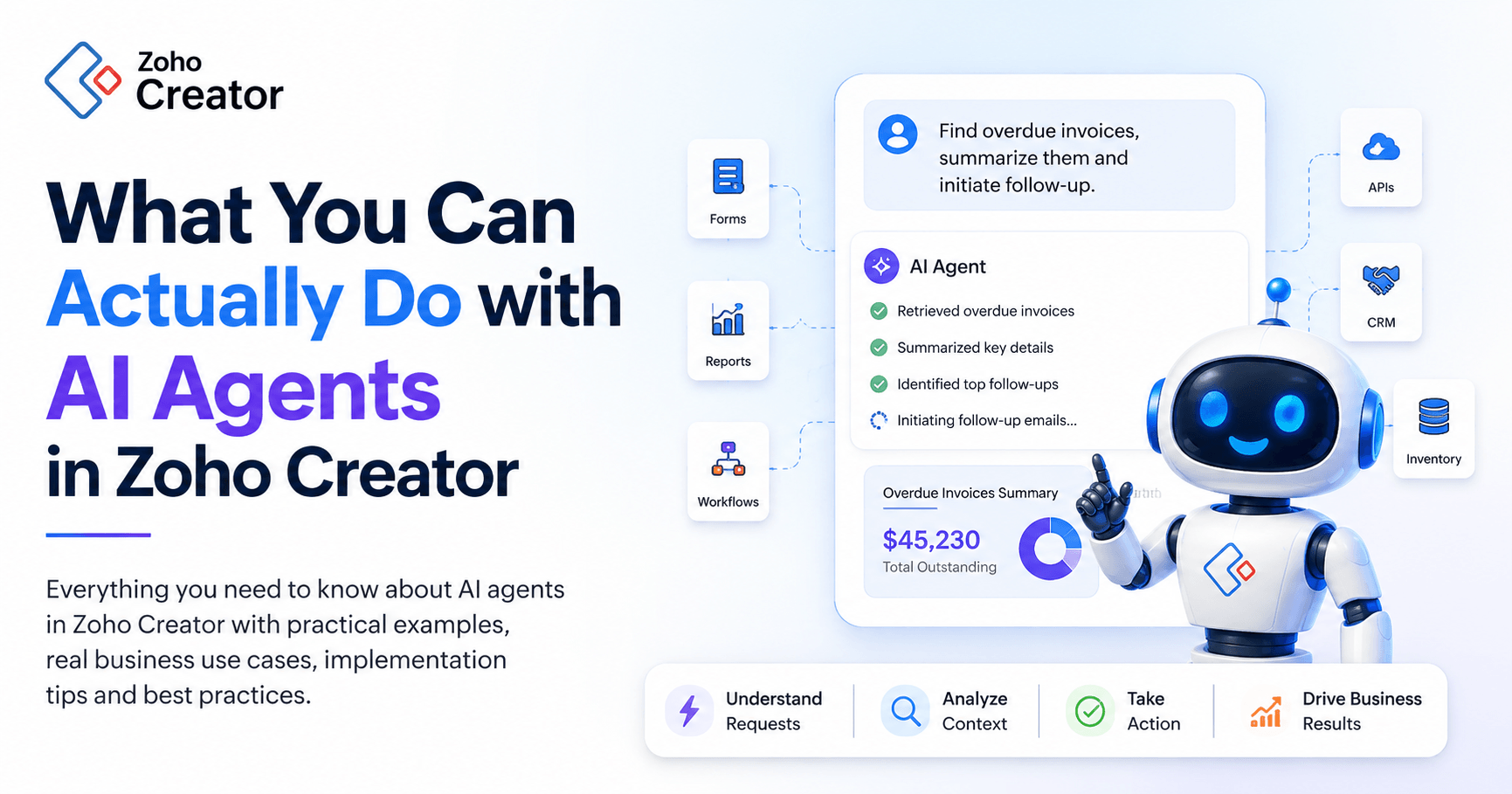
Every growing business eventually reaches a point where traditional automation starts to show its limitations.
You've built workflows. You've automated approvals. You've connected applications. You've created forms, reports, and dashboards that help teams work more efficiently.
Yet despite all these improvements, employees still spend hours answering routine questions, searching for information, updating records, coordinating tasks, and managing processes that require constant manual intervention.
Traditional automation has undoubtedly improved productivity. However, most automation systems are designed to follow predefined rules. They excel at handling structured processes but struggle when situations require interpretation, judgment, or context.
This is where AI agents introduce a new way of working.
Instead of simply executing instructions, AI agents can understand requests, evaluate business context, retrieve information, make decisions, and perform actions across systems. They operate less like workflows and more like intelligent digital coworkers that assist employees in accomplishing meaningful work.
For organizations using Zoho Creator, AI agents represent the next stage in business application development.
Applications are no longer limited to storing information and triggering workflows. They can now understand data, assist users, recommend actions, and actively contribute to business operations.
In this guide, you'll learn what AI agents in Zoho Creator are, how they work, how they differ from traditional automation, and the practical ways businesses are using them to transform everyday operations.
Why AI Agents Matter Now
AI has been part of business software for years through recommendation engines, predictive analytics, and rule-based workflows. What's changed is the expectation. Businesses no longer want systems that just process information. They want systems that understand it and act on it.
A few forces are driving that shift.
Increasing Operational Complexity
Modern businesses run across multiple applications, departments, and communication channels, and employees often spend more time navigating systems than doing the work itself. AI agents bridge these gaps by connecting information, interpreting requests, and executing actions across systems without forcing a person to be the glue.
Rising Customer Expectations
Customers expect fast responses, personalized interactions, and a consistent experience regardless of channel. Manual processes alone struggle to keep up. AI agents provide round-the-clock assistance while keeping context intact across the conversation.
Pressure to Do More with the Same Headcount
Organizations are asked to grow output without growing headcount at the same rate. AI agents take on the repetitive administrative load so employees can spend their time on work that requires judgment.
The Rise of Low-Code AI
Platforms like Zoho Creator already opened application development to non-technical users. AI agents extend that same accessibility to intelligence itself. A business can now build an application that reasons about its own data without hiring a dedicated AI team.
Stack these four forces together and you get a new generation of business applications. They don't just automate work. They take part in getting it done.
Ready to Move Beyond Traditional Automation?
If your team is still spending hours answering routine questions, updating records, routing approvals, and coordinating work across multiple systems, it may be time to add intelligent AI agents to your Zoho applications. Learn more about our AI Agent Development Services in Zoho.
What is AI Agent in Zoho Creator?
An AI Agent in Zoho Creator is an intelligent, low-code digital assistant that can understand natural language, analyze business context, make decisions, and perform multi-step actions autonomously.
Unlike traditional rule-based workflows, AI agents can interpret user requests, evaluate complex scenarios, interact with business data, and execute tasks across applications with minimal human intervention.
Zoho Creator enables businesses to build custom applications with minimal coding requirements. When AI agents are introduced into the ecosystem, applications become significantly more capable.
AI agents can interact with:
- Forms
- Reports
- Workflows
- Business rules
- External APIs
- CRM systems
- Financial applications
- Inventory platforms
- Customer service tools
This creates a connected environment where intelligent automation can operate across the entire business.
For example, instead of requiring an employee to review a request manually, gather information, determine eligibility, and initiate approvals, an AI agent can perform much of that work automatically while keeping humans informed throughout the process.
Rather than waiting for users to trigger every action manually, AI agents can proactively identify opportunities, recommend next steps, and initiate workflows when necessary.
If you are evaluating AI agents for your Zoho environment, YAALI provides Zoho AI Agent Development Services to help businesses identify suitable use cases, design agents, connect Zoho applications, configure permissions and guardrails, and deploy agents with appropriate human oversight.
AI Agents vs. Chatbots vs. Traditional Automation
One of the most common mix-ups in this space is treating an AI agent like a fancier chatbot. They're related, but the gap in capability is significant.
Traditional Workflow Automation
Traditional automation runs on a fixed trigger-and-action model. A form gets submitted, an approval request goes out, a record updates, and a notification fires. It's reliable for predictable processes and breaks down the moment a decision needs context or judgment.
Chatbots
Chatbots improve user interaction through conversation. A chatbot can answer questions, retrieve information, and walk a user through a simple process, but most stop there. They rarely make decisions or carry out a multi-step business action on their own.
AI Agents
AI agents combine conversation with reasoning, analysis, and action. An agent can understand intent, pull business data, weigh context, make a recommendation, trigger a workflow, execute actions across systems, and report the outcome back to the user, all in a single exchange.
For example:
-A chatbot can explain how to apply for leave.
-An agent can check the employee's leave balance, validate it against policy, submit the request, notify the manager, update the HR record, track the approval, and tell the employee the outcome, start to finish, in one conversation.
To put it simply, Traditional automation is a set of instructions.
A chatbot answers questions.
An AI agent gets the work done.
How AI Agents Work Inside Zoho Creator
Now that we've explored why businesses are adopting AI agents, it's important to understand how they actually operate within a Zoho Creator environment.
Although AI agents appear conversational from the user's perspective, several coordinated processes occur behind the scenes.
Step 1: User Request or Trigger
The process begins when a user submits a request or when a business event occurs.
For example: "Show me all pending orders worth more than $10,000."
Or:
"Generate a summary of overdue invoices and notify the finance manager."
Step 2: Intent and Context Analysis
The AI agent interprets the request and determines:
- What the user wants
- Which information is needed
- Which systems must be accessed
- What actions may be required
Rather than relying on rigid keywords, the agent evaluates meaning and context.
Step 3: Information Retrieval
The agent gathers relevant information from:
- Creator applications
- Connected Zoho applications
- External systems
- Internal knowledge sources
- Business records
Step 4: Reasoning and Evaluation
The agent analyzes available information and determines the most appropriate response or action.
This stage differentiates AI agents from conventional workflows.
Instead of following a fixed path, the agent evaluates circumstances before proceeding.
Step 5: Action Execution
The agent performs the necessary task.
Depending on the scenario, this may include:
- Updating records
- Creating reports
- Triggering workflows
- Sending notifications
- Generating content
- Assigning tasks
- Initiating approvals
Step 6: Response and Follow-Up
Finally, the agent communicates outcomes to users and may continue monitoring progress if additional actions are required.
This creates a natural and intuitive experience where users interact with business systems through conversations rather than navigating multiple screens and applications.
Why Businesses Are Leaning Towards AI Agents in Zoho Creator
Understanding what AI agents are is only part of the story.
The real question is why businesses are investing in them.
The answer is simple.
Every organization faces operational friction:
-Sales teams spend hours updating CRM records.
-Support teams repeatedly answer similar questions.
-Finance departments process large volumes of invoices and approvals.
-HR teams manage countless routine employee requests.
-Operations teams coordinate activities across multiple departments.
These tasks are essential, but they rarely create strategic value.
AI agents help eliminate this friction by automating activities that consume time without contributing directly to growth, innovation, or customer satisfaction.
A Practical Example: Picture a sales team fielding dozens of new leads a day.
Without an agent, leads arrive manually, reps review each one, a manager assigns ownership, and follow-ups get scheduled one at a time. It works, but it eats hours that could go toward selling.
With an agent in place, leads get captured automatically, scored for quality, assigned to the right rep, and queued for follow-up, with a management summary generated at the end. Work that used to take hours now takes minutes.
The real win isn't speed on its own. It's the shift from a manual, reactive process to one that's proactive and scales as the business grows, without needing to scale headcount at the same rate.
Organizations already building on Zoho Creator have the flexibility to design custom applications around their exact process. Adding an agent on top doesn't replace that flexibility. It makes the application built on it meaningfully more valuable.
In the next section, we'll explore practical use cases that demonstrate how organizations are using AI agents in Zoho Creator.
Practical Ways to Use AI Agents in Zoho Creator (With Examples)
Understanding how AI agents work is important. However, their true value becomes clear when applied to real business challenges.
Across departments, organizations face a common problem: employees spend too much time managing processes instead of driving outcomes.
AI agents help solve this problem by combining intelligence, automation, and action execution into a single operational layer.
Whether you're managing customers, employees, inventory, finances, or projects, AI agents can reduce manual effort while improving accuracy and responsiveness.
Let's explore some of the most impactful use cases.
AI-Powered Customer Support
Customer expectations have changed dramatically.
Customers expect immediate answers, personalized interactions, and fast issue resolution regardless of business hours.
Meeting these expectations with human teams alone can become expensive and difficult to scale.
AI agents help organizations deliver better support experiences while reducing operational workloads.
Answer Frequently Asked Questions
Customers regularly ask questions about:
- Order status
- Product details
- Pricing information
- Service availability
- Account updates
- Subscription renewals
Instead of requiring customers to browse documentation or wait for support representatives, AI agents can instantly provide accurate responses based on business data and knowledge repositories.
The experience becomes faster, more convenient, and more consistent.
Intelligent Ticket Creation and Routing
When customers submit requests, AI agents can:
- Analyze customer intent
- Identify urgency levels
- Categorize issues automatically
- Route tickets to appropriate teams
- Assign service priorities
This eliminates manual triage and ensures requests reach the right people faster.
Providing Context to Support Teams
One of the biggest causes of slow support resolution is fragmented information.
Support representatives often need to search multiple systems before they can help a customer.
AI agents can automatically gather:
- Customer history
- Previous conversations
- Purchase records
- Open service requests
- Account information
Support teams receive complete context before responding, reducing resolution times and improving customer satisfaction.
Proactive Customer Service
Instead of waiting for customers to report issues, AI agents can identify potential problems before they escalate.
Examples include:
- Failed payments
- Service disruptions
- Expiring subscriptions
- Delayed orders
The agent can notify customers proactively and initiate corrective actions when appropriate. Customer support becomes more proactive rather than reactive.
Automating Sales Operations
Sales professionals should spend their time building relationships and closing deals.
Unfortunately, much of their day is consumed by administrative work.
AI agents help sales teams focus on selling by automating many of the repetitive tasks surrounding the sales process.
Lead Qualification
Not every lead deserves equal attention.
AI agents can evaluate incoming leads based on:
- Industry
- Company size
- Geographic location
- Engagement history
- Budget indicators
- Product interest
Based on these factors, the agent can score leads and prioritize opportunities automatically.
Sales teams spend less time filtering prospects and more time engaging high-value opportunities.
Lead Enrichment
Incomplete prospect data often slows down the sales process.
AI agents can automatically enrich records by:
- Gathering business information
- Identifying decision-makers
- Updating company profiles
- Completing missing data fields
This gives sales representatives a more complete view of each prospect before outreach begins.
Automated Follow-Ups
Consistent follow-up is critical to maintaining sales momentum.
AI agents can:
- Draft personalized emails
- Schedule reminders
- Track engagement activity
- Recommend next actions
- Trigger follow-up workflows
This helps prevent opportunities from falling through the cracks.
Sales Performance Insights
Managers often spend significant time compiling reports and analyzing pipeline performance.
AI agents can automatically generate:
- Pipeline summaries
- Forecast reports
- Deal progression analysis
- Risk assessments
Leaders gain faster visibility into sales performance without manual reporting efforts.
Intelligent Data Entry and Document Processing
Manual data entry remains one of the most time-consuming and error-prone activities in many organizations.
AI agents significantly reduce this burden.
Extracting Information from Business Documents
Organizations process large volumes of:
- Invoices
- Purchase orders
- Contracts
- Vendor forms
- Receipts
- Applications
AI agents can extract relevant information and populate Zoho Creator records automatically.
Employees move from entering data to reviewing and validating information.
Data Validation
Poor data quality creates downstream operational problems.
AI agents can identify:
- Missing information
- Duplicate records
- Inconsistent formatting
- Invalid entries
- Potential anomalies
This helps maintain cleaner and more reliable business data.
Intelligent Form Processing
When customers or employees submit forms, AI agents can:
- Review submissions
- Detect incomplete responses
- Request clarification
- Validate supporting information
The result is a faster and more accurate submission process.
Streamlining Human Resources Operations
Human Resources teams often manage hundreds of repetitive employee interactions.
AI agents can help automate many of these activities while improving employee experiences.
Employee Onboarding
Successful onboarding involves numerous coordinated activities.
These often include:
- Collecting employee information
- Completing documentation
- Creating accounts
- Assigning equipment
- Scheduling training
- Coordinating approvals
AI agents can orchestrate these tasks automatically while keeping HR teams informed.
Employee Self-Service
Employees frequently seek information about:
- Leave policies
- Benefits
- Payroll schedules
- Internal procedures
- Company guidelines
AI agents provide instant answers, reducing routine inquiries and allowing HR teams to focus on strategic initiatives.
Resume Screening
Recruitment teams often receive large volumes of applications.
AI agents can:
- Analyze resumes
- Match qualifications against requirements
- Highlight strong candidates
- Create preliminary shortlists
Recruiters spend less time reviewing unsuitable applications and more time engaging qualified talent.
Internal HR Assistance
AI agents can help employees navigate internal processes by:
- Explaining policies
- Assisting with requests
- Guiding form submissions
- Tracking request status
This improves employee satisfaction while reducing administrative overhead.
Streamlining Finance and Accounting Operations for Greater Efficiency and Accuracy
Finance departments manage complex processes that demand both speed and accuracy.
AI agents can help streamline these workflows while maintaining control and compliance.
Invoice Processing
AI agents can:
- Read invoices
- Extract key information
- Match invoices against purchase orders
- Identify discrepancies
- Route approvals automatically
Processing times decrease while accuracy improves.
Expense Management
When employees submit expenses, AI agents can:
- Categorize expenses
- Verify policy compliance
- Identify unusual spending patterns
- Recommend approval decisions
Finance teams gain greater visibility without increasing review workloads.
Financial Reporting Assistance
Generating reports often requires gathering data from multiple systems.
AI agents can:
- Consolidate information
- Generate summaries
- Highlight key trends
- Identify anomalies
Leaders receive faster access to actionable financial insights.
Payment Monitoring
AI agents can monitor:
- Outstanding invoices
- Overdue accounts
- Collection activities
- Vendor payment schedules
This improves cash flow visibility and helps reduce payment delays.
Supporting Field Service Operations
Field service teams depend on timely information and effective coordination.
AI agents help ensure technicians receive the right information at the right time.
Intelligent Work Order Assignment
AI agents can evaluate:
- Technician availability
- Skills and certifications
- Location proximity
- Existing workloads
Assignments are distributed more efficiently, improving response times and resource utilization.
Real-Time Technician Assistance
When technicians encounter unfamiliar issues, AI agents can provide:
- Service history
- Troubleshooting guidance
- Equipment documentation
- Recommended next steps
This improves first-time resolution rates and reduces service delays.
Automated Service Reporting
After a visit, AI agents can summarize:
- Technician notes
- Photos
- Completed work
- Customer feedback
Reports are generated automatically, reducing administrative effort.
Automating Approval Workflows
Approval delays are among the most common operational bottlenecks.
AI agents help accelerate decision-making while maintaining appropriate oversight.
Intelligent Routing
Instead of relying on rigid workflows, AI agents can determine the appropriate approver based on:
- Department
- Budget thresholds
- Project requirements
- Organizational hierarchy
Approval Recommendations
AI agents can analyze:
- Historical approvals
- Supporting documentation
- Risk factors
- Policy requirements
Managers receive recommendations while retaining final decision-making authority.
Escalation Management
If requests remain unresolved, AI agents can:
- Send reminders
- Escalate requests
- Notify stakeholders
- Track response times
This helps maintain process momentum.
AI-Driven Analytics and Reporting
Data only creates value when it leads to action.AI agents help transform data into meaningful business insights.
Natural Language Analytics
Users can ask questions such as:
- What were last month's top-selling products?
- Which customers generated the most revenue?
- Why did support ticket volumes increase?
The AI agent retrieves information and presents findings in plain language.
Automated Insight Generation
AI agents can identify:
- Trends
- Opportunities
- Risks
- Anomalies
- Performance changes
Instead of requiring users to interpret raw reports, the system highlights what matters most.
Executive Summaries
Leaders often need concise updates rather than detailed reports.AI agents can generate summaries that help executives make faster decisions.
Real-Time Example:
Implemented AI Agent in Zoho Creator for a Growing Field Service Management Business
A mid-sized field service company managing hundreds of client requests each month.
Before implementing AI agents, employees spent considerable time:
- Reviewing customer requests
- Assigning technicians
- Creating reports
- Managing schedules
- Updating records
After integrating AI agents into their Zoho Creator application:
- Requests were categorized automatically.
- Technician assignments became more efficient.
- Customer responses were generated instantly.
- Reports were created automatically.
- Operational bottlenecks became visible.
The company didn't simply save time.
It transformed how work was performed.
Employees shifted from repetitive administrative tasks to higher-value activities that directly impacted growth and customer satisfaction.
Overall, Whether you're a startup who wants to setup AI Agents in your Zoho Creator app or an enterprise optimizing large-scale operations, AI agents can be tailored to your unique requirements.
The future isn't about replacing people.It's about empowering them.
And with AI agents in Zoho Creator, it's achievable now.
Integrating AI Agents Across the Zoho Ecosystem
AI agents are already useful inside Zoho Creator on its own, but their reach grows considerably once they connect to the rest of the Zoho ecosystem. Few businesses run on a single application. Customer data, financial records, support interactions, project status, and analytics typically live across several systems at once, and agents are what tie them back together.
Zoho CRM. Agents can score leads, update records, analyze customer interactions, recommend sales actions, and generate account summaries.
Zoho Desk. Agents can categorize support tickets, draft responses, escalate critical issues, and track service performance.
Zoho Books. Agents can monitor invoices, flag overdue payments, generate payment reminders, and assist with financial reporting.
Zoho Projects. Agents can track milestones, flag at-risk timelines, summarize project status, and coordinate task dependencies across teams.
Zoho People. Agents can support onboarding, answer policy questions, and flag attendance or attrition patterns worth a manager's attention.
AI agents become even more useful when they need to work across multiple Zoho applications rather than operating inside a single app. If your use case involves CRM, Creator, Desk, Books, Inventory or external business systems, see our Zoho AI Agent Development Services for an overview of the development, integration and governance approaches we support.
Now that you've explored the practical use cases of AI agents, the next step is understanding how organizations can begin creating AI Agents in Zoho Creator while maintaining proper security, governance, and operational control.
Getting Started with AI Agents in Zoho Creator Without Overcomplicating It
If you're considering AI agents in Zoho Creator, here's a practical approach to getting started.
Step 1: Identify a High-Impact Process
Look for processes that are:
- Repetitive
- Time-consuming
- Rules-driven
- Frequently delayed
- Dependent on manual coordination
Examples include:
- Support ticket triage
- Lead qualification
- Employee onboarding
- Invoice processing
- Approval routing
Avoid starting with your most complex process.
Instead, select a workflow that is important enough to deliver measurable value but simple enough to implement and evaluate quickly.
Step 2: Define the Agent's Objective
Before building anything, answer a simple question:
What specific outcome should this agent achieve?
For example:
Instead of saying: "Help the sales team."
Define something more specific: "Qualify incoming leads, assign ownership, and schedule follow-up tasks."
Clear objectives lead to better agent design and easier performance measurement.
Step 3: Map the Required Data and Actions
Every AI agent needs access to information and the ability to perform actions.
Identify:
- What data does the agent need?
- Which systems contain that data?
- What decisions does the agent have to make?
- What actions does the agent should perform?
In Zoho Creator, many of these actions will be supported through forms, workflows, Deluge functions, APIs, and integrations.
Step 4: Test Against Real-World Scenarios
Many organizations test only ideal scenarios.
The real value comes from understanding how the agent behaves when faced with incomplete information, unexpected inputs, or unusual requests.
Test with:
- Missing data
- Incorrect submissions
- Edge cases
- Ambiguous requests
This helps refine behavior before deployment.
Step 5: Define Appropriate Permissions
An AI agent should only access information required for its responsibilities.
Permission design should be intentional, not accidental.
The principle is simple:
Give the agent enough access to perform its job, but no more than necessary.
Step 6: Expand Incrementally
Once the first implementation proves successful, identify adjacent processes that can benefit from similar automation.
Organizations often discover additional opportunities after seeing the impact of their first AI agent deployment.
The goal isn't to build dozens of agents immediately.
The goal is to build one successful agent and scale intelligently from there.
Security and Permission Boundaries: Who's Really in Control?
Whenever AI systems gain access to business data, a critical question naturally follows:
Who controls what the agent can see and do?
This question becomes even more important when agents interact with:
- Customer information
- Financial records
- Employee data
- Operational workflows
- Business-critical processes
The answer is straightforward.
AI agents should be governed using the same principles organizations already apply to employees and business systems.
Role-Based Access Matters
Not every employee has access to every piece of information.
The same principle applies to AI agents.
For example:
A support agent may require access to customer service records.
It does not require access to payroll information.
Similarly, an agent helping with marketing operations does not need visibility into sensitive financial reports.
Role-based access controls should define:
- What data the agent can view
- What records it can modify
- What actions it can perform
- Which systems it can access
This creates clear operational boundaries.
Auditability Is Essential
Trust should never replace visibility.
Organizations should maintain detailed logs of:
- Agent actions
- Record updates
- Approval recommendations
- Communications generated
- Workflow executions
Comprehensive audit trails make it easier to:
- Investigate issues
- Demonstrate compliance
- Improve performance
- Identify unintended behavior
The objective isn't to assume AI agents will make mistakes.
The objective is to ensure organizations always understand what occurred, why it occurred, and how it can be improved.
Human Oversight Remains Important
AI agents can significantly accelerate business processes.
However, certain decisions should continue to involve human review.
Examples include:
- Legal commitments
- Large financial transactions
- Compliance-sensitive actions
- Strategic business decisions
The most effective organizations combine AI-driven efficiency with human judgment.
What to Watch Out For When building an AI Agent in Zoho Creator
While AI agents offer substantial benefits, successful implementation requires realistic expectations.
Understanding potential challenges helps organizations avoid common mistakes.
Poor Data Quality
AI agents rely on the information available to them.
Incomplete, inaccurate, or inconsistent data will affect outcomes.
Before deploying AI agents, organizations should evaluate:
- Data quality
- Process consistency
- Record completeness
- Governance standards
Strong data foundations produce better results.
Unclear Decision Boundaries
Not every decision should be delegated to an AI agent.
Organizations should clearly define:
- What the agent can decide independently
- What requires approval
- What requires escalation
Ambiguity creates unnecessary risk.
Over-Automating Broken Processes
One of the most common mistakes is automating inefficient processes.
If a workflow is already confusing, inconsistent, or poorly designed, introducing AI simply accelerates the problem.
Before deploying AI agents:
- Simplify workflows
- Remove unnecessary steps
- Clarify ownership
- Standardize procedures
AI performs best when built on strong operational foundations.
Expecting Immediate Perfection
AI agents improve through testing, refinement, and ongoing optimization.
The most successful implementations treat deployment as the beginning of a continuous improvement process rather than the final destination.
Not sure where to start with AI agents?
Our Zoho Consultants can help you identify high-impact opportunities, define the right architecture, and implement AI agents that align with your business goals.
Zia Agent Studio and the Agent Store: You Don't Have to Build AI Agents from Scratch
Building an AI agent from scratch is not always necessary. Zoho's Zia Agent Studio and the accompanying Agent Marketplace exist specifically to make agent creation faster and more accessible, whether you're building inside Zoho Creator, CRM, Desk, or another connected app.
What Is Zia Agent Studio?
Zia Agent Studio is a no-code environment for building and configuring AI agents. Two build paths are available: describe what you want the agent to do in plain language and let the studio's text-to-agent feature assemble it, or configure everything by hand for full control.
Either way, an agent is defined by three core pieces:
- Instructions. The role the agent plays and the objective it's working toward.
- Knowledge. The documents, SOPs, and reference material the agent draws on to stay aligned with how your business operates, sourced from uploads, Zoho WorkDrive, or scraped URLs.
- Tools. The specific actions the agent is allowed to take, such as retrieving a record, updating a deal, or creating a task. Zoho's tool library now spans more than 700 pre-built actions across its app suite, with granular permission controls on each one.
Every agent also supports custom guardrails, which set boundaries on what it can say or do regardless of how a request is phrased. That matters more than it sounds like it should, since it's the difference between an agent that's merely fast and one that's actually safe to deploy.
The Value of Pre-Built Agents
Not every organization wants to start from a blank canvas, and that's exactly what the Agent Marketplace is for. It ships with a library of more than 100 pre-built agents spanning sales, support, marketing, HR, inventory, operations, and finance, ready to deploy across an ecosystem of dozens of connected apps. Partners and independent developers can also publish their own agents to the marketplace, so the library keeps growing well beyond what Zoho builds in-house.
For most organizations, starting with a pre-built agent and customizing it for your environment cuts implementation time significantly compared to designing one from zero.
Build, Adapt, and Scale
A practical rollout strategy usually looks like this: deploy an existing agent, evaluate how it performs, customize where the fit isn't quite right, and expand its responsibilities over time. That sequence reduces risk while still moving fast, which is exactly the balance most teams are trying to strike.
What AI Agents Cost: Licensing and Pricing Considerations
Cost is usually the first question that comes up once the use cases start to feel real, and the honest answer is that it depends on a few moving pieces rather than one flat number.
Building and deploying an agent is generally the cheap part. Creating, testing, and managing agents inside Zia Agent Studio doesn't typically carry its own separate fee on top of your existing Zoho subscription.
The model behind the agent is where cost shows up. If an agent runs on Zoho-hosted AI models, usage is usually covered by a monthly free allowance and then drawn from a prepaid credit balance once that allowance runs out. If you'd rather connect an external model such as GPT or Claude using your own API key, Zoho doesn't add a markup on that connection, but the model vendor bills you directly at their standard rate.
Feature availability is tied to your plan. Which AI capabilities are unlocked, and at what limits, depends on the specific Zoho app and edition you're on. Some advanced Zia features are gated behind higher-tier plans in certain apps, while in others, they're bundled in from a lower tier. This varies by product and changes as Zoho updates its pricing, so it's worth confirming current entitlements against your actual Zoho Creator plan before you build a budget around a specific feature.
Data residency adds a separate cost dimension, not a pricing one. Zoho operates regional data centers, and choosing where data is processed and stored matters for businesses with GDPR or other regional compliance requirements, even if it doesn't change the bill itself.
The practical takeaway is that the agent-building tools themselves are rarely the expensive part. The variable to budget for is model usage at scale, plus whatever plan tier unlocks the specific Zia features your use case needs.
Connecting External AI Tools Through MCP
As AI ecosystems mature, organizations are increasingly working across multiple AI platforms rather than committing to just one. Many businesses already use tools like ChatGPT, Claude, Gemini, or other large language models for different tasks, which raises an obvious question: can these tools work with Zoho Creator? Increasingly, the answer is yes.
Understanding MCP: Model Context Protocol, or MCP, is an emerging standard that lets AI systems interact with business applications in a structured, secure way. In practical terms, it creates a bridge between an AI model and a business system.
Why This Matters
Organizations are no longer locked into a single AI ecosystem. They can use the strengths of different AI platforms while keeping core business processes centralized inside Zoho Creator. That flexibility lets a business preserve its existing AI investments, expand into new use cases, reduce dependency on any one vendor, and build a more adaptable AI strategy overall.
Security Remains Critical
The most important detail in any MCP-based integration is permission inheritance. An external AI system should only ever see what the user who authorized the connection is already allowed to see. That keeps governance consistent no matter which AI platform sits on the other end of the connection.
Curious how MCP could connect Claude or ChatGPT to your Zoho Creator app?
We specialize in integrating external AI models with Zoho Creator, Zoho CRM, and other Zoho apps using secure APIs, MCP, and custom AI workflows. Get in touch to explore the best LLM integration strategy for your business.
Best Practices for Implementing AI Agents in Zoho Creator
Organizations that get the most out of AI agents tend to follow a similar playbook.
Start with business outcomes. Solve a real problem rather than deploying technology for its own sake. The strongest projects start with a clear objective and a measurable result in mind.
Prioritize high-value opportunities. Look for processes that are repetitive, resource-intensive, error-prone, or hard to scale. These tend to deliver the strongest return.
Keep humans in the loop. AI should augment judgment, not replace oversight where it actually matters, like strategic decisions, high-risk approvals, regulatory activity, and sensitive customer interactions.
Establish success metrics. Track time saved, response times, cost reductions, error rates, customer satisfaction, and employee productivity. Measurement is what drives the next round of improvement.
Continuously optimize. Business requirements change, and agents need to change with them. Regular reviews keep an agent aligned with what the organization actually needs now, not what it needed six months ago.
Implementation is where most AI agent projects stall, not the idea stage.
Get a free Consultation from our Zoho Expert about a phased rollout plan that keeps your first agent simple, measurable, and actually shipped.
How AI Agents Are Changing What's Possible in Zoho Creator
The most important contribution of AI agents isn't automation. It's augmentation. Automation removes work; augmentation improves a person's ability to do the work that's left. That distinction matters more than it sounds like it should.
Employees get better information. Managers make faster decisions. Customers get better service. Organizations become more responsive across the board.
Paired with Zoho Creator's low-code foundation, AI agents put real intelligence within reach of organizations that don't have a dedicated AI team. You don't need an enormous budget or specialized expertise to start benefiting from AI-driven operations. What you need is a clear picture of the problem you're trying to solve.
The Future of AI Agents in Zoho Creator
Agents are evolving fast. Today's version can understand a request, retrieve information, and execute an action. Tomorrow's will likely go further, with deeper business context awareness, sharper reasoning, more sophisticated decision support, greater operational autonomy, and multi-agent collaboration.
Picture an environment with several specialized agents working in parallel: a sales agent spotting opportunities, a finance agent checking profitability, an operations agent verifying delivery capacity, and a customer success agent recommending retention moves.
Together, they start to look less like separate tools and more like a coordinated decision-making layer that helps an organization move faster and operate with more intelligence than any single agent could provide alone.
Organizations that start exploring agents now will be in a far better position to take advantage of that next wave once it arrives.
Ready to put AI agents to work in your Zoho Creator app?
Tell us about what you are trying to achieve with AI Agents in Zoho Creator. Our Zoho Creator Experts will build an agent tailored to meet your unique requirements.
Final Thought
Many assume AI Agents creation require:
- Specialized expertise
- Large development teams
- Significant investments
- Long implementation cycles
Zoho Creator changes that equation.
With its low-code approach, businesses can build and integrate AI agents into custom applications more efficiently.
This allows teams to experiment, innovate, and deploy AI-powered solutions without starting from scratch.
Whether you're automating approvals, improving customer service, streamlining operations, or enhancing decision-making, AI agents can become a natural extension of your business applications.
Businesses no longer need applications that simply collect and store information. They need applications that understand information, act on it, and help drive an actual outcome.
That's where "AI agents in Zoho Creator" deliver their real value.
AI agents are not here to replace people.They are here to remove friction.
The most successful organizations will combine human expertise with AI-driven assistance.
People bring judgment, creativity, and experience. AI agents bring speed, consistency, and scalability.
Together, they create a more productive way of working.
Every organization has processes that slow teams down. Every employee has tasks they wish they could automate. Every customer wants faster answers.
The question is no longer about whether AI belongs in business applications.
The question is: which processes in your organization could move faster, smarter, and more efficiently with an AI agent working alongside your team?
If your organization is already using Zoho Creator, now is the perfect time to explore how AI agents can elevate your applications from automated to truly intelligent.
Looking to build custom AI agents across your Zoho environment?
Explore our Zoho AI Agent Development Services to see how we can design, develop, integrate, and optimize AI agents around your business processes.
Thanks for taking the time to read the entire content.
ATTENTION: Sign up through our exclusive Zoho Creator Partner Link to get personalized support and expert guidance every step of the way for your app development.
Share this Post if you found this Content Useful😊. Sharing is Caring!
📧 Join over 1000+ Business Owners, Zoho Customers, Consultants, and Zoho Partners who read our content to get the most out of Zoho for their business.
▣ Zoho + Your Business+ Our Expertise = Get Maximum Value out of your Zoho Investment.

Enter Your Email Address Below to receive the Exclusive Content that we only share with those who Subscribe to our Newsletter.


