How to Automate Quote-to-Cash Process using Zoho Finance
Manual quote creation, delayed invoices, and late payments hurt cash flow. This blog post breaks down how Zoho Finance Suite automates the Quote-to-Cash lifecycle to streamline financial operations, eliminate bottlenecks, accelerate deal closures, and get paid faster to maintain a steady cash flow.

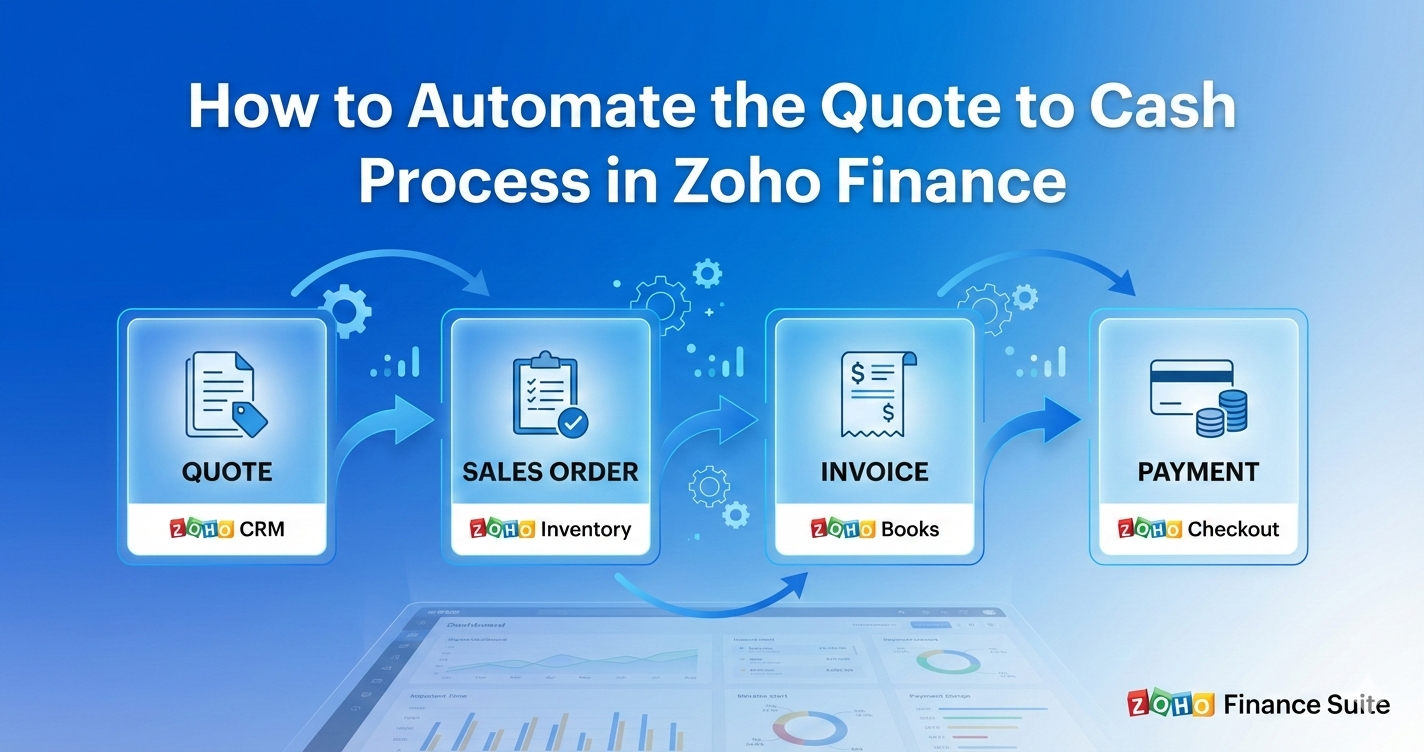
If you run a growing business, you already know what slows teams down. Repetitive tasks, manual calculations, and data scattered across applications that do not work well together.
Approval chains drag on, customers wait for clear pricing and delivery details, sales teams spend time tracking down updates from accounting, and finance teams circle back to sales to confirm accuracy. All of this piles up and creates one core problem, a broken Quote to Cash process.
From the moment a prospect shows interest, the clock starts ticking. The faster you can create accurate quotes, close deals, collect payments, and recognize revenue, the stronger your cash flow becomes.
The catch is that many companies still depend on processes held together with spreadsheets, emails, and outdated systems. These workarounds get the job done, but they also slow progress and increase the risk of errors.
Zoho’s Finance Suite addresses this challenge by offering an integrated set of applications designed to work in sync. Better still, you can automate nearly every step in your Quote to Cash workflow. This helps you save time, cut down on errors, stay compliant, and shorten the path from quote to revenue.
This raises a practical question. How do you put all of this into action in a way that feels manageable rather than overwhelming?
This guide walks you step by step through automating the Quote to Cash process using the Zoho Finance Suite. You will see how each app fits into the bigger picture, what to automate first, how to prevent messy handoffs, and how to build a steady, predictable revenue engine your team can rely on.
Take a moment to settle in. You are about to change the way your business gets paid.
If you are already using Zoho applications or planning a unified setup, it helps to understand how Quote-to-Cash fits into the broader Zoho ecosystem. You may also want to explore how Zoho One works as an all-in-one business solution for scaling operations
Without any further ado, let's get into the details.
What Is Quote-to-Cash, and Why Does It Matter So Much?
Quote-to-Cash describes the full journey that begins when a prospect asks for a quote and ends when your business successfully collects payment. It is not just about sales. It is a single, connected business process that covers quoting, approvals, order processing, invoicing, accounting, and payment collection.
In simple terms, Quote-to-Cash connects potential revenue to real money in your bank.
Why does it matter so much? Because every step in the process shapes both your customer experience and your cash flow. When one stage breaks down, the rest of the process feels the ripple effect.
Quote-to-Cash covers every step from quote creation to payment collection and revenue recognition. This includes:
- Quote and estimate creation
- Approval workflows
- Sales order processing
- Invoicing
- Payment collection
- Accounting and reconciliation
- Reporting and forecasting
When these steps are disconnected, common problems appear: delayed approvals, incorrect invoices, slow collections, and poor visibility into revenue.
Many of these issues are also seen during Zoho CRM implementations when sales and finance workflows are not aligned. Understanding the root causes of Zoho CRM implementation failures can help prevent Q2C breakdowns early.
Here are a few common pain points that may hit close to home:
- If quotes take too long, prospects lose interest and move on.
- If approvals drag on, deals stall, and revenue gets pushed back.
- If invoices contain errors, clients lose trust in your billing.
- If payments are not collected on time, cash flow becomes hard to predict.
Automation changes this pattern. Automating the Quote to Cash process inside the Zoho Finance Suite streamlines every step into one connected system. Data flows from quote to invoice without re-entry. Approvals move faster. Billing stays consistent. Payments post accurately.
The result is clear visibility into revenue and cash at every stage. Teams spend less time fixing issues and more time closing deals. Customers see faster responses and cleaner invoices.
Whether you are a growing business or an established company trying to trim inefficiencies, the Zoho Finance Suite provides the apps you need to turn the Quote-to-Cash process into a smooth, end-to-end lifecycle.
If you want to identify exactly where your Quote to Cash gaps lie, request a quick assessment.
You will receive a mapped view of bottlenecks and a recommended automation roadmap tailored to your team.
How does the Quote-to-Cash(Q2C) Process Works in Zoho
Before we dive into automation, let me first break down the stages that make up the Quote to Cash process. Every business may have its own variation, but the core steps usually stay the same.
- A lead turns into a potential sale, and a quote request comes in.
- The sales team prepares a quote or estimate, including pricing, product setup, and terms.
- The customer reviews and approves the quote.
- Sales converts the approved quote into an order, which triggers delivery or fulfillment.
- An invoice is generated and sent to the customer.
- Payment is collected through online methods, bank transfers, or other channels.
- Accounting records the transaction, updates the general ledger, and manages tax and compliance.
In many businesses, this cycle touches at least three departments. When several teams are involved, delays and errors can easily slip through the cracks. Automation helps smooth things over by connecting sales and finance activities into one continuous system, with fewer manual handoffs.
This is where the Zoho Finance Suite comes into play.
The Zoho Finance Suite is not a single application. It is a tightly integrated ecosystem that includes:
- Zoho Books for accounting and financial management
- Zoho Inventory for stock, warehouses, and order fulfillment
- Zoho Subscriptions for recurring billing
- Zoho Checkout for simple payment pages
- Zoho Invoice for invoicing and time tracking
- Zoho Expense for employee expense management
- Zoho CRM for deal management and sales forecasting
When these applications work together, they create a strong pipeline from quote creation to cash collection. Without automation, each stage can become a bottleneck that slows things down and increases risk.
The Zoho Finance Suite is designed to remove these roadblocks.
Within the Zoho Finance Suite, you have everything needed to streamline each stage, from quoting to revenue recognition. The key is making sure the apps communicate smoothly so your business does not miss a beat.
Once automation is set up correctly, the revenue cycle becomes a clear, repeatable process instead of a patchwork of disconnected tasks.
Picture this scenario: A quote created in Zoho CRM automatically becomes an invoice in Zoho Books, with no need to retype data. Payment updates flow back into the CRM, so sales teams always know where things stand. Inventory levels adjust as soon as a sales order is confirmed. This is the real payoff of an automated Quote to Cash engine, where everything clicks into place.
You do not automate everything in one day. You automate each stage in a logical sequence that builds reliability and speed.
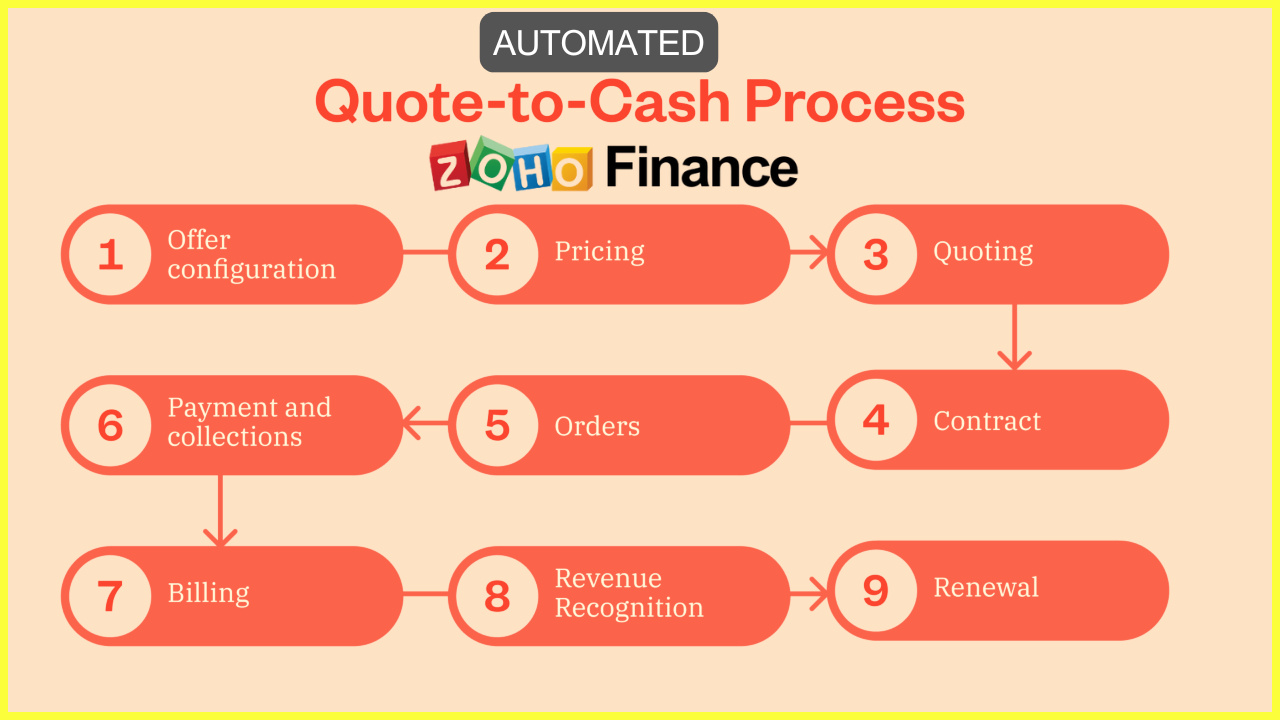
Once your Quote to Cash process runs automatically, your revenue engine no longer depends on manual intervention. It becomes consistent and scalable, which is exactly what a growing business needs.
You may be wondering whether your business is ready for this step.
Here are some signs that you are ready to automate Quote to Cash in Zoho:
• Your deal volume is growing, and your team is feeling the pressure.
• You notice recurring pricing mistakes.
• There are gaps between CRM deals and accounting records.
• Invoicing is delayed because it takes too much time.
• You want customers to pay faster, but follow-ups are inconsistent.
• Subscription billing feels disorganized.
• Your finance team spends hours matching payments.
If you check two or more of these boxes, automation can make a real difference.
The real question is not whether you should automate. It is how soon you can get the ball rolling.
Wanna Know How Quote-To-Cash(Q2C) Automation Fits Your Business?
Schedule a short consultation to see how each stage of your Quote to Cash process can be automated without disrupting your existing workflows.
Why You Need Zoho Finance to Automate the Quote-to-Cash Process
Many platforms promise automation, but few fully deliver. Zoho Finance delivers practical automation through several clear and strategic advantages.
A unified data model
Zoho Finance Suite products share the same core architecture. As a result, customers, items, prices, taxes, and transactions move smoothly across modules. This setup helps you avoid data silos that often crop up when Zoho apps are patched together.
Native integrations
Zoho Books, Zoho Inventory, Zoho Subscriptions, Zoho Checkout, Zoho CRM, and Zoho Analytics work together out of the box. This seamless connection removes the need for fragile custom code that can break down over time and slow teams down.
Extensive Automation Capabilities
With Zoho Finance, you can automate the entire quote-to-cash process without putting extra work on your engineers. Workflows, blueprints, custom functions, webhooks, and custom APIs are just some of the ways you can automate the process.
For organizations that require deeper customization, Zoho Creator plays a key role. You should know when to use AI and manual logic in Zoho Creator to implement automation effectively.
Compliance and audit trails
Automation is effective only when it follows the rules. Zoho includes detailed audit logs, role-based access controls, tax management, and support for major accounting standards. These features help organizations stay on the right side of regulations in most regions.
Scalability
Zoho Finance supports both small businesses and large enterprises. As your organization grows, the automation grows with you instead of holding you back.
These strengths turn Zoho Finance into a connected operating system. It runs the quote-to-cash flow as one process, not a chain of apps.
Discuss your sales, finance, and fulfillment workflows with our Zoho Expert who can show you how to simplify your Quote to Cash cycle using Zoho Finance.
How Zoho Finance Suite Supports the Entire Quote-To-Cash Lifecycle
Before you set up automation, you need a clear understanding of the stages you want to streamline. Quote to cash may look different across industries, but the core stages usually stay the same.
These stages include:
- Lead generation and qualification
- Quote or estimate creation
- Quote approval
- Deal acceptance
- Sales order or contract creation
- Invoice creation
- Payment collection
- Delivery and fulfillment
- Revenue recognition
- Reporting and compliance
Each stage links to the next one. When one step breaks down, the whole chain slows to a crawl. Automation helps keep everything on track and moving forward from start to finish.
The Zoho Finance Suite solves this by unifying multiple financial and operational modules inside one platform. These include:
- Zoho CRM (for sales pipeline and quote creation)
- Zoho Books (for accounting and invoicing)
- Zoho Inventory (for stock control and order management)
- Zoho Subscriptions (for subscription billing cycles)
- Zoho Checkout (for payment forms)
- Zoho Expense (for reimbursement and operational spending)
- Zoho Analytics (for financial insights)
Each app plays a role. Your job is to create the glue that connects them. Automation is that glue.
When these modules are integrated properly, they share customer data, pricing, taxes, item details, payments, and revenue workflows. As a result, the Quote-to-Cash journey becomes a smooth, predictable, and automated process instead of a manual juggling act.
Zoho designed its Finance Suite as a connected ecosystem rather than a loose collection of separate apps. This design helps businesses save time, cut errors, and keep their financial operations running like clockwork.
Need help mapping your current Quote to Cash flow and identifying opportunities for automation inside the Zoho Finance Suite.
Let me break it down, step by step, and walk through how you can automate your entire quote to cash flow inside the Zoho Finance Suite.
Step by Step Guide to Automate Quote-to-Cash in Zoho
The following steps explain how to plan, configure, and automate the Quote-to-Cash process using the Zoho Finance Suite.
Let me walk through each stage and see how the Zoho Finance Suite can automate it for you.
Step 1. Prepare your product catalog and pricing rules
Quote accuracy starts with a clean product database. Zoho Inventory and Zoho Books share the same item records. Every quote, order, and invoice pulls from one source.
Actions to take
- Create all products and services in Zoho Inventory.
- Set prices, tax rules, SKU codes, and units of measurement.
- Define quantity breaks or tiered pricing where required.
- Create price lists for region specific or customer specific rates.
- Add product bundles for packaged offerings.
Automation result
When a sales user creates a quote, the system loads current prices, stock levels, and tax values. Sales teams stop relying on old files. Finance teams trust the numbers.
Step 2. Sync CRM and finance data
A single customer record keeps the process clean. Leads and deals in CRM should flow into estimates, sales orders, and invoices without manual entry.
Recommended setup
- Enable Zoho CRM integration inside Zoho Books.
- Map customer fields such as addresses, contacts, and tax settings.
- Create rules so closed or approved deals generate estimates in Books.
- Match currencies and territory settings across all apps.
Automation result
Sales teams enter customer data once. Finance teams see consistent records across quotes and invoices. Disputes over duplicate customers stop.
Step 3. Automate the Quote Creation Process
Zoho Books and Zoho CRM both support automated quote generation. While the best starting point depends on your workflow, most businesses begin in the CRM and let automation push the quote into Zoho Books.
How to Design the Quoting Workflow
- Create custom quote templates with branding, disclaimers, and legal terms.
- Use workflow rules to generate quotes when deals reach a specific stage.
- Add controls that limit discounts based on roles or margin thresholds.
- Configure quote approval flows to ensure compliance.
- Enable digital acceptance through the built-in customer portal.
Adding Smart Logic to Quotes
You can use custom functions to apply pricing logic based on volume, contract history, or region. For example, customers who purchase above a set threshold can automatically receive a pre-approved discount. This approach helps you work smarter, not harder, while keeping pricing consistent.
Step 4. Automate Your Quote Review, Approval, and Negotiation
Approvals often slow down the Quote-to-Cash process. Zoho offers several practical ways to speed up this stage and keep deals moving.
Use Zoho CRM Approval Processes:
Approvals can be routed based on deal size, product type, or discount percentage. Managers can approve or reject requests from mobile devices, which helps cut down waiting time.
Use the Zoho Books Customer Portal:
Customers can view quotes, ask for changes, and accept them electronically. This removes the back and forth that usually happens over email and keeps everything in one place.
Use automation to handle negotiations:
When a customer asks for a change, a workflow can alert the right internal team and trigger a revised quote. Every update stays logged, which makes audits easier and clearer.
Recommend Content To Read: If your quoting process involves complex configurations, read how Zoho CPQ and Wizards in Zoho CRM can further shorten sales cycles.
Step 5. Convert Quote to Sales Order Automatically
Once a quote is approved, the next step should happen without delay. Automatic conversion prevents hand-off gaps and missed follow ups.
Key actions to automate
-Convert approved quotes into sales orders as soon as customers accept them.
-Send automatic notifications to operations or fulfillment teams.
-Update inventory levels based on confirmed orders.
-Trigger purchase orders when stock drops below set limits.
Why this matters
Many companies lose time because a quote gets approved but no one moves it forward. Automation closes this gap and keeps revenue flowing.
Step 6. Automate Fulfillment or Service Delivery
This stage depends on whether you sell products or services. Zoho Inventory supports product fulfillment and shipment tracking, while Zoho Projects or Zoho Desk supports service delivery.
Automation Suggestions:
-Generate packing slips automatically when sales orders are created.
-Update shipment status in real time using carrier integrations.
-Create service tickets or project tasks as soon as a sales order is generated.
-Notify customers automatically when items are shipped or delivered.
-Sync delivery records with Zoho Books for accurate revenue tracking.
Step 7. Automate Invoice Generation
In many businesses, invoices are delayed because teams forget or depend on manual steps. Automation solves this problem and keeps billing on track.
Invoice automation techniques
-Convert sales orders into invoices when items are delivered.
-Use scheduled invoicing for service milestones or subscription cycles.
-Apply taxes, discounts, and retainer adjustments automatically.
-Maintain consistent invoice numbering and branding.
-Send invoices to customers automatically by email or through the portal.
If your business uses recurring billing, Zoho Subscriptions manages plans, renewals, trials, usage-based billing, and billing adjustments. All invoices sync automatically with Zoho Books.
Step 8. Automate Payment Collection
Faster payment collection improves cash flow and reduces follow ups. Zoho provides several tools to support this stage.
Options within the Finance Suite
-Enable payment gateways such as Razorpay, Stripe, PayPal, or Paytm in Zoho Books.
-Offer multiple payment options, including cards, UPI, bank transfers, or ACH.
-Use Zoho Checkout for one-time or recurring payment pages.
-Set up automatic reminders for overdue invoices.
-Charge customers automatically for recurring subscriptions.
Customers gain flexibility. Finance teams gain visibility. Automation reduces friction between sales and accounting through shared data.
Step 9. Automate Accounting and Reconciliation
Once payments are received, Zoho Books records the accounting entries automatically.
What to automate
-Bank feeds through supported banking integrations.
-Automatic transaction categorization using rules.
-Automatic matching of payments to invoices.
-Reconciliation suggestions to match deposits with customers.
-Journal entries for deferred revenue or advance payments.
Why is this important?
Automation removes the manual work finance teams usually spend matching hundreds of transactions. As a result, books stay accurate with far less effort.
Step 10. Automate Revenue Recognition and Reporting
For businesses with multiple revenue streams, correct revenue recognition is critical.
How Zoho handles it
-Zoho Books supports deferred revenue schedules for prepaid services.
-Zoho Subscriptions tracks recurring revenue and syncs it with Zoho Books.
-Custom reports allow finance teams to build dashboards for cash flow, receivables, and profitability.
-Zoho Analytics connects across the suite to deliver advanced business intelligence dashboards.
Automation supports compliance and gives teams a real-time view of financial health.
Additional Tips To Consider:
Once the core automation is in place, you can extend it even further with additional automation with Zoho apps.
Zoho Flow for Cross App Automation
Zoho Flow allows businesses to connect Finance Suite apps with CRM, Desk, Projects, Creator, external tools, and even custom APIs.
Example use cases
- Create an onboarding project automatically when a sales order is approved.
- Update CRM deal stages when invoices are paid.
- Notify account managers when subscriptions are about to expire.
- Generate support tickets when payments fail.
Zoho Flow provides low code configuration that scales easily without developer involvement.
Custom Functions for Tailored Business Logic
Advanced businesses often require specialized rules. Zoho’s Deluge scripting engine allows custom automations.
Examples
- Auto apply loyalty credits based on customer history.
- Calculate bundled pricing logic.
- Trigger internal escalations for high value deals.
- Enforce margin checks before quote generation.
These functions allow businesses to embed their unique operational DNA inside the Finance Suite.
Client Portal for Better Customer Experience
Zoho offers a dedicated custom portal where customers can view quotes, orders, invoices, payments, and subscriptions.
Portal benefits
- Customers receive updates without contacting support.
- Customers can accept quotes digitally.
- Invoices and payment receipts remain accessible.
- Customers can update payment methods directly.
A self service portal reduces workload on sales and finance teams while improving customer satisfaction.
Handle Edge Cases With Smart Rules and Exceptions
Every business has unique needs. You may sell configurable products, offer negotiated pricing, or deal with compliance rules. Zoho lets you handle these edge cases with custom rules.
Examples
A. Conditional taxes
• Apply specific GST or VAT rules automatically
• Trigger tax exceptions based on region or product type
B. Discount rules
• Limit discounts based on role
• Require approval for custom discount values
C. Inventory reservations
• Reserve stock automatically for high priority customers
• Prevent sales teams from selling items that are unavailable
D. Document generation rules
• Auto attach compliance certificates
• Add warranty information based on product type
E. Legal terms
• Append region specific contract language to quotes or invoices
When you build these exceptions in the system, you avoid risky manual judgment calls.
Advanced Automations for Mature Zoho Finance Setup
Once the basic workflows run smoothly, you can step up to more advanced automation. At this stage, the goal is to save time, cut errors, and keep everything running like clockwork as the business grows.
Organizations building advanced workflows often face similar decisions discussed in Zoho Creator vs custom development comparisons.
Automate contract management
Integrate Zoho CRM with Zoho Sign. When a customer clicks to accept a quote, the system automatically generates and sends the contract for signature. Once signed, it triggers follow-up workflows, which help you move deals forward without lifting a finger.
Automate tax handling
Use tax rules in Zoho Books so the system applies the correct tax based on region or product type. This setup reduces manual checks and helps you stay on the right side of compliance.
Automate commissions
Push deal data from Zoho CRM to Zoho Payroll. Set up rules that calculate and pay commissions automatically after deals close. This approach removes guesswork and ensures sales teams get paid on time.
Automate subscription upgrades and downgrades
Zoho Subscriptions supports mid-cycle changes, fair price adjustments, and accurate billing updates. With automation in place, the system handles upgrades and downgrades smoothly, without the need for constant finance oversight.
Automate fraud detection
Create workflows that flag unusually high discounts, mismatched addresses, or duplicate customer records. These checks act as an early warning system and help you catch problems before they spiral out of control.
These added layers of automation help businesses scale up without losing control or creating confusion.
Multi-step fulfillment logic
For businesses that ship from multiple warehouses, build rules that allocate stock based on location, availability, or delivery speed. This setup ensures orders are fulfilled efficiently and keeps customers in the loop.
Predictive analytics
Use Zoho Analytics to forecast deal closure chances, revenue cycles, and payment delays. These insights help teams plan ahead instead of reacting at the last minute.
End-to-end subscription lifecycle
If you offer subscription services, integrate Zoho Subscriptions with Zoho CRM to manage the full customer journey. From sign-up to upgrade or downgrade, automation keeps the experience smooth and consistent.
Continuous Improvement Plan
Automation should grow with the business. A long-term improvement plan keeps systems sharp and relevant. Key activities include:
- Monthly workflow reviews to spot bottlenecks.
- Quarterly data cleanup to remove outdated or duplicate records.
- Annual pricing structure reviews to stay competitive.
- Expansion of integrations with external platforms as needed.
- Regular user training sessions to keep teams up to speed.
- Feedback loops with sales and finance teams to fine-tune processes.
By reviewing and improving automation on a regular basis, you ensure it stays efficient and aligned with your business goals.
Wanna Build Advanced Automations Without Complexity for your Q2C process?
If your business needs custom pricing, tax rules, or workflow logic, expert configuration can save weeks. Get support designing advanced automations that match your exact process.
A Practical Example: What an Automated Quote to Cash Flow Looks Like
Imagine you run a company that sells equipment and maintenance services. You have sales reps across different regions and a small finance team that handles billing and payments.
Here is what your automated quote to cash cycle might look like with Zoho:
A sales rep adds a lead to the Zoho CRM and schedules a call.
When the deal reaches the negotiation stage, the Zoho CRM opens up the quote creation option.
The quote pulls item prices directly from Zoho Books, so there is no guesswork.
Tax rules are applied based on the customer’s location.
Discounts follow role-based permissions, keeping things fair and under control.
If a discount goes above 15 percent, the request goes up the chain for manager approval.
Once approved, the quote is sent to the customer by email.
The customer accepts the quote through the portal and signs it digitally, with no paperwork back and forth.
After acceptance, Zoho CRM turns the quote into a sales order.
The sales order flows into Zoho Inventory for fulfillment.
Stock is set aside right away.
The warehouse team receives clear packing and shipping instructions, so nothing falls through the cracks.
Tracking details sync back to the CRM and Zoho Books, keeping everyone in the loop.
Once delivery is complete, Zoho Books creates the invoice.
The customer pays through Stripe.
The payment is matched instantly, and the invoice is marked as paid.
With everything recorded, the finance team reviews reports and updates forecasts with real-time data.
As a result, your team never opens a spreadsheet. No one runs after approvals or chases emails. Customers always know what is happening. Sales reps stay focused on closing deals. Finance focuses on planning and strategy instead of typing in numbers.
This is what automation looks like when it is set up the right way.
Wanna Build a Quote-To-Cash Automated Workflow Like This for Your Business?
Share your requirement with us to get your custom end-to-end automated Quote to Cash process based on your products, pricing, sales stages, and fulfillment logic.
How to Roll Out Quote to Cash Automation Without Disrupting Your Team
Automation can feel intimidating for teams that rely on manual workflows. With a clear plan and steady pace, you can introduce change without rocking the boat.
Start small
Avoid automating everything at once. Begin with quotes and invoicing. Once the team feels confident and gets the hang of the process, expand to fulfillment and payments.
Train your team
Even the best automation tools fall flat if people do not use them. Run short, hands-on training sessions that focus on day-to-day tasks instead of abstract theory. This helps the team learn by doing and builds confidence quickly.
Create internal documentation
A simple, step-by-step internal guide makes it easier for new employees to learn the workflow. It also gives current team members a quick reference when questions pop up.
Involve all departments
Sales, accounts, operations, and leadership should all have a seat at the table. When everyone chips in, the quote-to-cash process works like a well-oiled machine, and ownership is shared across teams.
Review and refine
Automation is not a one-time setup. Keep an eye on how the system is used, spot patterns, and adjust rules as needed. Small tweaks over time can lead to big improvements.
With the right approach, your team will soon see how much time and effort automation saves, making daily work faster and less stressful.
Best Practices for Implementing Quote-to-Cash Automation Strategy
Automation works best when you build it intentionally. Here are some best practices that make a huge difference.
Standardize Your Pricing and Quote Templates
Before automating anything, clean up your pricing structure and templates. Automation needs consistency.
Use Approval Rules Sparingly
Only automate the approvals that matter. Too many rules slow down your workflow.
Automate Sequences Gradually
Start with high-impact automations such as quote creation, invoice generation, and payment reminders. Then layer in more complex workflows.
Keep CRM and Finance Data Synchronized
Deactivate old products, update tax settings, and maintain accurate contacts. Clean data improves automation performance.
Test Workflows Before Launch
Run sample scenarios to ensure the process behaves exactly as intended.
Ensure cross-team alignment
Sales, finance, and operations must agree on definitions, rules, and expectations. Misalignment creates friction.
Prioritize security
Use role-based access, strong password policies, two-factor authentication, and restricted permissions to safeguard sensitive data.
Track Performance Metrics
Monitor:
• Quote acceptance rate
• Invoice aging
• Payment collection time
• Fulfillment delays
Use insights to refine automation rules.
Practical Tips for Zoho Users Automating Quote-to-Cash
1. Map your current process before you automate anything
Write down every step from quote creation to final payment. Document who touches each stage and which tools they use. Automation works best when you clearly understand your before state.
2. Use Zoho’s native integrations wherever possible
Zoho products are designed to communicate. Avoid third party tools unless necessary. Native connections are smoother and more reliable.
3. Standardize templates across departments
Your quotes, sales orders, invoices, and emails should feel unified. Branding consistency reduces customer friction and internal confusion.
4. Set up approval workflows for pricing and discounts
This protects margins without slowing down deals. Zoho CRM and Zoho Books both support structured approval processes.
5. Automate reminders but keep them human in tone
A reminder email should feel polite and personal. You can automate the timing while still writing messages that sound like your company.
6. Start with basic automation, then refine it
You do not need to build a perfect system immediately. Begin with one stage, observe the results, then layer more complexity.
7. Keep your product catalog clean
Accurate prices, tax rules, and unit measures ensure every quote and invoice is consistent.
8. Train your team on the why, not just the how
People adopt automation faster when they understand the purpose behind it. Share the expected benefits.
9. Test every workflow before deploying
Run trial transactions. Make sure data syncs correctly. Fix issues early.
10. Revisit your automation rules every quarter
Business evolves. Your Quote-to-Cash automation should evolve too.
These small steps prevent overwhelm and ensure long-term success.
So ask yourself one question: Which stage of your quote-to-cash process would you prioritize automating if you could eliminate one bottleneck this week?
The Emotional Side of Automation That Nobody Talks About
When businesses implement automation, they often focus on operational metrics. Yet one of the most overlooked benefits is how automation improves morale and day-to-day work life.
Sales teams feel supported rather than boxed in by manual tasks.
Finance teams feel respected because data arrives clean, accurate, and on time.
Operations teams feel empowered because they receive information when they need it.
Leadership feels grounded because financial visibility improves across the organization.
As a result, people stop firefighting and start doing meaningful work. This is the kind of work that energizes them and supports steady career growth.
Across many Zoho implementations, senior leaders report a noticeable shift in company culture. Stress levels decline, confidence increases, and decision-making becomes more deliberate. Automation creates stability, and stability builds momentum.
Customers expect speed and clarity. Teams need efficiency. Leaders need reliable numbers. Automation delivers all three. Once organizations experience this change, returning to previous manual processes becomes unthinkable.
The Future of Quote to Cash Automation inside Zoho
Zoho continues investing in automation capabilities.
Expect future enhancements, such as:
- Smarter approval routing
- AI-driven quote recommendations
- Predictive revenue forecasting
- Automated profitability analysis
- More payment options
- Tighter integrations with external systems
The more your team embraces automation today, the more prepared you will be for tomorrow.
When to Bring in a Zoho Partner for Smooth Quote-to-Cash Execution
You can configure most of the apps and workflows on your own, but in some cases, you need Zoho Implementation help. Knowing when to bring in a Zoho Partner during the Quote-to-Cash process is Important. They can help you avoid common pitfalls, save time and resources while maximizing the efficiency of your Quote-to-Cash implementation.
Consider involving a Zoho partner if:
• You have complex tax rules
• Your pricing model has a lot of conditions
• You sell configurable products
• You have multi-warehouse inventory
• You run large-scale subscription billing
• You need integration with external systems like ERP or payment gateways
• You need custom functions or Deluge scripting
Being the best Zoho Partner in India, we can speed up the Quote-To-Cash Process implementation using Zoho Finance and help you avoid hidden traps.
Recommend Content To Read: If you are evaluating Zoho partners, reviewing how to choose the best Zoho implementation partner can prevent costly mistakes.
Need help implementing your Quote-To-Cash (Q2C) Process?
If you want faster execution, cleaner configuration, and a fully optimized Quote to Cash pipeline, connect with our team to get expert implementation support.
Final Thoughts
Automating the Quote-to-Cash process in the Zoho Finance Suite turns your business into a streamlined, predictable, and scalable operation. Rather than chasing paperwork, your teams can concentrate on growth. Instead of being slowed by bottlenecks, deals progress smoothly and without friction. Instead of juggling repetitive manual tasks, you can rely on dependable systems that operate quietly in the background.
When quotes roll straight into sales orders, invoices go out on time, and payments come in faster, you build a revenue engine that works around the clock. Customers notice the smoother experience. Your team notices the lighter workload. Your bottom line reaps the rewards.
If you are serious about scaling your business with accuracy and confidence, automation is not just nice to have. It is a must. The Zoho Finance Suite provides a unified app to set up a seamless, reliable, and fully connected Quote-to-Cash pipeline. Put these steps into action, and you will see gains in efficiency, accuracy, customer satisfaction, and cash flow.
Every business aims for steady revenue, quicker deal cycles, and clean financial data. Few reach those goals without solid automation in place. The Zoho Finance Suite helps you build a Quote-to-Cash flow that runs smoothly, even when work piles up or deals come in back-to-back. It keeps everything moving forward, no matter how busy things get.
Ready to automate your Quote to Cash process and accelerate revenue?
If you want quotes to convert faster, invoices to go out automatically, and payments to arrive without follow-ups, ready to eliminate manual work, accelerate revenue, and build a smooth automated flow inside Zoho Finance, Get expert assistance to implement Quote-To-Cash automation without disrupting your daily operations.
Transform My Quote to Cash Process Consult with our Zoho Expert
Share this Post if you found this Content Useful😊. Sharing is Caring!
📧 Join over 1000+ Business Owners, Zoho Customers, Consultants, and Zoho Partners who read our content to get the most out of Zoho for their business.
▣ Zoho + Your Business+ Our Expertise = Get Maximum Value out of your Zoho Investment.

Enter Your Email Address Below to receive the Exclusive Content that we only share with those who Subscribe to our Newsletter.


