Automate your Sales Outreach using Cadences in Zoho CRM
You're juggling dozens of sales leads, each at different stages in the pipeline. No more manual juggling of emails, calls, and tasks. No more lost leads or missed opportunities. With Zoho CRM Cadences, you can automate your sales outreach efforts.

Have you ever found yourself drowning in a sea of sales tasks, trying to keep track of follow-ups, emails, and calls? If so, you're not alone.
Sales outreach can be a time-consuming and overwhelming process. But what if I told you there's a way to streamline and automate your outreach process?
Enter Zoho CRM Cadence – your new best friend in sales automation.
With Zoho CRM Cadence Studio, you can design a cadence to set up a series of personalized, timely interactions with your leads and automate the repetitive tasks that bog you down, ensuring that no lead is left behind and every interaction is perfectly timed. With Cadences, your sales outreach becomes automated, efficient, and incredibly effective.
Imagine having a virtual assistant that never sleeps, always ready to nudge your leads at just the right moment. Intrigued?
This comprehensive guide will delve into the What is Cadences in Zoho CRM, why you need it, exploring its capabilities, benefits, and best practices for implementation. By the end of this article, you will have a clear understanding of how you can effectively automate your sales outreach using Cadences in Zoho CRM.
Without any further ado, dive into our detailed guide now!

Why you need to Automate your Sales Outreach?
First things first, let's talk about why you should even consider automating your sales outreach. Manual sales processes can be incredibly tedious and prone to errors. By automating these tasks, you not only save time but also ensure that no potential lead falls through the cracks.
Ever faced a situation like potential leads slip through the cracks because you forgot to follow up? Automation ensures that your outreach is consistent and timely. No more missed opportunities or forgotten follow-ups.
You might be wondering, "Why should I bother automating my sales outreach?" Well, let me ask you this: How many times have you forgotten to follow up with a lead? Or missed an opportunity because you were bogged down with other tasks?
Automation takes these worries off your plate. Zoho CRM Cadences take automation to the next level, allowing you to streamline your entire sales outreach process.
Here are a few reasons why automating your sales outreach with Cadence in Zoho CRM is a game-changer:
- Consistency
- Time-Saving
- Scalability
- Data-Driven Insights
Automation ensures that every lead gets the same level of attention and follow-up, ensuring no potential lead falls through the cracks.
By automating repetitive tasks, you free up your time to focus on what you do best – building relationships with potential prospects/customers and closing deals.
As your business grows, manual outreach becomes unsustainable. Automation allows you to scale your efforts without compromising quality.
Cadence provides detailed analytics, helping you track the performance of your outreach efforts and make data-driven decisions.
Let’s dive in and discover how Cadences in Zoho CRM can help you take your sales outreach to the next level!
What is Cadence in Zoho CRM?
A cadence in Zoho CRM is basically a pre-planned sequence of actions, like emails, calls, or tasks, designed to nurture leads and move them through the sales pipeline. The beauty lies in their automation, allowing sales reps to focus on higher-value activities while Cadences handle the routine follow-ups. This ensures that your leads receive timely, personalized messages, increasing your chances of converting them into customers.
But why should you care? Well, consistency is key in sales. When you're managing multiple leads, it's easy for some to slip through the cracks. Cadence ensures that every lead gets the attention it deserves, and nothing falls through the cracks.
One of the most remarkable aspects of Cadences is its intelligent automation process. It allows businesses to automatically remove records from a Cadence once the desired response is achieved. This intelligent automation ensures that follow-ups are not only consistently managed but also strategically optimized. As a result, Cadences not only saves precious time and resources but also boosts the effectiveness of customer engagement efforts.
But here's the kicker: unlike a rigid, one-size-fits-all approach, Zoho CRM's Cadences are flexible. You can customize it to fit your unique sales process, whether you're focusing on cold outreach, nurturing warm leads, or re-engaging past customers, allowing you to create dynamic sequences that change based on how your leads interact with your outreach efforts.
How Cadences differ from Blueprint in Zoho CRM?
Understanding the difference between Cadences and Blueprints in Zoho CRM is crucial for optimizing your CRM strategy. Even though they appear similar at first glance, they serve distinct purposes and improve your sales process differently.
With Cadences, you can automate and personalize your sales outreach, whereas blueprints ensure that your business processes are followed consistently and correctly.
Cadences vs. Blueprints: The Core Differences
Purpose:
- Cadences are primarily focused on automating and managing your sales outreach efforts. They help you maintain consistent communication with your leads and prospects.
- Blueprints are about defining and enforcing business processes. They ensure that every step in your workflow is followed correctly, whether it's for sales, support, or internal processes.
Flexibility:
- Cadences offer flexibility in scheduling follow-ups and customizing communication steps based on the lead's behavior and response.
- Blueprints provide a structured approach to managing processes, with clear rules and validations to ensure compliance and consistency.
Tired of chasing down missed follow-ups and losing potential deals?
It’s frustrating, right? Cadences in Zoho CRM eliminates that headache by automating everything and making your outreach efficient & effective!
Benefits of using Cadence in Zoho CRM
Setting up Cadence in Zoho CRM can transform your sales outreach, making it more efficient, personalized, and effective.
Here are some of the benefits you get when implementing Cadences in your Zoho CRM account:
- Automated Lead Engagement:
Cadences remove the need for manual lead follow-up by sales development reps (SDRs). Lead outreach happens automatically based on the cadence criteria and schedule. This saves huge amounts of SDR time, allowing them to focus on high-value activities that drive results, rather than mundane tasks.
- Consistency in Follow-ups:
The ability to maintain consistent communication with prospects is a primary benefit of using cadences. Human error and busy schedules often lead to missed follow-ups, resulting in missed opportunities. Cadences eliminate this risk by automatically executing predefined actions at specified intervals, ensuring no lead falls through the cracks.
- Personalized Outreach:
Cadences allow for personalized messaging in automated emails & SMS, making communication feel more tailored and relevant to each prospect. This level of personalization fosters stronger connections with prospects, making them feel valued and understood. This leads to better engagement, resulting in higher sales and profitability. Cadences also save time and resources, allowing companies to reach more prospects in less time.
- Increased Sales Team Productivity:
Cadences automate repetitive tasks, allowing your sales team to spend more time on more strategic activities. By automating repetitive tasks, sales teams can focus on building relationships with their customers and closing more deals. Cadences also help to ensure that team members are working efficiently and are not wasting time and resources on tasks that can be automated.
- Improved Lead Qualification:
Using Cadences in Zoho CRM, you can automate and optimize the lead nurturing process to maximize lead qualification. By establishing predefined sequences of emails, calls, and tasks, cadences help ensure consistent follow-up, increasing the chance of engaging potential customers. This helps sales teams save time by automating the manual steps of nurturing leads and allows them to focus on more important tasks such as closing deals.
- Improved Lead Nurturing:
Cadences help you nurture leads over time by delivering relevant content and touchpoints at the right intervals. By interacting with potential customers regularly, you're keeping your brand top-of-mind and creating trust over time. By leveraging automation, you can focus on higher-level tasks while still maintaining personalized engagement with each lead.
- Data-Driven Decision-Making:
Zoho CRM's Cadence feature offers detailed analytics and reporting. You can track the performance of each cadence, understand which touchpoints are most effective, and optimize your strategy based on data-driven insights, leading to improved outcomes over time.
- Enhanced Customer Experience:
Cadences provide consistent and timely communication to provide a better customer experience. Your prospects will feel valued and attended to, which can significantly improve their perception of your brand. By regularly engaging with your customers through cadences, you can address their needs proactively and resolve any issues before they escalate. This ongoing communication fosters trust and loyalty, making customers more likely to stick with your brand.
How to set up sales outreach cadences in Zoho CRM
Implementing Zoho CRM Cadences should be approached strategically to maximize its potential. By effectively implementing cadences in Zoho CRM, you can significantly enhance your sales team's efficiency and boost overall sales performance.
To leverage the full potential of cadences in Zoho CRM, it's crucial to approach implementation strategically. Here’s a breakdown of how to implement it:
1. Define Your Sales Process
- Identify Touchpoints:
Determine the key stages in your sales process where automated touchpoints would be beneficial.
- Set Objectives:
Establish clear goals for each cadence, such as booking a meeting, closing a deal, or nurturing a lead.
2. Creating a Cadence
- Define Target Audience:
Determine the specific group of leads or contacts for the cadence (e.g., new leads, qualified prospects).
- Create Sequence:
Design a logical sequence of actions based on your sales process. Consider different touchpoints like initial email, follow-up call, email reminder, etc.
- Set Intervals:
Specify the time gaps between each action in the sequence.
- Personalization:
Include dynamic content to make messages relevant to each recipient.
3. Enrolling & Un-Enrolling records from a Cadence
- Manual enrollment:
Individually add leads or contacts to a cadence.
- Automatic enrollment:
Use custom views or workflows to automatically add leads based on specific criteria.
- Exit Criteria:
Specify conditions for when a lead should exit the cadence, like a response received or a deal closed.
4. Monitoring and Optimization
- Track Performance:
Use cadence analytics to measure open rates, response rates, and conversion rates.
- Adjust Cadence:
Modify the sequence, intervals, or content based on performance data.
- Identify bottlenecks:
Determine which steps in the cadence are less effective.
- Refine the Cadence:
Make adjustments based on performance data.
By following these steps, you can ensure a structured and effective approach to managing your sales outreach.
Ready to Transform Your Sales Outreach?
Take the next step towards more efficient and effective sales outreach. Contact us today to discuss how our Zoho CRM Developers can design a cadence tailored to your business scenario and industry needs.
Best Practices for Using Cadences in Zoho CRM
To ensure your cadences are as effective as possible, consider these best practices:
- Define Clear Objectives:
- Personalize Your Outreach:
- Set Up Multi-Channel Touchpoints:
- Use Timely Follow-Ups:
- Leverage Automation Wisely:
- Test Different Cadences:
- Monitor and Optimize Cadences:
Before setting up cadences, think about what you want to accomplish. Are you aiming to increase follow-ups, improve lead nurturing, or boost conversion rates? With clear goals, you can design cadences that will resonate with your audience and achieve better results.
Cadences should be more than just automated messages. The key to engaging your leads effectively is personalization. Cadences should be tailored to the individual lead, addressing their needs and providing relevant information. Furthermore, they should regularly be monitored and adjusted to ensure they are effective. Finally, they should be automated, but they should still feel personalized and human.
Don’t limit your sales outreach to just email. Incorporate multiple channels like phone calls, and SMS. This multi-channel approach ensures that you reach out to prospects through their preferred communication methods and increases the chances of engagement.
Timing is crucial in sales outreach. Schedule follow-ups at optimal times based on your contacts’ behaviors and time zones. Be careful not to overwhelm prospects with too many touchpoints in a short period, but also keep in touch often enough to stay top-of-mind.
The use of automation can save a lot of precious time, but it is imperative to use it wisely. Avoid over-automation, which can make your communications feel robotic. Don't lose sight of the importance of human interaction during critical stages of the sales process. Make an effort to strike a balance between automation and human touch. Remember, the key is to balance automation with personalization and continuously refine your approach based on performance data.
Don't settle for the first cadence you create. Test different variations to see which performs best. Analyze the results and adjust your cadence accordingly. Monitor your metrics and adjust accordingly. Test again and repeat. This iterative testing approach ensures continuous improvement and optimization of your strategy. By refining and adapting your cadence based on data-driven insights, you can maximize engagement and effectiveness. Ultimately, this leads to better results and a more successful outcome.
Regularly review the performance of your cadences. Look at metrics like open rates, click-through rates, response rates, and conversion rates. Use this data to tweak and improve your cadences over time, ensuring they remain effective and relevant.
Use Cases of Zoho CRM Cadences
To illustrate how cadences can be effectively used, let’s explore a real-life example and business scenario:
Lead Nurturing Cadence for Sales
A lead nurturing cadence might start with a welcome email, followed by a series of educational content pieces, and then a personalized follow-up email. This cadence is designed to build trust and provide value to leads over time.

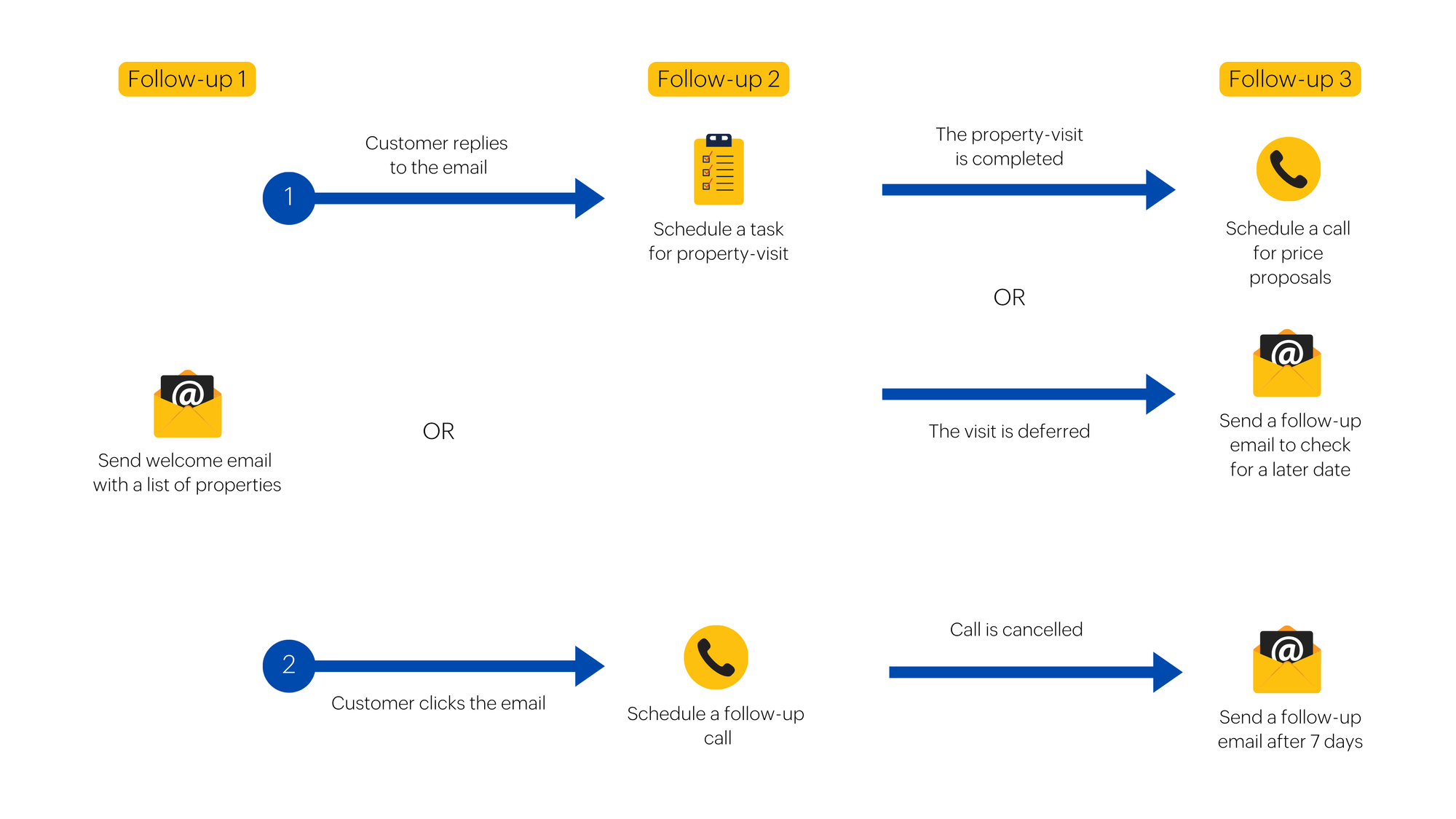
Real Estate Cadence
Real estate is a fast-paced industry where timing is everything. By promptly addressing inquiries, coordinating property tours, and providing valuable insights, realtors can cultivate strong lead relationships. Cadences optimize this process, guiding realtors to convert potential buyers into satisfied homeowners
Cadence Pitfalls: What Not to Do
There are common mistakes to avoid when automating your sales outreach with Cadence:
- Over-Automation Risk:
- Resistance to Change:
- Data Quality Issues:
- Neglecting Content Quality:
- Be Persistent but Not Annoying:
- Set-it-and-forget-it Mentality:
Striking the right balance between automation and the personal touch is crucial. Automating processes can streamline processes, but building relationships and providing exceptional customer service requires a human touch. Companies should strive for a balance between automation and personal service to ensure customers feel valued and appreciated. Automation should be used to supplement, not replace, the human touch.
Some sales reps may be hesitant to adopt Cadences, fearing automation will diminish their role. Training should include demonstrating the features of Cadences and how it can make their job easier and more efficient. It should also focus on the personal benefits of using Cadences, such as the ability to focus on more important tasks.
The effectiveness of Cadences is heavily dependent upon accurate prospect data. Implement regular data cleansing processes and encourage sales reps to maintain up-to-date records in Zoho CRM. Evaluate the data regularly to ensure its accuracy and up-to-dateness. Encourage sales reps to review records regularly and update them.
Note: Read this informative blog post to learn about “How to keep Zoho CRM data Clean and Accurate?” [Expert Insights]
A Cadence is only as good as the content it delivers. Invest time in crafting compelling, value-driven messages. Avoid using generic phrases or language that is overly salesy. Focus on providing useful content that educates and engages your audience. This will lead to more meaningful conversations and ultimately, more sales.
There’s a fine line between persistence and annoyance. Set a reasonable number of follow-ups and know when to back off. If a lead isn’t responding after several attempts, it might be time to move on or re-engage with them at later stages.
Cadences require ongoing attention and optimization. Companies should regularly assess their cadences to ensure they are still relevant and effective. They should also look for opportunities to optimize their cadences, such as streamlining processes or eliminating unnecessary steps. Finally, they should measure the impact of their cadences to ensure that they are achieving the desired outcomes.
Conclusion
By automating your sales outreach using Cadence in Zoho CRM, you can Save time, scale your outreach, and increase the chances of getting responses from potential customers. Cadence also helps you track and analyze your outreach campaigns so that you can continuously improve your results.
The power of Cadences lies not just in their ability to automate, but also in how they can be strategically designed and continuously refined to align with your unique sales process. Every step is meticulously planned and executed, leaving no room for missed opportunities, from automated emails and calls to timely task reminders. With the right strategy and execution, you can nurture leads more effectively, close deals faster, and achieve your sales goals.
By setting up a well-structured cadence, crafting relevant content for campaigns, automating follow-ups at the exact touchpoints, and continuously analyzing and optimizing, you can take your sales outreach to the next level. This will enable you to target the right customers better and close more deals.
So, what are you waiting for? Get started with Cadence in Zoho CRM and watch your sales skyrocket.
Don’t have the time to set up Cadences in Zoho CRM? No Problem!
Our Zoho CRM Experts are here to implement Cadences in your Zoho CRM account that can be tailored to your unique sales process.
Share this Post if you think this blog post useful😊. Sharing is Caring!
📩 Subscribe to our newsletter for exclusive insights, expert tips, and the latest updates on optimizing your Zoho CRM experience.


