WooCommerce logo
Zoho Books logo

WooCommerce Zoho Books Integration

Effortlessly manage and sync your customers and their order data from multiple WooCommerce stores in your Zoho Books account.

WooCommerce Extension for Zoho Books

By using our Woocommerce extension for Zoho Books, you can connect multiple WooCommerce stores seamlessly with your Zoho Books account. This makes it easier for your sales team to access order, product, payment, and shipment details directly within Zoho Books, enabling them to provide faster and more accurate support.

Furthermore, our extension simplifies order management, as your sales team can track orders, access product details, view payment details, and keep track of shipments-all within a single platform-Zoho Books. No more scrambling for information across different platforms.

Our WooCommerce Extension for Zoho Books takes the burden of manual data entry off from your shoulders, allowing you to focus on what matters most – growing your business.


Ready to try this WooCommerce Extension in your Zoho Books account?

Key Features:

With the WooCommerce Extension for Zoho Books, you can:

  • Connect and synchronize customers and their order information from multiple WooCommerce stores to Zoho Books.
  • Sync order-associated products from WooCommerce to Zoho Books, ensuring accurate order records. Stock levels are automatically updated between WooCommerce and Zoho Books to maintain Books consistency.
  • Contacts, Sales Orders, and Items are automatically created in the Zoho Books for each WooCommerce order.
  • Automated Task Creation in Zoho Books for Paid Orders in WooCommerce (Optional).
  • Multicurrency operations are easily handled, enabling you to manage transactions in multiple currencies effortlessly.
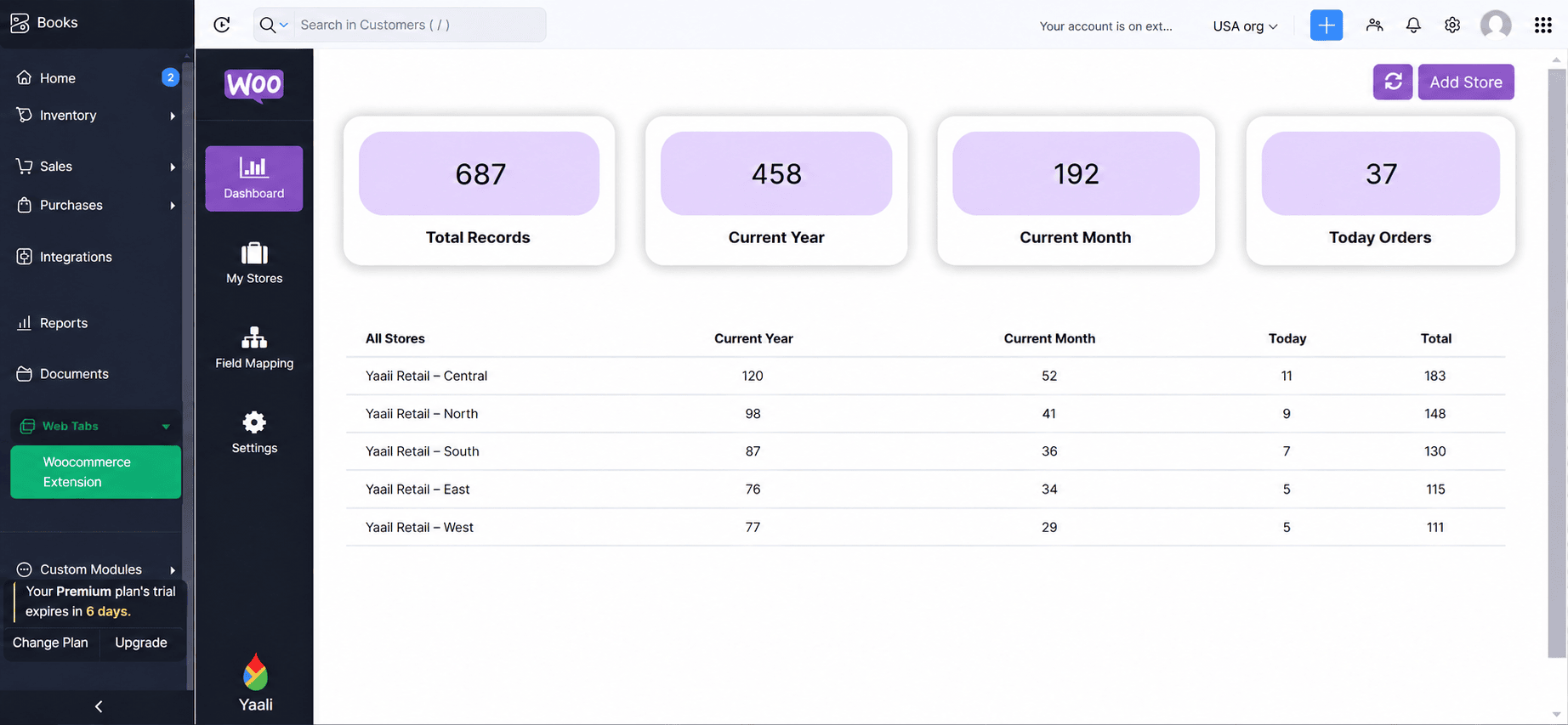
  • Gain Complete visibility of your Orders synced from multiple WooCommerce stores within Zoho Books (Custom dashboard)

Uni-directional Synchronization

Our extension supports the following synchronizations:

See how WooCommerce and Zoho Books Integration Works

The integration between WooCommerce and Zoho Books must be authenticated and authorized. To do this, configure the necessary settings and authorizations must be performed to enable data transfer from WooCommerce to Zoho Books. This step ensures that both platforms can communicate with each other securely.

Woocommerce for Zoho Books salesorder Image

WooCommerce Orders to Zoho Books Sales Orders

Whenever a customer places an order on your WooCommerce store, our extension automatically creates a corresponding sales order in Zoho Books. This eliminates manual data entry, saving time, and ensuring accurate record-keeping.

As orders progress from "Processing" to "Shipped", our extension automatically updates the corresponding order status in Zoho Books corresponding sales order, ensuring that your sales team has timely and accurate information.

WooCommerce Customers to Zoho Books Contacts

Whenever an order is placed in your WooCommerce store, regardless whether the customer is registered or a guest, a corresponding contact record can be automatically created in Zoho Books. The new contact will be populated with information gathered from WooCommerce customer information, usually including their name, email address, and shipping address. This ensures that all customer information is synced between the two platforms, allowing for efficient order tracking and customer management.

Woocommerce for Zoho Books Contact Image
Woocommerce for Zoho Books Product Image

WooCommerce Products to Zoho Books Items(Standalone Items)

For every WooCommerce order, corresponding products are added to the Zoho Books as standalone items. The product information from WooCommerce, including names, descriptions, prices, SKUs, and any other relevant details, is populated into Zoho Books's Items. If there are new products in WooCommerce that are not yet available in Zoho Books, the sync process will automatically create new items in Zoho Books during order synchronization

Note: With our extension, you can sync the stock count of the products associated with an order, either from WooCommerce Products to Zoho Books Items or from Zoho Books Items to WooCommerce Products.This ensures that your Books levels remain accurate and up-to-date across both platforms, reducing the risk of overselling or stockouts.

View Payment and Shipping information for WooCommerce orders in Zoho Books

Gain instant visibility into WooCommerce

Order Status: See if an order is Unpaid, Processed, or Received, eliminating the need to check WooCommerce for updates.

Shipment Information: Track your orders efficiently with tracking numbers and shipment dates within Zoho Books.

Payment Method: Identify the chosen payment method (credit card, PayPal, or other online gateway) for each order.

Woocommerce for Zoho Books Payment and Shipment Image
Woocommerce for Zoho Books Multi-currency Support Image

MultiCurrency Support

Multi-currency operations are supported by our extension, enabling you to manage multi-currency transactions with ease. You can now manage and track multi-currency transactions within your Zoho Books account when it is connected to WooCommerce, ensuring smooth multi-currency transactions between WooCommerce and Zoho Books.

Would you like a quick, personalized tour of how the WooCommerce extension works with Zoho Books?

WooCommerce - Zoho Books Integration HelpDoc

Need any help in setting up and configuring the WooCommerce extension in your Zoho Books account? Refer to the help doc for detailed instructions.

WooCommerce Extension Lite: Built for Small Businesses

We’re excited to introduce the WooCommerce Extension Lite for Zoho Books is the perfect fit for small businesses.

Not every business needs all the bells and whistles- sometimes, simplicity and essential features get the job done.

With the Lite version, you can:

If you only manage one WooCommerce store and need core automation features without the extras, the Lite version offers incredible value at just $5/month.


Get a personalized demo of Woocommerce Extension for Zoho Books Pro

A respective person from our Zoho Extension Development Team will reach out to you for a 1:1 demo to clarify your doubts and answer any questions you have.


Would you like us to customize this extension according to your business needs?


Our Zoho developer utilizes Zoho Sigma (Extension Development Platform) to build extensions that your business requires.

zoho app development icon+ zoho app development icon Install